Quick Access
Quick access to the navigator's functionalities and bookmarks
Quick Accessとは何ですか?
Quick AccessはXecKによって開発されたChromeの拡張機能で、その主な機能は「Quick access to the navigator's functionalities and bookmarks」です。
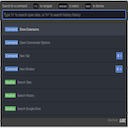
拡張機能のスクリーンショット


Quick Access拡張機能のCRXファイルをダウンロード
Quick Access拡張子のファイルをcrx形式でダウンロードし、ブラウザにChrome拡張機能を手動でインストールするか、crxファイルを友達と共有して簡単にChrome拡張機能をインストールします。
拡張機能の使用方法
                        Quick access is a command palette for Chrome. It allows you to access chrome functionnalities and your bookmarks just by typing a few keys using a fuzzy search close to the Sublime Text one.

Install, hit Ctrl+Shift+F, and you're good to go!

You can change these keys by clicking on "Shorcuts" at the bottom of the page chrome://extensions/
拡張機能の基本情報
| 名前 |  Quick Access Quick Access |
| ID | iihnbnncigiiampnmeiiaiomcbnjmgmb |
| 公式URL | https://chromewebstore.google.com/detail/quick-access/iihnbnncigiiampnmeiiaiomcbnjmgmb |
| 説明 | Quick access to the navigator's functionalities and bookmarks |
| ファイルサイズ | 63.79 KB |
| インストール数 | 225 |
| 現在のバージョン | 0.1 |
| 最終更新日 | 2018-03-08 |
| 公開日 | 2018-03-08 |
| 評価 | 5.00/5 合計 1 レビュー |
| 開発者 | XecK |
| 支払い方法 | free |
| 拡張機能のウェブサイト | https://github.com/XecKiE/Quick-Access |
| 対応言語 | en,fr |
| manifest.json | |
{
"update_url": "https:\/\/clients2.google.com\/service\/update2\/crx",
"manifest_version": 2,
"default_locale": "en",
"name": "__MSG_extensionName__",
"description": "__MSG_extensionDescription__",
"version": "0.1",
"icons": {
"512": "icons\/512.png",
"256": "icons\/256.png",
"192": "icons\/192.png",
"64": "icons\/64.png",
"32": "icons\/32.png"
},
"browser_action": {
"default_icon": {
"32": "icons\/32.png",
"64": "icons\/64.png"
},
"default_title": "__MSG_extensionName__",
"default_popup": "popup.html"
},
"commands": {
"_execute_browser_action": {
"suggested_key": {
"default": "Ctrl+Shift+F",
"mac": "MacCtrl+Shift+P"
}
}
},
"options_ui": {
"page": "options.html"
},
"permissions": [
" | |