ovice Reaction Extension
Extension for one-click execution of ovice reaction functions.
ovice Reaction Extensionとは何ですか?
ovice Reaction ExtensionはoVice Labによって開発されたChromeの拡張機能で、その主な機能は「Extension for one-click execution of ovice reaction functions.」です。
拡張機能のスクリーンショット
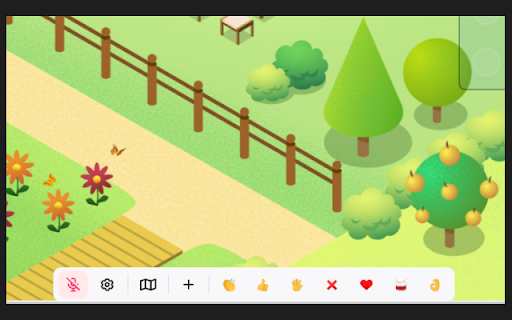
ovice Reaction Extension拡張機能のCRXファイルをダウンロード
ovice Reaction Extension拡張子のファイルをcrx形式でダウンロードし、ブラウザにChrome拡張機能を手動でインストールするか、crxファイルを友達と共有して簡単にChrome拡張機能をインストールします。
拡張機能の使用方法
                        oviceのリアクション機能を、ワンクリックで実行できるようにする拡張機能です。

この拡張機能では、以下の操作が可能となります。

・"clap"や"good"などのリアクションをワンクリックで実行
・拡張機能のみで実行できるリアクションを追加

oviceスペースの画面下に表示されるバーにリアクションのマーク(ボタン)が追加されるため、手軽に利用することができます。

詳しいインストール方法などはovice公式ブログをご覧ください。

◆ oVice公式ブログ
https://ovice.in/ja/blog-chrome-extension/
拡張機能の基本情報
| 名前 |  ovice Reaction Extension ovice Reaction Extension |
| ID | ioaggohoccnilmlmbgcoijlpacihioei |
| 公式URL | https://chromewebstore.google.com/detail/ovice-reaction-extension/ioaggohoccnilmlmbgcoijlpacihioei |
| 説明 | Extension for one-click execution of ovice reaction functions. |
| ファイルサイズ | 200 KB |
| インストール数 | 1,800 |
| 現在のバージョン | 0.0.19 |
| 最終更新日 | 2023-03-08 |
| 公開日 | 2022-11-10 |
| 開発者 | oVice Lab |
| Eメール | [email protected] |
| 支払い方法 | free |
| 拡張機能のウェブサイト | https://ovice.in/ja/blog-chrome-extension/ |
| プライバシーポリシーページのURL | https://ja.ovice.wiki/09229c6a66bb42d49b1ce3d0ad47f303 |
| 対応言語 | en,ja |
| manifest.json | |
{
"update_url": "https:\/\/clients2.google.com\/service\/update2\/crx",
"icons": {
"16": "icon16.plasmo.00ac8b83.png",
"32": "icon32.plasmo.9ad0c5b6.png",
"48": "icon48.plasmo.cae3a6b3.png",
"64": "icon64.plasmo.e4b604fc.png",
"128": "icon128.plasmo.b89b7dfa.png"
},
"manifest_version": 3,
"action": {
"default_icon": {
"16": "icon16.plasmo.00ac8b83.png",
"32": "icon32.plasmo.9ad0c5b6.png",
"48": "icon48.plasmo.cae3a6b3.png",
"64": "icon64.plasmo.e4b604fc.png",
"128": "icon128.plasmo.b89b7dfa.png"
},
"default_popup": "popup.html"
},
"version": "0.0.19",
"author": "cti1650",
"name": "__MSG_extensionName__",
"description": "__MSG_extensionDescription__",
"permissions": [
"storage"
],
"background": {
"service_worker": "background.d0591844.js"
},
"options_ui": {
"page": "options.html",
"open_in_tab": true
},
"content_scripts": [
{
"matches": [
" | |