Language Learning with Frogly
Language Learning with Netflix, YouTube and Amazon Prime Video – double subtitles and word translation. Add to Chrome for Free!
Language Learning with Froglyとは何ですか?
Language Learning with Froglyはhttps://frogly.appによって開発されたChromeの拡張機能で、その主な機能は「Language Learning with Netflix, YouTube and Amazon Prime Video – double subtitles and word translation. Add to Chrome for Free!」です。
拡張機能のスクリーンショット



Language Learning with Frogly拡張機能のCRXファイルをダウンロード
Language Learning with Frogly拡張子のファイルをcrx形式でダウンロードし、ブラウザにChrome拡張機能を手動でインストールするか、crxファイルを友達と共有して簡単にChrome拡張機能をインストールします。
拡張機能の使用方法
                        Frogly (Language Learning with Netflix, YouTube and Amazon Prime Video) is a free Chrome extension for watching Netflix & YouTube with double subtitles and translating words with the mouse cursor moves on them. Meet a new way to learn languages while watching Netflix!

★★ Features ★★

✓ Watching videos with double subtitles
✓ Translate words with the mouse cursor moves on them
✓ Click on a word for advanced translation
✓ Hotkeys to move between subtitles
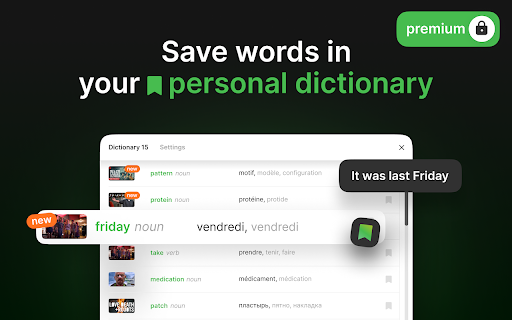
✓ Save words in your personal dictionary (Premium)
✓ Word definition and translations (Premium)
✓ Word memory exercises (Premium)

☆☆ How to use this extension ☆☆

1. Install Frogly Extension;
2. Start watching any series or movie on Netflix just like you always do;
3. You'll see the Frogly icon in the video player, click on it and select the languages you want;
4. Here it is! Now you can get double subtitles (in case this series/movie on Netflix has subtitles in the target languages) and word translation as you move your mouse cursor.
拡張機能の基本情報
| 名前 |  Language Learning with Frogly Language Learning with Frogly |
| ID | jfmlfmpdclmcknhmonpdhppojbnoinpb |
| 公式URL | https://chromewebstore.google.com/detail/language-learning-with-fr/jfmlfmpdclmcknhmonpdhppojbnoinpb |
| 説明 | Language Learning with Netflix, YouTube and Amazon Prime Video – double subtitles and word translation. Add to Chrome for Free! |
| ファイルサイズ | 615 KB |
| インストール数 | 50,952 |
| 現在のバージョン | 1.7.3 |
| 最終更新日 | 2022-12-15 |
| 公開日 | 2021-05-12 |
| 評価 | 2.90/5 合計 78 レビュー |
| 開発者 | https://frogly.app |
| Eメール | [email protected] |
| 支払い方法 | free |
| 拡張機能のウェブサイト | https://frogly.app/ |
| ヘルプページのURL | https://frogly.app/ |
| プライバシーポリシーページのURL | https://frogly.app/privacy |
| 対応言語 | en,tr,es,pt-BR,ru,ko |
| manifest.json | |
{
    "update_url": "https:\/\/clients2.google.com\/service\/update2\/crx",
    "description": "__MSG_appDescription__",
    "version": "1.7.3",
    "name": "__MSG_appName__",
    "manifest_version": 2,
    "default_locale": "en",
    "permissions": [
        "storage",
        "https:\/\/www.netflix.com\/watch\/*",
        "https:\/\/assets.nflxext.com\/*",
        "https:\/\/www.youtube.com\/*",
        "https:\/\/www.amazon.com\/*",
        "https:\/\/frogly.app\/*",
        "*:\/\/*.frogly.app\/*",
        "*:\/\/*.frogly-api.net\/*"
    ],
    "icons": {
        "16": "images\/icon16.png",
        "32": "images\/icon32.png",
        "64": "images\/icon64.png",
        "128": "images\/icon128.png",
        "512": "images\/icon356.png"
    },
    "background": {
        "page": "background.html"
    },
    "browser_action": {
        "default_popup": "browserAction.html",
        "default_icon": "images\/icon32.png"
    },
    "content_scripts": [
        {
            "matches": [
                "https:\/\/www.netflix.com\/*",
                "https:\/\/www.youtube.com\/*",
                "https:\/\/www.amazon.com\/*"
            ],
            "js": [
                "videoStreamingWebsite.bundle.js"
            ],
            "run_at": "document_end"
        },
        {
            "matches": [
                "https:\/\/frogly.app\/*",
                "*:\/\/*.frogly-api.net\/*",
                "*:\/\/*.frogly.app\/*"
            ],
            "js": [
                "froglyWebsite.bundle.js"
            ],
            "run_at": "document_end"
        }
    ],
    "web_accessible_resources": [
        "netflixWebsiteInjection.bundle.js",
        "youtubeWebsiteInjection.bundle.js",
        "amazonWebsiteInjection.bundle.js",
        "authFrogly.bundle.js",
        "images\/*",
        "*:\/\/*.frogly-api.net\/*",
        "*:\/\/*.frogly.app\/*"
    ],
    "externally_connectable": {
        "matches": [
            "https:\/\/www.netflix.com\/*"
        ]
    },
    "content_security_policy": "script-src 'self' 'unsafe-eval'; object-src 'self'"
} | |