Ultimate Guitar Favorites to Spotify
Easily export your Ultimate Guitar favorite songs to your Spotify
Ultimate Guitar Favorites to Spotifyとは何ですか?
Ultimate Guitar Favorites to SpotifyはAntoine Maryによって開発されたChromeの拡張機能で、その主な機能は「Easily export your Ultimate Guitar favorite songs to your Spotify」です。
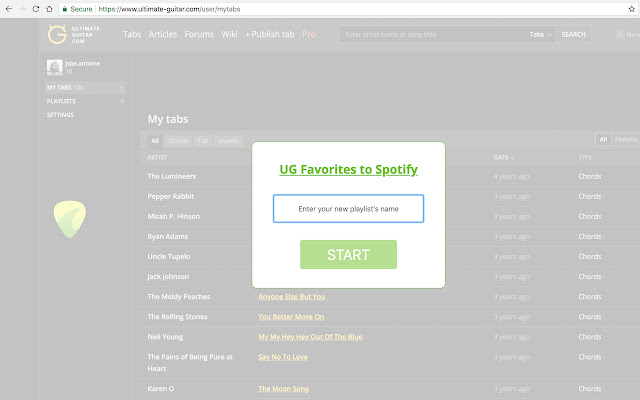
拡張機能のスクリーンショット
Ultimate Guitar Favorites to Spotify拡張機能のCRXファイルをダウンロード
Ultimate Guitar Favorites to Spotify拡張子のファイルをcrx形式でダウンロードし、ブラウザにChrome拡張機能を手動でインストールするか、crxファイルを友達と共有して簡単にChrome拡張機能をインストールします。
拡張機能の使用方法
                        v1.6.8: 2021 Spring cleaning, sorry for the delay!

You added a lot of tabs to your favorites on Ultimate Guitar and you wish you could practice them easily. Well you came to the right place! This extension will create a Spotify playlist containing all the songs from your favorites.

Once this extension is installed, you'll only have to open your 'My Tabs' page and click on the guitar pick located on the left of the page.

Enjoy it!
拡張機能の基本情報
| 名前 |  Ultimate Guitar Favorites to Spotify Ultimate Guitar Favorites to Spotify |
| ID | jhadlgfdcpedmbohiknkbnfmpiaccocl |
| 公式URL | https://chrome.google.com/webstore/detail/ultimate-guitar-favorites/jhadlgfdcpedmbohiknkbnfmpiaccocl |
| 説明 | Easily export your Ultimate Guitar favorite songs to your Spotify |
| ファイルサイズ | 386 KB |
| インストール数 | 648 |
| 現在のバージョン | 1.6.8 |
| 最終更新日 | 2021-04-26 |
| 公開日 | 2020-05-17 |
| 評価 | 3.73/5 合計 11 レビュー |
| 開発者 | Antoine Mary |
| Eメール | [email protected] |
| 支払い方法 | free |
| 拡張機能のウェブサイト | https://github.com/gyab/ultimate-guitar-favorites-to-spotify |
| ヘルプページのURL | https://github.com/gyab/ultimate-guitar-favorites-to-spotify |
| 対応言語 | en |
| manifest.json | |
{
    "update_url": "https:\/\/clients2.google.com\/service\/update2\/crx",
    "manifest_version": 2,
    "version": "1.6.8",
    "icons": {
        "128": "icon128.png"
    },
    "name": "Ultimate Guitar Favorites to Spotify",
    "description": "Easily export your Ultimate Guitar favorite songs to your Spotify",
    "content_scripts": [
        {
            "matches": [
                "https:\/\/www.ultimate-guitar.com\/user\/mytabs"
            ],
            "js": [
                "app.js"
            ],
            "run_at": "document_end"
        }
    ],
    "permissions": [
        "activeTab"
    ]
} | |