Immersion AI
Immersion AI
Immersion AIとは何ですか?
Immersion AIはhttps://immersion-ai.comによって開発されたChromeの拡張機能で、その主な機能は「Immersion AI」です。
拡張機能のスクリーンショット

Immersion AI拡張機能のCRXファイルをダウンロード
Immersion AI拡張子のファイルをcrx形式でダウンロードし、ブラウザにChrome拡張機能を手動でインストールするか、crxファイルを友達と共有して簡単にChrome拡張機能をインストールします。
拡張機能の使用方法
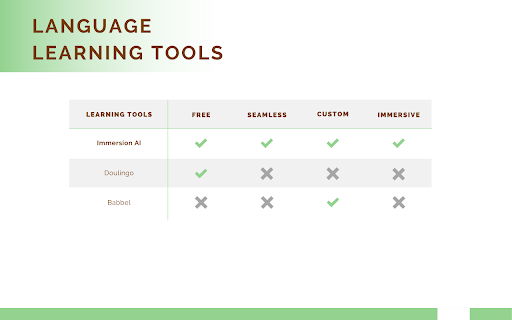
                        Seamlessly integrate language learning into your web browsing with Immersion AI!

Immersion AI lets you learn a language while you browse. First you select one of the several languages to learn. Once a language is selected and translation is active, new words will be translated directly in your browser.

Immersion AI is perfect for you if,
• You want to learn a language while you work
• You are learning a language and want more exposure each day
• You love learning and want to learn a language

With Immersion AI, you can set your own learning pace and new words are automatically added every day!


**Important**
Some sites don't work well when this extension is active. You can black-list a URL so that the extension never runs on the URL via the 'Blacklist Site' Button

• For more details about Immersion AI and see the extension in action visit: https://immersion-ai.com/
• You can help me improve the extension and create a more personalized experience by buying me a coffee at: https://www.buymeacoffee.com/zjwarnes
拡張機能の基本情報
| 名前 |  Immersion AI Immersion AI |
| ID | jnmjgojkocjnmpeaajnhgljmpallopma |
| 公式URL | https://chromewebstore.google.com/detail/immersion-ai/jnmjgojkocjnmpeaajnhgljmpallopma |
| 説明 | Immersion AI |
| ファイルサイズ | 949 KB |
| インストール数 | 200 |
| 現在のバージョン | 1.1.0 |
| 最終更新日 | 2023-07-24 |
| 公開日 | 2023-01-19 |
| 評価 | 5.00/5 合計 2 レビュー |
| 開発者 | https://immersion-ai.com |
| Eメール | [email protected] |
| 支払い方法 | free |
| 拡張機能のウェブサイト | https://immersion-ai.com/ |
| ヘルプページのURL | https://immersion-ai.com/contact-us |
| 対応言語 | en-US |
| manifest.json | |
{
"update_url": "https:\/\/clients2.google.com\/service\/update2\/crx",
"manifest_version": 3,
"name": "Immersion AI",
"description": "Immersion AI",
"version": "1.1.0",
"icons": {
"16": "icons\/logo_icon.png",
"32": "icons\/logo32_icon.png",
"48": "icons\/logo48_icon.png"
},
"background": {
"service_worker": "background.js"
},
"host_permissions": [
"https:\/\/www.google-analytics.com\/*"
],
"content_scripts": [
{
"matches": [
" | |