Save to Screenly
Display live web pages on your Screenly digital sign.
Save to Screenlyとは何ですか?
Save to ScreenlyはScreenlyによって開発されたChromeの拡張機能で、その主な機能は「Display live web pages on your Screenly digital sign.」です。
拡張機能のスクリーンショット


Save to Screenly拡張機能のCRXファイルをダウンロード
Save to Screenly拡張子のファイルをcrx形式でダウンロードし、ブラウザにChrome拡張機能を手動でインストールするか、crxファイルを友達と共有して簡単にChrome拡張機能をインストールします。
拡張機能の使用方法
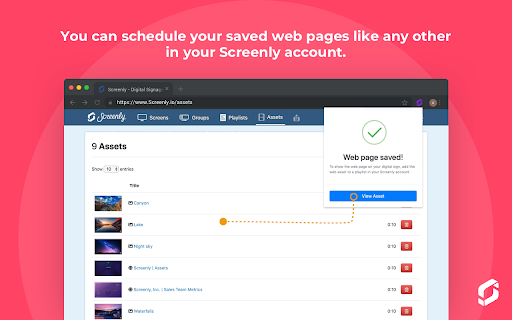
                        Easily and quickly create digital signage content from a web page, and display this content on your Screenly-powered digital signs. Whether you have a chart, an analytics page, or just an inspirational quote, the Save to Screenly extension makes publishing to your screens a breeze.

Save to Screenly also makes it easy to display web pages that require a username and password. The Save Authentication option saves your current login session so that Screenly can display the password-protected web page on your digital sign. If your session expires, use Save to Screenly to update it quickly.
拡張機能の基本情報
| 名前 |  Save to Screenly Save to Screenly |
| ID | kcoehkngnbhlmdcgcadliaadlmbjmcln |
| 公式URL | https://chromewebstore.google.com/detail/save-to-screenly/kcoehkngnbhlmdcgcadliaadlmbjmcln |
| 説明 | Display live web pages on your Screenly digital sign. |
| ファイルサイズ | 88.92 KB |
| インストール数 | 442 |
| 現在のバージョン | 1.0.1 |
| 最終更新日 | 2019-08-18 |
| 公開日 | 2019-08-14 |
| 開発者 | Screenly |
| 支払い方法 | free |
| プライバシーポリシーページのURL | https://www.screenly.io/privacy-policy |
| 対応言語 | en |
| manifest.json | |
{
    "update_url": "https:\/\/clients2.google.com\/service\/update2\/crx",
    "manifest_version": 2,
    "name": "Save to Screenly",
    "version": "1.0.1",
    "description": "Display live web pages on your Screenly digital sign.",
    "icons": {
        "16": "assets\/images\/screenly-logo-16.png",
        "48": "assets\/images\/screenly-logo-48.png",
        "128": "assets\/images\/screenly-logo-128.png"
    },
    "permissions": [
        "storage",
        "activeTab",
        "cookies",
        "http:\/\/*\/*",
        "https:\/\/*\/*"
    ],
    "browser_action": {
        "default_popup": "popup.html",
        "default_title": "Save to Screenly",
        "default_icon": {
            "16": "assets\/images\/screenly-logo-16.png",
            "32": "assets\/images\/screenly-logo-32.png"
        }
    },
    "options_page": "options.html"
} | |