Advanced Inputs
Customize and expand your mouse and touchscreen inputs.
Advanced Inputsとは何ですか?
Advanced InputsはTomáš Jarolímによって開発されたChromeの拡張機能で、その主な機能は「Customize and expand your mouse and touchscreen inputs.」です。
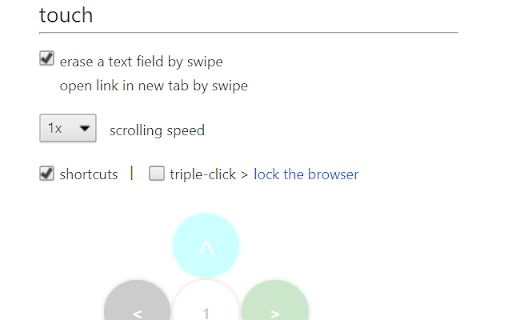
拡張機能のスクリーンショット


Advanced Inputs拡張機能のCRXファイルをダウンロード
Advanced Inputs拡張子のファイルをcrx形式でダウンロードし、ブラウザにChrome拡張機能を手動でインストールするか、crxファイルを友達と共有して簡単にChrome拡張機能をインストールします。
拡張機能の使用方法
                        / mouse

Browse the history with double-click.

Scroll to the top by click both buttons at the same time.

Stop mouse cursor on a text field for focus it.
Shake mouse over a text field for erase it.

/ touch

Browse the history with shortcuts.
Lock the browser with triple-click.
Set your own unlock shortcut.

Boost your scrolling speed.

Erase a text field by swipe over it.
Open link in new tab by swipe over it.

====================================

https://addons.mozilla.org/en-US/firefox/addon/advanced-inputs/
拡張機能の基本情報
| 名前 |  Advanced Inputs Advanced Inputs |
| ID | kecoefjmldppdcdlmpbmebkecdjkoanc |
| 公式URL | https://chromewebstore.google.com/detail/advanced-inputs/kecoefjmldppdcdlmpbmebkecdjkoanc |
| 説明 | Customize and expand your mouse and touchscreen inputs. |
| ファイルサイズ | 17.58 KB |
| インストール数 | 18 |
| 現在のバージョン | 1.0 |
| 最終更新日 | 2018-01-13 |
| 公開日 | 2018-01-12 |
| 評価 | 3.00/5 合計 2 レビュー |
| 開発者 | Tomáš Jarolím |
| Eメール | [email protected] |
| 支払い方法 | free |
| 拡張機能のウェブサイト | https://github.com/mXdevs/Advanced-Inputs |
| 対応言語 | de,en,fr,es,cs |
| manifest.json | |
{
    "update_url": "https:\/\/clients2.google.com\/service\/update2\/crx",
    "manifest_version": 2,
    "name": "Advanced Inputs",
    "version": "1.0",
    "default_locale": "en",
    "description": "__MSG_extExp__",
    "icons": {
        "128": "icon128.png"
    },
    "author": "Tom\u00e1\u0161 Jarol\u00edm",
    "background": {
        "scripts": [
            "js\/background.js"
        ],
        "persistent": true
    },
    "permissions": [
        "storage",
        "tabs",
        "sessions",
        "bookmarks"
    ],
    "options_page": "html\/options.html",
    "options_ui": {
        "chrome_style": true,
        "page": "html\/options.html"
    },
    "content_scripts": [
        {
            "matches": [
                "http:\/\/*\/*",
                "https:\/\/*\/*"
            ],
            "run_at": "document_end",
            "js": [
                "etc\/vars.js",
                "js\/PlS.js",
                "js\/content.js"
            ],
            "css": [
                "css\/content.css"
            ]
        }
    ],
    "web_accessible_resources": [
        "icon128.png"
    ]
} | |