Stats Checker for Google Analytics™
A bird's-eye view of all accounts in a single click.
Stats Checker for Google Analytics™とは何ですか?
Stats Checker for Google Analytics™はhttp://mystatschecker.comによって開発されたChromeの拡張機能で、その主な機能は「A bird's-eye view of all accounts in a single click.」です。
拡張機能のスクリーンショット
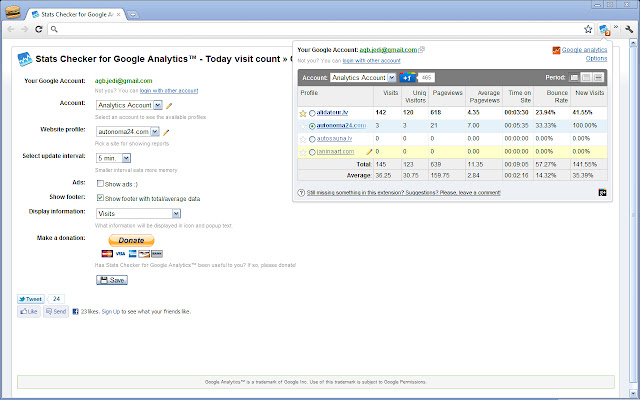
Stats Checker for Google Analytics™拡張機能のCRXファイルをダウンロード
Stats Checker for Google Analytics™拡張子のファイルをcrx形式でダウンロードし、ブラウザにChrome拡張機能を手動でインストールするか、crxファイルを友達と共有して簡単にChrome拡張機能をインストールします。
拡張機能の使用方法
                        Stats Checker for Google Analytics™
=======================================================

Displays count of your site visits.

Shows the number of visits to your site today.
Updating every 5 minutes.

Allows you to choose one of your sites registered in Google Analytics.

P.S. Thanks for all your suggestions!

Version 1.6.11.0
- Google Analytics new interface problem fixes

Version 1.6.10.0
- Fixed account display problem

Version 1.6.9.0
- Fixed Real-Time reports

Version 1.6.8.0
- New Google Analytics url support - analytics.google.com
- Lots of small bugfixes

Version 1.6.5.0
- Lots of small bugfixes
- Favourite profile selection fix
- Selecting accounts fix


Version 1.6.3.0
- Improved rendering speed
- Latest Google Analytics update fix (Thanks for solutions!)
- Remove social buttons from options


Version 1.6.2.0
- Google Analytics updated version support
- Added search function
- Mobile app support (beta)
- All profiles/Favourites toggle
- Fancy select design
- Improved profile loading speed
- Instant pre-data for 7 and 30 days (For slow internet connection)

Version 1.6.1.1
- Added Google Analytics sign-in error notification

Version 1.6.1
- Added "Go To Property Default URL" button
- Showing property names with profile names, if differs. (Useful, when profile names are "All Web Site Data")
- Options page fix

Version 1.6.0.3
- Google Analytics updated version support

Version 1.6
- Works with new Google Analytics version
- Added Star/Favourite sync between Google Analytics and Extension
- Real-Time data on extension icon


Version 1.5.3.5
- Added Portuguese language (Thanks, Fabio!)
- Changed default language back to english :)
- JavaScript performance optimizations

Version 1.5
- Graph for the last 7 days (In test mode) (Thanks to Norbert)
- Select a date range to show in Google Analytics (Today, 7 days, 30 days, Real-Time)

Version 1.4
- New Google Analytics support
- Floating table header
- Total row
- Customizable update time
- Link to Google Analytics :)
- Bigger screen

Version 1.3
- Now you can sort results by name, click count etc... (Thanks to virae for advice :))
- Large numbers now are displaying correctly
- Icon text fix for numbers >9999

Version 1.2
- Added different periods support (day/week/month) (only for popup window, number on icon stays only for today)
- Added virtual account "Favorited" - there you can see profiles from all accounts, that you have marked with yellow star (Favorited profiles are NOT Google Analytics Starred profiles)

Version 1.1.1:
- Added all profiles overview in popup by clicking on icon!

Version 1.0.7:
- Multiple accounts support!

Version 1.0.5:
- 1 September bug fix (wrong statistics)

Version 1.0.4:
- Custom statistics - possible to choose, what to show

Version 1.0.3:
- Improved interface

Version 1.0.2:
- Added multi-language support
拡張機能の基本情報
| 名前 |  Stats Checker for Google Analytics™ Stats Checker for Google Analytics™ |
| ID | kfphhfdokdamioolhjfdohhkodbieida |
| 公式URL | https://chrome.google.com/webstore/detail/stats-checker-for-google/kfphhfdokdamioolhjfdohhkodbieida |
| 説明 | A bird's-eye view of all accounts in a single click. |
| ファイルサイズ | 541 KB |
| インストール数 | 4,826 |
| 現在のバージョン | 1.6.11.0 |
| 最終更新日 | 2017-02-20 |
| 公開日 | 2017-02-20 |
| 評価 | 3.72/5 合計 90 レビュー |
| 開発者 | http://mystatschecker.com |
| 支払い方法 | free |
| 拡張機能のウェブサイト | http://mystatschecker.com/ |
| ヘルプページのURL | http://mystatschecker.com/ |
| 対応言語 | en,pt-PT,ru |
| manifest.json | |
{
    "update_url": "https:\/\/clients2.google.com\/service\/update2\/crx",
    "background": {
        "page": "background.html"
    },
    "browser_action": {
        "default_icon": "img\/logo.32.png",
        "default_title": "__MSG_extName__",
        "default_popup": "popup.html"
    },
    "default_locale": "en",
    "name": "__MSG_extName__",
    "short_name": "__MSG_extShortName__",
    "description": "__MSG_extDesc__",
    "icons": {
        "16": "img\/logo.16.png",
        "32": "img\/logo.32.png",
        "48": "img\/logo.48.png",
        "64": "img\/logo.64.png",
        "128": "img\/logo.128.ext.png"
    },
    "options_page": "options.html",
    "permissions": [
        "https:\/\/analytics.google.com\/*"
    ],
    "version": "1.6.11.0",
    "content_security_policy": "script-src 'self' 'unsafe-eval' https:\/\/connect.facebook.net https:\/\/ssl.google-analytics.com https:\/\/apis.google.com https:\/\/platform.twitter.com; object-src 'self'",
    "manifest_version": 2
} | |