Play Genius
Adds lyrics from Genius to Google Play Music
Play Geniusとは何ですか?
Play GeniusはRab Rennieによって開発されたChromeの拡張機能で、その主な機能は「Adds lyrics from Genius to Google Play Music」です。
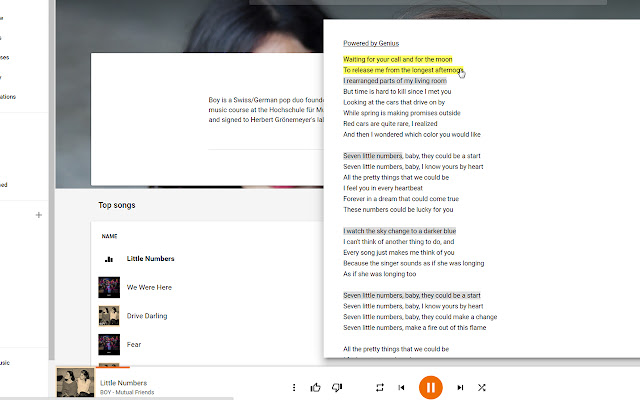
拡張機能のスクリーンショット
Play Genius拡張機能のCRXファイルをダウンロード
Play Genius拡張子のファイルをcrx形式でダウンロードし、ブラウザにChrome拡張機能を手動でインストールするか、crxファイルを友達と共有して簡単にChrome拡張機能をインストールします。
拡張機能の使用方法
                        Adds a lyrics button next to the queue button in Google Play Music.

Lyrics from Genius.com open in google play music and allow you to click on annotated lyrics to view their meaning.

Changelog
v1.1.0 Added options menu and themes
v1.0.7 Lyrics button is now grey when no song is playing.
       Lyrics button now has a tooltip.
       Thanks to /u/StargateCommand on reddit for the suggestions.
v1.0.6 Open animation now plays correctly
v1.0.5 No longer stops displaying randomly
v1.0.4 Extension now loads if the tab is opened in the background
v1.0.3 Lyrics now close properly
v1.0.2 Music queue now closes if open
       Improved look
v1.0.1 Lyrics button now changes to orange like the queue button when lyrics are open
v1.0.0 Initial Release

Icon made by Elegant Themes from www.flaticon.com
Lyrics provided by Genius.com.
拡張機能の基本情報
| 名前 |  Play Genius Play Genius |
| ID | khlghnjfjflnecmoildkjfoaenhgnegm |
| 公式URL | https://chrome.google.com/webstore/detail/play-genius/khlghnjfjflnecmoildkjfoaenhgnegm |
| 説明 | Adds lyrics from Genius to Google Play Music |
| ファイルサイズ | 694 KB |
| インストール数 | 247 |
| 現在のバージョン | 1.1.0 |
| 最終更新日 | 2016-07-02 |
| 公開日 | 2016-07-02 |
| 評価 | 4.00/5 合計 22 レビュー |
| 開発者 | Rab Rennie |
| Eメール | [email protected] |
| 支払い方法 | free |
| 対応言語 | en |
| manifest.json | |
{
    "update_url": "https:\/\/clients2.google.com\/service\/update2\/crx",
    "name": "Play Genius",
    "version": "1.1.0",
    "manifest_version": 2,
    "description": "Adds lyrics from Genius to Google Play Music",
    "homepage_url": "http:\/\/extensionizr.com",
    "options_page": "src\/options\/index.html",
    "icons": {
        "16": "icons\/icon16.png",
        "48": "icons\/icon48.png",
        "128": "icons\/icon128.png"
    },
    "default_locale": "en",
    "web_accessible_resources": [
        "src\/inject\/interface.svg"
    ],
    "permissions": [
        "https:\/\/play.google.com\/*",
        "https:\/\/api.genius.com\/*",
        "storage"
    ],
    "content_scripts": [
        {
            "matches": [
                "https:\/\/play.google.com\/*"
            ],
            "css": [
                "src\/inject\/inject.css"
            ]
        },
        {
            "matches": [
                "https:\/\/play.google.com\/*"
            ],
            "js": [
                "src\/inject\/inject.js"
            ]
        }
    ]
} | |