RationalSales - Lead Prospector
Discover new sales leads complete with business emails and phone numbers
RationalSales - Lead Prospectorとは何ですか?
RationalSales - Lead Prospectorはhttp://rationalsales.comによって開発されたChromeの拡張機能で、その主な機能は「Discover new sales leads complete with business emails and phone numbers」です。
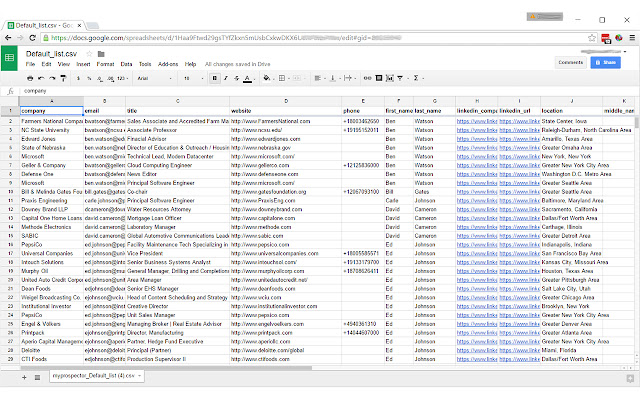
拡張機能のスクリーンショット


RationalSales - Lead Prospector拡張機能のCRXファイルをダウンロード
RationalSales - Lead Prospector拡張子のファイルをcrx形式でダウンロードし、ブラウザにChrome拡張機能を手動でインストールするか、crxファイルを友達と共有して簡単にChrome拡張機能をインストールします。
拡張機能の使用方法
                        RationalSales Lead Prospector is the easiest way to find professional email addresses and phone numbers with just one click.

- Find email addresses on LinkedIn profiles: when you visit a profile on LinkedIn, click on the button in your browser to find the email address of this profile in seconds.

- Save your leads from LinkedIn search pages and profiles. You can download all your saved leads in CSV format.

# Is it free?

Yes, Lead Prospector is free to use. You get 200 free contacts upon registering and can upgrade your account to a paid plan for more.

# Does it work with LinkedIn Sales Navigator?

Yes, this is the recommended method.
拡張機能の基本情報
| 名前 |  RationalSales - Lead Prospector RationalSales - Lead Prospector |
| ID | lbpefbgmafdddhabeapafkbpkfmobgch |
| 公式URL | https://chrome.google.com/webstore/detail/rationalsales-lead-prospe/lbpefbgmafdddhabeapafkbpkfmobgch |
| 説明 | Discover new sales leads complete with business emails and phone numbers |
| ファイルサイズ | 836 KB |
| インストール数 | 185 |
| 現在のバージョン | 9.0.1 |
| 最終更新日 | 2017-07-29 |
| 公開日 | 2017-07-29 |
| 評価 | 4.00/5 合計 4 レビュー |
| 開発者 | http://rationalsales.com |
| Eメール | [email protected] |
| 支払い方法 | free |
| 拡張機能のウェブサイト | https://www.rationalsales.com |
| ヘルプページのURL | https://rationalsales.zendesk.com |
| プライバシーポリシーページのURL | https://www.rationalsales.com/privacy-policy |
| 対応言語 | en-US |
| manifest.json | |
{
"update_url": "https:\/\/clients2.google.com\/service\/update2\/crx",
"manifest_version": 2,
"name": "RationalSales - Lead Prospector",
"short_name": "RationalSales",
"description": "Discover new sales leads complete with business emails and phone numbers",
"version": "9.0.1",
"minimum_chrome_version": "43.0.2357.130",
"icons": {
"16": "icons\/icon16.png",
"48": "icons\/icon48.png",
"128": "icons\/icon128.png"
},
"content_security_policy": "script-src 'self' https:\/\/*.pusher.com; object-src 'self'",
"web_accessible_resources": [
"images\/*.png",
"results.html",
"results2.html",
"goog_search.html",
"goog_search.js",
"select2.min.js",
"jquery.js",
"bootstrap.min.js",
"goog_search.data.js",
"fonts\/*.ttf",
"fonts\/*.woff",
"fonts\/*.woff2"
],
"background": {
"scripts": [
"jquery.js",
"pusher.min.js",
"background.js"
],
"persistent": true
},
"browser_action": {
"default_icon": {
"19": "icons\/icon19.png",
"38": "icons\/icon38.png"
},
"default_popup": "signin.html",
"default_title": "Search with RationalSales"
},
"permissions": [
"contextMenus",
"tabs",
"storage",
" | |