Microsoft Audio-Content-Creation TTS Exporter
Download Microsoft Azure Text-to-Speech Audio-Content-Creation synthesized audio with 1 click.
Microsoft Audio-Content-Creation TTS Exporterとは何ですか?
Microsoft Audio-Content-Creation TTS Exporterはmtd supportによって開発されたChromeの拡張機能で、その主な機能は「Download Microsoft Azure Text-to-Speech Audio-Content-Creation synthesized audio with 1 click.」です。
拡張機能のスクリーンショット
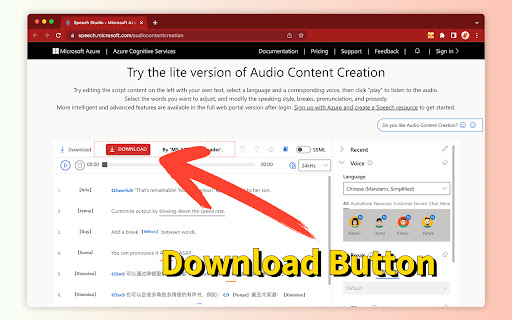
Microsoft Audio-Content-Creation TTS Exporter拡張機能のCRXファイルをダウンロード
Microsoft Audio-Content-Creation TTS Exporter拡張子のファイルをcrx形式でダウンロードし、ブラウザにChrome拡張機能を手動でインストールするか、crxファイルを友達と共有して簡単にChrome拡張機能をインストールします。
拡張機能の使用方法
                        Microsoft Azure Audio Content Creation is a text-to-speech service that converts text to lifelike speech.

You can optimize text-to-speech voice output by easily adjusting and fine-tuning key speech attributes.

Audio Content Creation enables you to visually control speech attributes in real-time – such as voice style, rate, pitch, volume, pronunciation and breaks. It allows you to quickly create more accurate, expressive and customized audio.

The official Microsoft Azure website offers a lite version of Audio Content Creation app for you to try out text-to-speech. You can tailor the settings and play the synthesized lifelike audio.

⚠️ However, the synthesized speech can only be played but not be downloaded.
🎯 This extension adds a free download button on that page.

🔗 Microsoft™ Azure official  Audio Content Creation website:
https://speech.microsoft.com/audiocontentcreation
拡張機能の基本情報
| 名前 |  Microsoft Audio-Content-Creation TTS Exporter Microsoft Audio-Content-Creation TTS Exporter |
| ID | lhphdiclklkbodombedbjeddjfkfcmao |
| 公式URL | https://chromewebstore.google.com/detail/microsoft-audio-content-c/lhphdiclklkbodombedbjeddjfkfcmao |
| 説明 | Download Microsoft Azure Text-to-Speech Audio-Content-Creation synthesized audio with 1 click. |
| ファイルサイズ | 414 KB |
| インストール数 | 1,710 |
| 現在のバージョン | 2.1.0 |
| 最終更新日 | 2023-09-02 |
| 公開日 | 2023-04-09 |
| 評価 | 4.50/5 合計 4 レビュー |
| 開発者 | mtd support |
| Eメール | [email protected] |
| 支払い方法 | free |
| 拡張機能のウェブサイト | https://speech.microsoft.com/audiocontentcreation |
| 対応言語 | en,vi,es,pt-BR,pt-PT,ru,zh-CN,zh-TW,ja,ko |
| manifest.json | |
{
    "update_url": "https:\/\/clients2.google.com\/service\/update2\/crx",
    "name": "__MSG_ext_fulltitle__",
    "description": "__MSG_ext_description__",
    "manifest_version": 3,
    "version": "2.1.0",
    "permissions": [
        "storage"
    ],
    "default_locale": "en",
    "icons": {
        "16": "assets\/icon16.png",
        "32": "assets\/icon32.png",
        "48": "assets\/icon48.png",
        "128": "assets\/icon128.png"
    },
    "action": {
        "default_popup": "popup.html",
        "default_icon": {
            "16": "assets\/icon16.png",
            "32": "assets\/icon32.png",
            "48": "assets\/icon48.png",
            "128": "assets\/icon128.png"
        }
    },
    "background": {
        "service_worker": "background.js"
    },
    "options_page": "options.html",
    "content_scripts": [
        {
            "matches": [
                "https:\/\/speech.microsoft.com\/audiocontentcreation*"
            ],
            "js": [
                "content.js"
            ],
            "all_frames": false,
            "run_at": "document_end"
        }
    ],
    "host_permissions": [],
    "externally_connectable": {
        "matches": [
            "https:\/\/*.microsoft-tts-downloader.com\/*"
        ]
    }
} | |