Productive
An extension to help keep track of tasks, notes, shortcuts and productivity.
Productiveとは何ですか?
ProductiveはEric Liuによって開発されたChromeの拡張機能で、その主な機能は「An extension to help keep track of tasks, notes, shortcuts and productivity.」です。
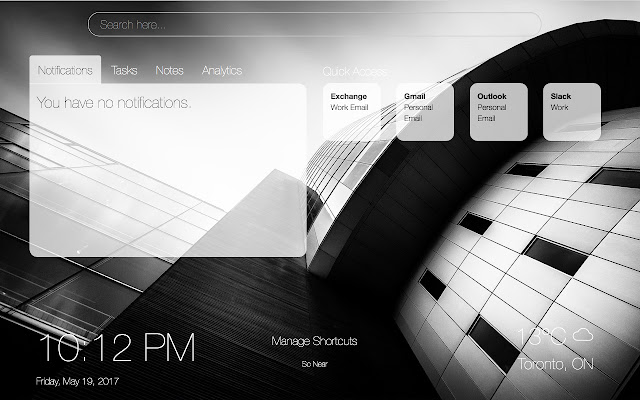
拡張機能のスクリーンショット


Productive拡張機能のCRXファイルをダウンロード
Productive拡張子のファイルをcrx形式でダウンロードし、ブラウザにChrome拡張機能を手動でインストールするか、crxファイルを友達と共有して簡単にChrome拡張機能をインストールします。
拡張機能の使用方法
                        Productive is a lightweight Chrome extension that makes your new tab page a beautiful, personal dashboard that helps you stay focused on your work. Featuring a modern, minimalistic user interface, you can add tasks, notes and shortcuts that are easily and conveniently accessible every time you open up your new tab page. You can track created, completed and deleted tasks. Every hour, it updates the background with a beautiful photo. In addition, it displays the time with the option of multiple time formats, weather with multiple weather unit formats as well as an overview of humidity, pressure and wind speed. By connecting to your email accounts, Productive is able to fetch your recent emails and give you fast access to them. (Note: Current only supports Gmail via the Gmail extension).

05/14/2017: Current work is being done for automatically updating background photos via the Flickr API, full offline support for cached weather/location data and support for other email services.

05/16/2017: v1.1.0 released. Time now supports 12hr/24hr time with AM/PM or not, weather displays humidity, pressure, wind speed, background changes every hour from Flickr, and other performance changes.

05/18/2017: v1.2.0 released. Fixes weather more detail section overlap issue with manage section and options section.

05/19/2017: v1.3.0 released. Fixes performance issues.

05/20/2017: v1.4.0 released. Full offline support fixed. Background image updates every hour and fixes caching image for faster retrieval. Performance upgrades.

05/25/2017: v1.5.0 released. Fixed issues regarding broken image links by loading last cached image instead. Font changed to Roboto Thin. Fixed issues with adding URLs. Performance upgrades.

05/26/2017: v1.6.0 released. Fixed script issue.
拡張機能の基本情報
| 名前 |  Productive Productive |
| ID | mbajcbhcbcbdianjgagmnbgnjmhoaooa |
| 公式URL | https://chrome.google.com/webstore/detail/productive/mbajcbhcbcbdianjgagmnbgnjmhoaooa |
| 説明 | An extension to help keep track of tasks, notes, shortcuts and productivity. |
| ファイルサイズ | 1.61 MB |
| インストール数 | 52 |
| 現在のバージョン | 1.6.0 |
| 最終更新日 | 2017-05-26 |
| 公開日 | 2017-05-26 |
| 評価 | 3.75/5 合計 8 レビュー |
| 開発者 | Eric Liu |
| 支払い方法 | free |
| 拡張機能のウェブサイト | https://startproductive.com |
| 対応言語 | en-US |
| manifest.json | |
{
"update_url": "https:\/\/clients2.google.com\/service\/update2\/crx",
"manifest_version": 2,
"name": "Productive",
"version": "1.6.0",
"description": "An extension to help keep track of tasks, notes, shortcuts and productivity.",
"author": "Eric Liu",
"icons": {
"16": "assets\/img\/icon-16x16.png",
"48": "assets\/img\/icon-48x48.png",
"128": "assets\/img\/icon-128x128.png"
},
"browser_action": {
"default_icon": "assets\/img\/icon-128x128.png"
},
"background": {
"scripts": [
"assets\/js\/tether.min.js",
"assets\/js\/bootstrap.min.js",
"assets\/js\/jquery-3.2.1.min.js",
"assets\/js\/modernizr.min.js",
"assets\/js\/string.js",
"assets\/js\/script.js"
]
},
"chrome_url_overrides": {
"newtab": "index.html"
},
"permissions": [
"background",
"identity",
"tabs",
"https:\/\/www.googleapis.com\/*",
"https:\/\/*.googleusercontent.com\/*",
"https:\/\/mail.google.com\/",
"activeTab",
"https:\/\/ajax.googleapis.com\/"
],
"short_name": "Productive",
"content_security_policy": "script-src https:\/\/*.google.com 'unsafe-eval'; object-src 'self'",
"oauth2": {
"client_id": " | |