C-Converter
C-Converter is a currency converter that sits on your chrome browser for quick and easy access of converting currencies.
C-Converterとは何ですか?
C-ConverterはKarennによって開発されたChromeの拡張機能で、その主な機能は「C-Converter is a currency converter that sits on your chrome browser for quick and easy access of converting currencies.」です。
拡張機能のスクリーンショット
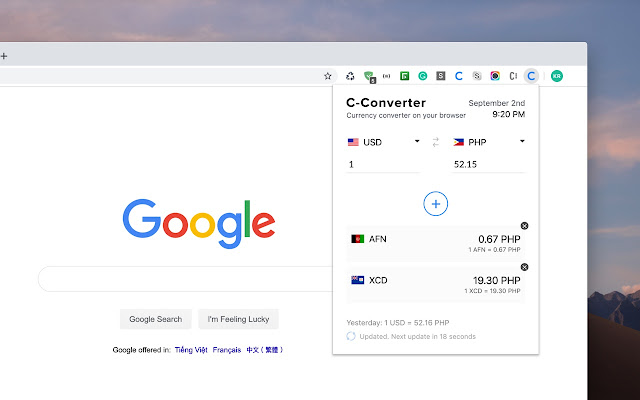
C-Converter拡張機能のCRXファイルをダウンロード
C-Converter拡張子のファイルをcrx形式でダウンロードし、ブラウザにChrome拡張機能を手動でインストールするか、crxファイルを友達と共有して簡単にChrome拡張機能をインストールします。
拡張機能の使用方法
                        C-Converter is a currency converter that sits on your chrome browser for quick and easy access of converting currencies.

Currently,
	• Converts multiple currencies
	• Updates every 30 seconds
	• All currencies from around the world is available
	• Displays yesterdays exchange rate
	• Displays last used currency

More updates to come.

If you have any feedback please do give us a review and ratings, that would be very helpful for us to continue on improving the extension.
拡張機能の基本情報
| 名前 |  C-Converter C-Converter |
| ID | mcchchkeaamjoeagofplonoldmeboiln |
| 公式URL | https://chrome.google.com/webstore/detail/c-converter/mcchchkeaamjoeagofplonoldmeboiln |
| 説明 | C-Converter is a currency converter that sits on your chrome browser for quick and easy access of converting currencies. |
| ファイルサイズ | 93.22 KB |
| インストール数 | 12 |
| 現在のバージョン | 2.0 |
| 最終更新日 | 2019-09-02 |
| 公開日 | 2019-09-02 |
| 評価 | 5.00/5 合計 2 レビュー |
| 開発者 | Karenn |
| Eメール | [email protected] |
| 支払い方法 | free |
| 対応言語 | en-US |
| manifest.json | |
{
    "update_url": "https:\/\/clients2.google.com\/service\/update2\/crx",
    "name": "C-Converter",
    "version": "2.0",
    "description": "C-Converter is a currency converter that sits on your chrome browser for quick and easy access of converting currencies.",
    "permissions": [
        "activeTab",
        "declarativeContent",
        "storage"
    ],
    "background": {
        "page": "bg.html",
        "persistent": false
    },
    "browser_action": {
        "default_popup": "popup.html",
        "default_icon": {
            "16": "images\/get_started16.png",
            "32": "images\/get_started32.png",
            "48": "images\/get_started48.png",
            "128": "images\/get_started128.png"
        }
    },
    "icons": {
        "16": "images\/get_started16.png",
        "32": "images\/get_started32.png",
        "48": "images\/get_started48.png",
        "128": "images\/get_started128.png"
    },
    "manifest_version": 2,
    "content_security_policy": "script-src 'self' https:\/\/ssl.google-analytics.com https:\/\/www.google-analytics.com; object-src 'self'"
} | |