Stock Portfolio
Track multiple portfolio in real time. You also get in-depth information on each stock. Stock Quotes, Multiple Watch List.
Stock Portfolioとは何ですか?
Stock PortfolioはWallPipeによって開発されたChromeの拡張機能で、その主な機能は「Track multiple portfolio in real time. You also get in-depth information on each stock. Stock Quotes, Multiple Watch List.」です。
拡張機能のスクリーンショット


Stock Portfolio拡張機能のCRXファイルをダウンロード
Stock Portfolio拡張子のファイルをcrx形式でダウンロードし、ブラウザにChrome拡張機能を手動でインストールするか、crxファイルを友達と共有して簡単にChrome拡張機能をインストールします。
拡張機能の使用方法
                        Multiple Stock Portfolio

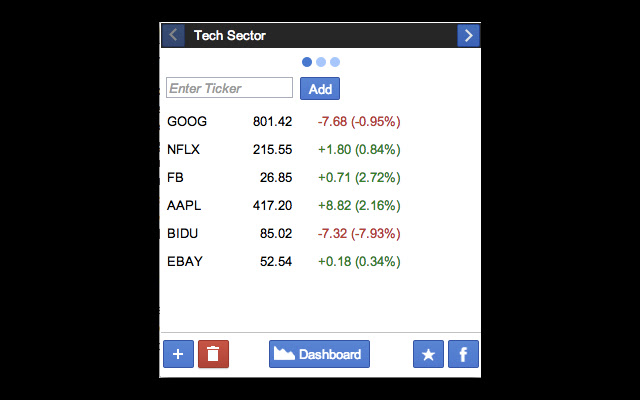
Stock Portfolio is designed for tracking multiple stock portfolio in a simple and beautiful interface from your favorite chrome browser with a single click. Here is a list of features currently available:

* Add/Delete multiple portfolio(s).

* Each portfolio can have multiple stocks.

* To add a stock to your portfolio, type in symbol and click "Add" button.

* Drag and drop(stock ticker) stocks to re-arrange order within a portfolio.

* One click delete of any stock.

* Click any stock to get it's details including OHLC, changes, volume, market capital, and etc.

* Starting 1.5.0 release, we have introduced a great feature called "Stock Portfolio Dashboard". Simply click on "Dashboard" button and we will show you dashboard for each portfolio in a new tab. This is a great way to follow your stocks with real time data and real time graphs. Try it out and let us know what you think?

##### Version - 1.1 #####

* Dropped extension size from 40MB down to 1.14MB now.

* Increased extension performance by 25%.

##### Version - 1.2 #####

* Stock data will now be saved for better user experience and will be updated every 5 seconds.

* Further reduction in extension size + increased performance.

##### Version - 1.3 #####

* Clicking on a stock will show you latest news aggregated from various sources, everything in one place.

##### Version - 1.4 #####

* Extension now preserves your last portfolio you visited and will load that portfolio when you re-launch the extension.

* If you click on link within News feed, it opens news in a new tab. And when you re-launch, it will automatically take you where you left off.

##### Version - 1.4.2 #####

* Re-arranged Add/Delete Portfolio buttons together.

* Added Facebook and Ratings buttons.

##### Version - 1.4.3 #####

* Fixing a critical bug where if user drags and drops stock in one place, it was deleting all other portfolios stocks.

##### Version - 1.5.0 #####

* Very happy to introduce a great feature. Stock Portfolio Dashboard. Simply click on "Dashboard" button and we will now show dashboard for each portfolio in a new tab. This is a great way to follow your stocks with real time data and real time graphs. Try it out and let us know what you think?

##### Version - 1.5.1 #####

* User were not able to add ticker that has special characters like "."(dot), "="(equal) etc. Fixing this issue.


##### Future Release #####

With next release you will get the following features:

* Add transaction data for each stock within multiple portfolio.

* Real time update of your portfolio performance per your transaction data.
拡張機能の基本情報
| 名前 |  Stock Portfolio Stock Portfolio |
| ID | mdoambecilccimhbonfabmoomaegehni |
| 公式URL | https://chrome.google.com/webstore/detail/stock-portfolio/mdoambecilccimhbonfabmoomaegehni |
| 説明 | Track multiple portfolio in real time. You also get in-depth information on each stock. Stock Quotes, Multiple Watch List. |
| ファイルサイズ | 1.91 MB |
| インストール数 | 5,544 |
| 現在のバージョン | 1.5.3 |
| 最終更新日 | 2013-05-20 |
| 公開日 | 2013-05-20 |
| 評価 | 3.51/5 合計 212 レビュー |
| 開発者 | WallPipe |
| 支払い方法 | free |
| 対応言語 | en-US |
| manifest.json | |
{
    "update_url": "https:\/\/clients2.google.com\/service\/update2\/crx",
    "manifest_version": 2,
    "name": "Stock Portfolio",
    "description": "Track multiple portfolio in real time. You also get in-depth information on each stock. Stock Quotes, Multiple Watch List.",
    "version": "1.5.3",
    "content_security_policy": "script-src 'self' 'unsafe-eval'; object-src 'self'",
    "icons": {
        "16": "icons\/icon-16.png",
        "48": "icons\/icon-48.png",
        "128": "icons\/icon-128.png"
    },
    "permissions": [
        "https:\/\/finance.google.com\/",
        "http:\/\/www.google.com\/uds\/",
        "https:\/\/www.google.com\/finance\/getprices",
        "http:\/\/d.yimg.com\/autoc.finance.yahoo.com\/autoc",
        "http:\/\/markets.financialcontent.com\/",
        "http:\/\/feeds.finance.yahoo.com\/rss\/2.0\/headline",
        "tabs"
    ],
    "browser_action": {
        "default_icon": "stock-up-new.png",
        "default_popup": "popup.html"
    }
} | |