Twitch Sneaky Mouse Button
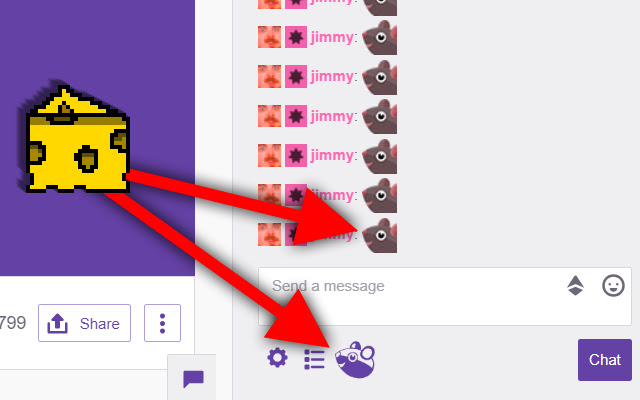
Adds a buttons below the Twitch chat to easily send emotes needed to control the game with a single click.
Twitch Sneaky Mouse Buttonとは何ですか?
Twitch Sneaky Mouse ButtonはElizabeth Rappによって開発されたChromeの拡張機能で、その主な機能は「Adds a buttons below the Twitch chat to easily send emotes needed to control the game with a single click.」です。
拡張機能のスクリーンショット
Twitch Sneaky Mouse Button拡張機能のCRXファイルをダウンロード
Twitch Sneaky Mouse Button拡張子のファイルをcrx形式でダウンロードし、ブラウザにChrome拡張機能を手動でインストールするか、crxファイルを友達と共有して簡単にChrome拡張機能をインストールします。
拡張機能の使用方法
                        Sneaky Mouse is a game created by Robert Moran, and is played exclusively via his Twitch channel. One of the core components of this game is using a specific emote in the chat.

This extension saves you the extra clicks or typing time by adding a button that will instantly submit that emote in the chat, making the game easier to play.

This is not an official extension, it was merely created by a fan.
拡張機能の基本情報
| 名前 |  Twitch Sneaky Mouse Button Twitch Sneaky Mouse Button |
| ID | mfbcbbeeogenjohbldijcpmcfnkocnfh |
| 公式URL | https://chrome.google.com/webstore/detail/twitch-sneaky-mouse-butto/mfbcbbeeogenjohbldijcpmcfnkocnfh |
| 説明 | Adds a buttons below the Twitch chat to easily send emotes needed to control the game with a single click. |
| ファイルサイズ | 104 KB |
| インストール数 | 180 |
| 現在のバージョン | 2.0.0 |
| 最終更新日 | 2019-05-10 |
| 公開日 | 2019-05-10 |
| 評価 | 5.00/5 合計 7 レビュー |
| 開発者 | Elizabeth Rapp |
| Eメール | [email protected] |
| 支払い方法 | free |
| 対応言語 | en |
| manifest.json | |
{
    "update_url": "https:\/\/clients2.google.com\/service\/update2\/crx",
    "author": "Elizabeth Rapp",
    "background": {
        "scripts": [
            "background.js"
        ]
    },
    "browser_action": {
        "default_icon": "icon.png"
    },
    "content_scripts": [
        {
            "js": [
                "jquery-3.3.1.min.js",
                "content.js"
            ],
            "matches": [
                "https:\/\/www.twitch.tv\/rawb"
            ]
        }
    ],
    "description": "Adds a buttons below the Twitch chat to easily send emotes needed to control the game with a single click.",
    "icons": {
        "128": "icon128.png",
        "16": "icon16.png",
        "48": "icon48.png"
    },
    "manifest_version": 2,
    "name": "Twitch Sneaky Mouse Button",
    "version": "2.0.0",
    "web_accessible_resources": [
        "icon.png",
        "icon-light.png",
        "icon-dark.png",
        "icon-2-light.png",
        "icon-2-dark.png"
    ]
} | |