Frappe/ERPNext Tools
Simple Extension that help you work & develop with Frappe/ERPNext Framework
Frappe/ERPNext Toolsとは何ですか?
Frappe/ERPNext ToolsはImad Abdouによって開発されたChromeの拡張機能で、その主な機能は「Simple Extension that help you work & develop with Frappe/ERPNext Framework」です。
拡張機能のスクリーンショット

Frappe/ERPNext Tools拡張機能のCRXファイルをダウンロード
Frappe/ERPNext Tools拡張子のファイルをcrx形式でダウンロードし、ブラウザにChrome拡張機能を手動でインストールするか、crxファイルを友達と共有して簡単にChrome拡張機能をインストールします。
拡張機能の使用方法
                        Get Started:
 Install the extension and reload your ERPNext site

Features:

- Support Frappe v13, v14
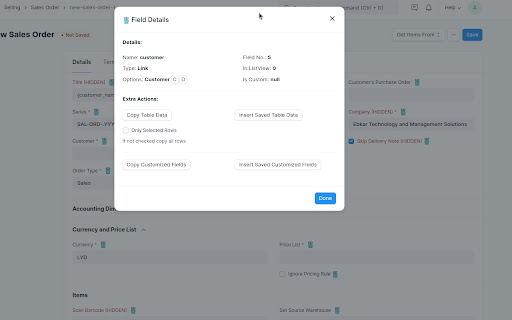
- Show & change hidden fields in any DocType
- Force Save Non changed forms, Submittable forms & Submitted forms (re submit)
- Highlight the hidden and custom fields in any DocType
- Show forms fields & tables fields details
- Fast Access to Customize Form/DocType for field Options of type Link, Table & Table MultiSelect
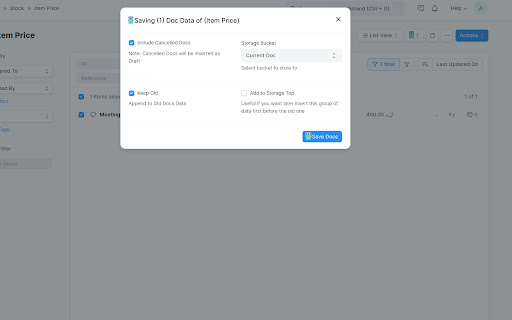
- Copy/Insert any child table all/specific rows from/to any ERPNext site
- Copy/Insert any Customize Form custom fields from/to any ERPNext site
- Copy/Insert Doctypes data between ERPNext Sites
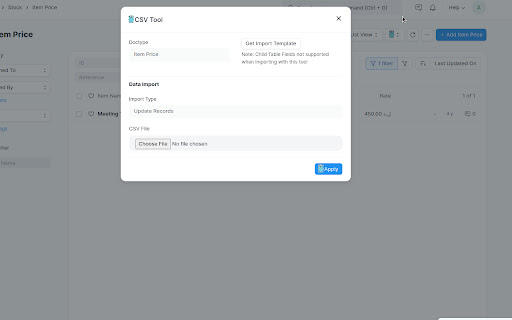
- Simple CSV Files bulk import (useful also for triggering python db apis, webhooks, server scripts, etc..)


Credits
- Frappe Framework - https://frappeframework.com
- PapaParse - https://www.papaparse.com
拡張機能の基本情報
| 名前 |  Frappe/ERPNext Tools Frappe/ERPNext Tools |
| ID | mfpfeokebfgddkaemagjigbjkmohmpab |
| 公式URL | https://chromewebstore.google.com/detail/frappeerpnext-tools/mfpfeokebfgddkaemagjigbjkmohmpab |
| 説明 | Simple Extension that help you work & develop with Frappe/ERPNext Framework |
| ファイルサイズ | 44.6 KB |
| インストール数 | 373 |
| 現在のバージョン | 1.1.6 |
| 最終更新日 | 2023-08-17 |
| 公開日 | 2022-08-15 |
| 評価 | 5.00/5 合計 3 レビュー |
| 開発者 | Imad Abdou |
| Eメール | [email protected] |
| 支払い方法 | free |
| 拡張機能のウェブサイト | https://github.com/ascorbic-acid/frappe_chrome_dev_utils |
| 対応言語 | en |
| manifest.json | |
{
"update_url": "https:\/\/clients2.google.com\/service\/update2\/crx",
"manifest_version": 3,
"name": "Frappe\/ERPNext Tools",
"description": "Simple Extension that help you work & develop with Frappe\/ERPNext Framework",
"version": "1.1.6",
"icons": {
"16": "logo\/logo.png",
"48": "logo\/logo.png",
"128": "logo\/logo.png"
},
"permissions": [
"scripting",
"storage"
],
"host_permissions": [
"http:\/\/*\/app\/*",
"https:\/\/*\/app\/*"
],
"content_scripts": [
{
"js": [
"content.js",
"frappe\/papaparse.min.js"
],
"matches": [
"http:\/\/*\/app\/*",
"https:\/\/*\/app\/*"
],
"run_at": "document_end"
}
],
"background": {
"service_worker": "service-worker.js"
},
"web_accessible_resources": [
{
"resources": [
"logo\/logo.png"
],
"matches": [
" | |