Harambe
Dicks Out For Harambe
Harambeとは何ですか?
HarambeはSteven Jinによって開発されたChromeの拡張機能で、その主な機能は「Dicks Out For Harambe」です。
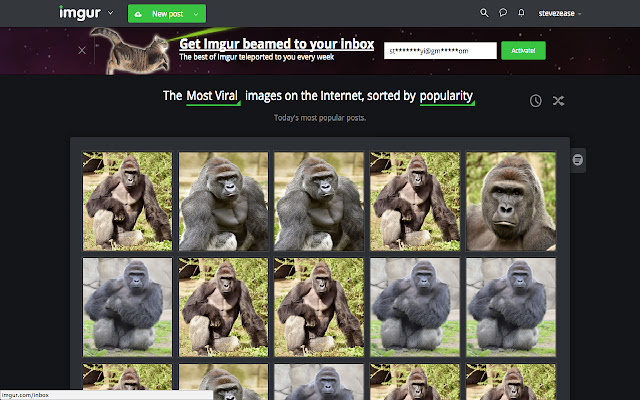
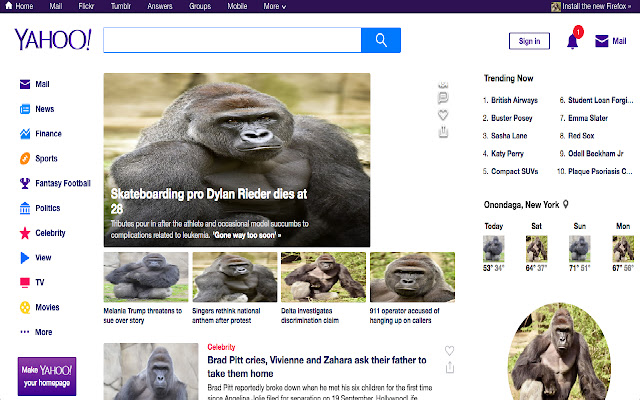
拡張機能のスクリーンショット

Harambe拡張機能のCRXファイルをダウンロード
Harambe拡張子のファイルをcrx形式でダウンロードし、ブラウザにChrome拡張機能を手動でインストールするか、crxファイルを友達と共有して簡単にChrome拡張機能をインストールします。
拡張機能の使用方法
                        Have a friend you want to prank? Hate that jerk Todd and want to get even?
Share with them the joy of Harambe

It's Easy:
While they're away from their computer:
Step 1. Go to Chrome
Step 2. Go to the extensions page by googling "Chrome Extensions" & clicking on the first link
Step 3. Search in extensions search "Harambe Pictures"
Step 4. install the top result

Now all of his/her pictures will turn into Harambe
Want to go one step further? Right click on the extension and click: "Hide in Chrome Menu."
They'll be freaking out for the next hour

This extension changes all images on a page to Harambe which then checks for changes on a 10 second interval.
拡張機能の基本情報
| 名前 |  Harambe Harambe |
| ID | mkghponibaehackhmaijeonapklpndlc |
| 公式URL | https://chrome.google.com/webstore/detail/harambe/mkghponibaehackhmaijeonapklpndlc |
| 説明 | Dicks Out For Harambe |
| ファイルサイズ | 1.98 MB |
| インストール数 | 16 |
| 現在のバージョン | 1.3.1 |
| 最終更新日 | 2018-01-07 |
| 公開日 | 2018-01-07 |
| 評価 | 2.83/5 合計 6 レビュー |
| 開発者 | Steven Jin |
| Eメール | [email protected] |
| 支払い方法 | free |
| 対応言語 | en |
| manifest.json | |
{
    "update_url": "https:\/\/clients2.google.com\/service\/update2\/crx",
    "manifest_version": 2,
    "name": "Harambe",
    "description": "Dicks Out For Harambe",
    "version": "1.3.1",
    "content_scripts": [
        {
            "matches": [
                "http:\/\/*\/*",
                "https:\/\/*\/*"
            ],
            "js": [
                "harambe.js",
                "textswapper.js"
            ]
        }
    ],
    "web_accessible_resources": [
        "1.jpg",
        "2.jpg",
        "3.jpg",
        "4.jpg",
        "5.jpg",
        "6.jpg",
        "7.jpg",
        "8.jpg",
        "9.jpg",
        "10.jpg"
    ],
    "browser_action": {
        "default_icon": "icon.png",
        "default_popup": "popup.html"
    },
    "permissions": [
        "activeTab",
        "https:\/\/ajax.googleapis.com\/"
    ]
} | |