YouTube Audio/Video Sync
Fix wireless audio streaming delay for YouTube
YouTube Audio/Video Syncとは何ですか?
YouTube Audio/Video Syncはadrian.ilieによって開発されたChromeの拡張機能で、その主な機能は「Fix wireless audio streaming delay for YouTube」です。
拡張機能のスクリーンショット
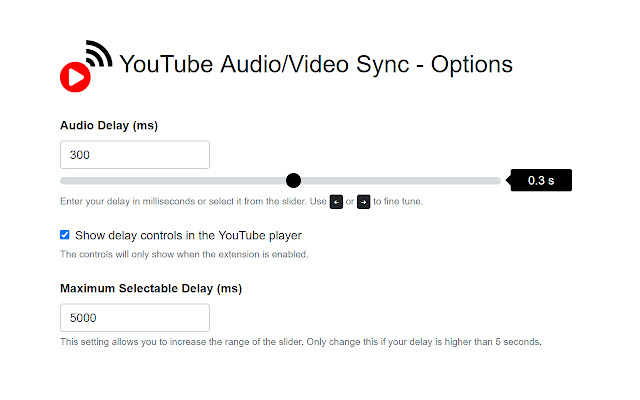

YouTube Audio/Video Sync拡張機能のCRXファイルをダウンロード
YouTube Audio/Video Sync拡張子のファイルをcrx形式でダウンロードし、ブラウザにChrome拡張機能を手動でインストールするか、crxファイルを友達と共有して簡単にChrome拡張機能をインストールします。
拡張機能の使用方法
                        There is always a delay when streaming audio from your device to a receiver (Apple TV, AirPlay speakers, Sonos, Network Player, TuneBlade, Bluetooth, etc.). This is not a big issue when streaming music but any video will become out of sync. This Chrome Extension attempts to solve this problem for YouTube.

The extension allows adjusting to a positive delay as well as a negative one making it possible also to correct any YouTube video that has been uploaded out of sync.

One time set up:
- Go to options
- Click on "Find your system's delay"
- A sound will be played, listen and press the button when you hear the last beep
- The approximate delay will be filled in "Global Audio Delay (ms)"
- Play a YouTube video and check if you are satisfied with the sync. If it is not perfectly in sync, repeat the steps above or adjust the delay value manually and save. You can do this from the Options page or directly from the YouTube player
- You can enable/disable the sync adjustment from the YouTube player or by clicking on the extension's icon in the toolbar.

Additional features:
- Auto toggle extension when audio device is connected
- The selectable delay value is limited to 5000ms in either direction but you can change this when you go to More Options: Maximum Selectable Delay (ms)
- If your computer is struggling to sync, you can try adjusting this setting: Maximum Acceptable Lip Sync (ms).

YouTube Audio/Video Sync works by muting the original video and reloading only the audio adjusted to the selected delay.

Note:
-YouTube Live Videos are not supported.
-This extension (at least for now) will only work on youtube.com, embedded YouTube players on other websites will not work.

This is an open source project, licensed under GPLv3
https://github.com/adrian-ilie/av-sync
拡張機能の基本情報
| 名前 |  YouTube Audio/Video Sync YouTube Audio/Video Sync |
| ID | mknmhikmjljhpccebpnplhicmcfjkgbk |
| 公式URL | https://chrome.google.com/webstore/detail/mknmhikmjljhpccebpnplhicmcfjkgbk |
| 説明 | Fix wireless audio streaming delay for YouTube |
| ファイルサイズ | 242 KB |
| インストール数 | 16,055 |
| 現在のバージョン | 0.3.8 |
| 最終更新日 | 2023-09-12 |
| 公開日 | 2020-06-26 |
| 評価 | 4.01/5 合計 134 レビュー |
| 開発者 | adrian.ilie |
| Eメール | [email protected] |
| 支払い方法 | free |
| 拡張機能のウェブサイト | https://github.com/adrian-ilie/av-sync |
| ヘルプページのURL | https://groups.google.com/forum/#!categories/youtube-audiovideo-sync/chrome-extension |
| 対応言語 | en |
| manifest.json | |
{
    "update_url": "https:\/\/clients2.google.com\/service\/update2\/crx",
    "name": "YouTube Audio\/Video Sync",
    "version": "0.3.8",
    "manifest_version": 2,
    "description": "Fix wireless audio streaming delay for YouTube",
    "offline_enabled": true,
    "icons": {
        "19": "img\/icon19.png",
        "38": "img\/icon38.png",
        "48": "img\/icon48.png",
        "128": "img\/icon128.png"
    },
    "background": {
        "scripts": [
            "js\/background.js"
        ]
    },
    "permissions": [
        "webRequest",
        "*:\/\/*.googlevideo.com\/*",
        "*:\/\/*.youtube.com\/*",
        "storage",
        "notifications",
        "contextMenus"
    ],
    "browser_action": {
        "default_title": "YouTube Audio\/Video Sync"
    },
    "content_scripts": [
        {
            "matches": [
                "*:\/\/*.youtube.com\/*"
            ],
            "exclude_matches": [
                "*:\/\/music.youtube.com\/*"
            ],
            "css": [
                "css\/contentScript.css"
            ],
            "js": [
                "js\/content-script.js"
            ],
            "run_at": "document_start"
        }
    ],
    "web_accessible_resources": [
        "html\/options.html",
        "html\/mediaDeviceManager.html"
    ],
    "options_page": "html\/options.html"
} | |