Register invitation code assistant
Automatically detect the invitation code in the page, and generate a list based on the mask to assist detection
Register invitation code assistantとは何ですか?
Register invitation code assistantはHoothinによって開発されたChromeの拡張機能で、その主な機能は「Automatically detect the invitation code in the page, and generate a list based on the mask to assist detection」です。
拡張機能のスクリーンショット
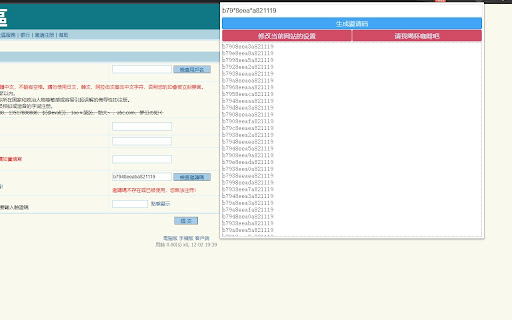

Register invitation code assistant拡張機能のCRXファイルをダウンロード
Register invitation code assistant拡張子のファイルをcrx形式でダウンロードし、ブラウザにChrome拡張機能を手動でインストールするか、crxファイルを友達と共有して簡単にChrome拡張機能をインストールします。
拡張機能の使用方法
                        Extract the invitation code on the web page(as most bbs which need invitation code to register) automatically, detect the invitation code list manually filled in and check the validity automatically.

* Optional: The image verification code needs to be filled with the identification interface, which can be replaced by a local server below. If you don’t set the interface, you need to manually enter the image verification code.
github.com/hoothin/imgCodeCheck

Custom mask rules for bullet boxes:
*: The asterisk will be replaced with 0-9 and a-f 16 characters
[abcd]: will be replaced with a, b, c, d respectively
[x-y]: will be replaced with all characters between x and y
Multiple masks are supported

Sample invitation code:
12*d means 121d 122d...12fd
ec[1-3]f means ec1f ec2f ec3f
f9[1a-cf]0a means f910a f9a0a f9b0a f9c0a f9f0a
拡張機能の基本情報
| 名前 |  Register invitation code assistant Register invitation code assistant |
| ID | ndmlflmkmohjoechiepcpflbljadmemp |
| 公式URL | https://chromewebstore.google.com/detail/register-invitation-code/ndmlflmkmohjoechiepcpflbljadmemp |
| 説明 | Automatically detect the invitation code in the page, and generate a list based on the mask to assist detection |
| ファイルサイズ | 137 KB |
| インストール数 | 810 |
| 現在のバージョン | 1.0.14 |
| 最終更新日 | 2023-12-24 |
| 公開日 | 2021-12-02 |
| 評価 | 4.20/5 合計 5 レビュー |
| 開発者 | Hoothin |
| Eメール | [email protected] |
| 支払い方法 | free |
| 対応言語 | en,zh-CN |
| manifest.json | |
{
    "update_url": "https:\/\/clients2.google.com\/service\/update2\/crx",
    "name": "__MSG_extName__",
    "version": "1.0.14",
    "default_locale": "en",
    "manifest_version": 3,
    "description": "__MSG_extDescription__",
    "icons": {
        "128": "icon\/icon128.png",
        "16": "icon\/icon16.png",
        "48": "icon\/icon48.png"
    },
    "action": {
        "default_icon": "favicon.png",
        "default_title": "__MSG_extName__",
        "default_popup": "popup.html"
    },
    "content_scripts": [
        {
            "js": [
                "js\/geneCode.js",
                "js\/content.js"
            ],
            "matches": [
                "*:\/\/*\/*"
            ]
        }
    ],
    "permissions": [
        "tabs",
        "storage",
        "notifications"
    ],
    "host_permissions": [
        "*:\/\/*\/*"
    ],
    "background": {
        "service_worker": "js\/background.js"
    }
} | |