Blueticks
Be in the know what happens to your emails after you press send with real-time feedback when any of the recipient opens your email.
Blueticksとは何ですか?
Blueticksはhttps://blueticks.ioによって開発されたChromeの拡張機能で、その主な機能は「Be in the know what happens to your emails after you press send with real-time feedback when any of the recipient opens your email.」です。
拡張機能のスクリーンショット
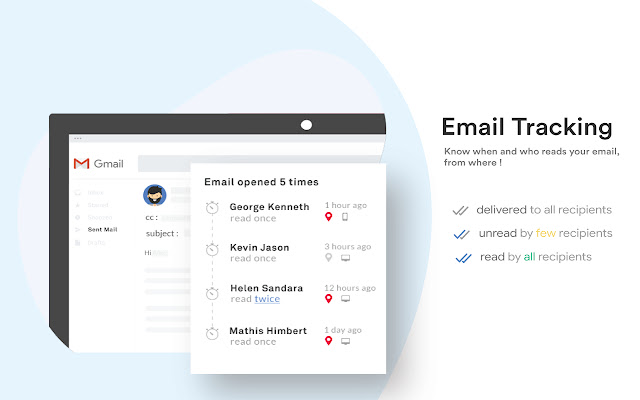

Blueticks拡張機能のCRXファイルをダウンロード
Blueticks拡張子のファイルをcrx形式でダウンロードし、ブラウザにChrome拡張機能を手動でインストールするか、crxファイルを友達と共有して簡単にChrome拡張機能をインストールします。
拡張機能の使用方法
                        Blueticks is the best free e-Mail tracking tool for both Gmail & GSuite.

Key features :
  - Per recipient Free Email tracking in Gmail
  - Attachment tracking
  - Link tracking
  - e-Mail Templates
  - Real-time alert notifications
  - e-Mail Performance dashboard

Who would need this ?
Anybody who wants to know when their e-Mails are read by recipients.

What per recipient tracking means ?
Blueticks tracks all individual recipients and notifies the sender in real time whenever the mail is read, attachements downloaded, links clicked.

What is send later mean ?
You can schedule your email to be sent on future date and time.
拡張機能の基本情報
| 名前 |  Blueticks Blueticks |
| ID | nohebfplolhpgcgkkhokcfbgnnbdlaaf |
| 公式URL | https://chrome.google.com/webstore/detail/blueticks/nohebfplolhpgcgkkhokcfbgnnbdlaaf |
| 説明 | Be in the know what happens to your emails after you press send with real-time feedback when any of the recipient opens your email. |
| ファイルサイズ | 976 KB |
| インストール数 | 445 |
| 現在のバージョン | 1.0.7 |
| 最終更新日 | 2019-04-03 |
| 公開日 | 2019-03-30 |
| 評価 | 4.00/5 合計 4 レビュー |
| 開発者 | https://blueticks.io |
| Eメール | [email protected] |
| 支払い方法 | free |
| 拡張機能のウェブサイト | https://blueticks.io |
| プライバシーポリシーページのURL | https://adyog.com/privacy-policy |
| 対応言語 | en-US |
| manifest.json | |
{
"update_url": "https:\/\/clients2.google.com\/service\/update2\/crx",
"manifest_version": 2,
"icons": {
"16": "images\/icon16.png",
"48": "images\/icon48.png",
"128": "images\/icon.png"
},
"browser_action": {
"default_icon": "images\/icon.png"
},
"background": {
"scripts": [
"js\/config.js",
"js\/background.js"
]
},
"content_scripts": [
{
"matches": [
"https:\/\/mail.google.com\/*",
"https:\/\/inbox.google.com\/*",
"https:\/\/us-central1-blueticks-v2.cloudfunctions.net\/*",
"https:\/\/maps.googleapis.com\/",
"https:\/\/blueticks.io\/*",
"https:\/\/sm.blueticks.io\/*",
"https:\/\/app.blueticks.io\/*",
"https:\/\/maps.googleapis.com\/*"
],
"js": [
"js\/inboxsdk.js",
"js\/config.js",
"js\/blueticks.js"
],
"css": [
"css\/flatpickr.min.css",
"css\/common.css"
],
"run_at": "document_start"
}
],
"permissions": [
"background",
"notifications",
"tabs",
"https:\/\/mail.google.com\/",
"https:\/\/www.inboxsdk.com\/",
"https:\/\/inbox.google.com\/",
"https:\/\/blueticks.io\/*",
"https:\/\/app.blueticks.io\/*",
"https:\/\/sm.blueticks.io\/*",
"*:\/\/us-central1-blueticks-v2.cloudfunctions.net\/*",
"https:\/\/maps.googleapis.com\/",
"https:\/\/fcm.googleapis.com\/*",
"*:\/\/*.google.com\/",
" | |