WikiTree Toolkit
An evolving set of tools and features to extend WikiTree's functionality.
WikiTree Toolkitとは何ですか?
WikiTree Toolkitはhttp://harrislineage.comによって開発されたChromeの拡張機能で、その主な機能は「An evolving set of tools and features to extend WikiTree's functionality.」です。
拡張機能のスクリーンショット
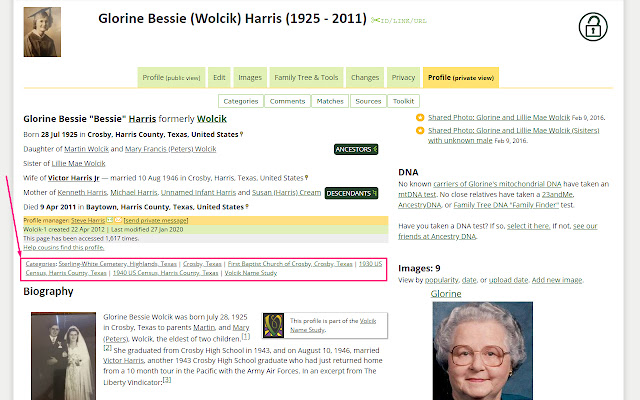


WikiTree Toolkit拡張機能のCRXファイルをダウンロード
WikiTree Toolkit拡張子のファイルをcrx形式でダウンロードし、ブラウザにChrome拡張機能を手動でインストールするか、crxファイルを友達と共有して簡単にChrome拡張機能をインストールします。
拡張機能の使用方法
The WikiTree Toolkit contains extensions and enhancements that are not currently available by the core site. Many of the ideas of this toolkit evolve from G2G discussions, or personal requests. 拡張機能の基本情報
| 名前 |  WikiTree Toolkit WikiTree Toolkit |
| ID | oapahencohfloonhoelkmmiaefkhoihh |
| 公式URL | https://chrome.google.com/webstore/detail/wikitree-toolkit/oapahencohfloonhoelkmmiaefkhoihh |
| 説明 | An evolving set of tools and features to extend WikiTree's functionality. |
| ファイルサイズ | 655 KB |
| インストール数 | 667 |
| 現在のバージョン | 3.0 |
| 最終更新日 | 2022-04-09 |
| 公開日 | 2020-09-07 |
| 評価 | 5.00/5 合計 1 レビュー |
| 開発者 | http://harrislineage.com |
| Eメール | [email protected] |
| 支払い方法 | free |
| 拡張機能のウェブサイト | https://www.wikitree.com/wiki/Space:WikiTree_Toolkit |
| ヘルプページのURL | https://www.wikitree.com/wiki/Space:WikiTree_Toolkit |
| 対応言語 | en-US |
| manifest.json | |
{
    "content_scripts": [
        {
            "css": [
                "style.css"
            ],
            "js": [
                "jquery.min.js",
                "toolkit.js",
                "settings.js",
                "options.js"
            ],
            "matches": [
                "https:\/\/*.wikitree.com\/*"
            ]
        }
    ],
    "description": "An evolving set of tools and features to extend WikiTree's functionality.",
    "icons": {
        "128": "icon128.png",
        "16": "icon16.png",
        "48": "icon48.png"
    },
    "key": "MIIBIjANBgkqhkiG9w0BAQEFAAOCAQ8AMIIBCgKCAQEAoQPbG2DQ\/7DmpxFZCJXmeE8dlvQ5ExMBNkGYZJFK5w2Hxb8QGvX8P7Geforzu91WZt8qNVnMbcE6yPPgnyKsz+HNbz+zdgY1cG9IFQbO3H6XQxCusA8BxZvF2CnOxs4zfAlxT88VW9UEmpWGDXZFGLLLS8ac9c5VipSUtSK9LTdFnY2VhqPDTBpicn0OZYVm7N3wFpzUA8xHVkTrpDRq8N7pSp85OFIXQDr1St3BwSLnBqcfru+jC\/KdVbbNP7dcN2nnXRaxrkYg\/dkpwkJEbcv8IrZTFAQRU0AxMqIaZO0HUvlr\/eFKyFLYX0EdRh5\/SodpAtQPi9b362gJAo6IOwIDAQAB",
    "manifest_version": 2,
    "name": "WikiTree Toolkit",
    "options_ui": {
        "chrome_style": true,
        "open_in_tab": true,
        "page": "options.html"
    },
    "permissions": [
        "storage",
        "clipboardWrite"
    ],
    "update_url": "https:\/\/clients2.google.com\/service\/update2\/crx",
    "version": "3.0"
} | |