Yomichan
Japanese dictionary with Anki integration
Yomichanとは何ですか?
YomichanはAlex Yatskovによって開発されたChromeの拡張機能で、その主な機能は「Japanese dictionary with Anki integration」です。
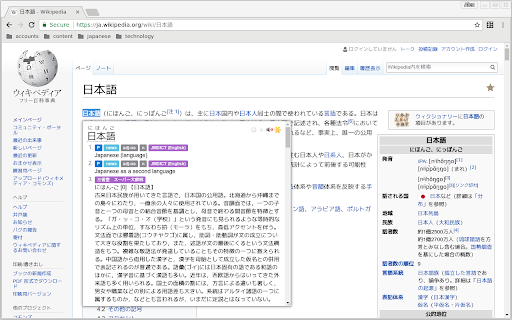
拡張機能のスクリーンショット


Yomichan拡張機能のCRXファイルをダウンロード
Yomichan拡張子のファイルをcrx形式でダウンロードし、ブラウザにChrome拡張機能を手動でインストールするか、crxファイルを友達と共有して簡単にChrome拡張機能をインストールします。
拡張機能の使用方法
Yomichan turns your browser into a tool for building Japanese language literacy by helping you to decipher texts which would be otherwise too difficult tackle. It features a robust dictionary with EPWING and flashcard creation support. 拡張機能の基本情報
| 名前 |  Yomichan Yomichan |
| ID | ogmnaimimemjmbakcfefmnahgdfhfami |
| 公式URL | https://chromewebstore.google.com/detail/yomichan/ogmnaimimemjmbakcfefmnahgdfhfami |
| 説明 | Japanese dictionary with Anki integration |
| ファイルサイズ | 9.68 MB |
| インストール数 | 92,056 |
| 現在のバージョン | 22.10.23.0 |
| 最終更新日 | 2022-11-06 |
| 公開日 | 2020-06-05 |
| 評価 | 4.58/5 合計 165 レビュー |
| 開発者 | Alex Yatskov |
| Eメール | [email protected] |
| 支払い方法 | free |
| 拡張機能のウェブサイト | https://foosoft.net/projects/yomichan |
| ヘルプページのURL | https://foosoft.net/projects/yomichan |
| 対応言語 | en-US |
| manifest.json | |
{
"update_url": "https:\/\/clients2.google.com\/service\/update2\/crx",
"manifest_version": 2,
"name": "Yomichan",
"version": "22.10.23.0",
"description": "Japanese dictionary with Anki integration",
"author": "Alex Yatskov",
"icons": {
"16": "images\/icon16.png",
"19": "images\/icon19.png",
"32": "images\/icon32.png",
"38": "images\/icon38.png",
"48": "images\/icon48.png",
"64": "images\/icon64.png",
"128": "images\/icon128.png"
},
"browser_action": {
"default_icon": {
"16": "images\/icon16.png",
"19": "images\/icon19.png",
"32": "images\/icon32.png",
"38": "images\/icon38.png",
"48": "images\/icon48.png",
"64": "images\/icon64.png",
"128": "images\/icon128.png"
},
"default_title": "Yomichan",
"default_popup": "action-popup.html"
},
"background": {
"page": "background.html",
"persistent": true
},
"content_scripts": [
{
"run_at": "document_idle",
"matches": [
"http:\/\/*\/*",
"https:\/\/*\/*",
"file:\/\/*\/*"
],
"match_about_blank": true,
"all_frames": true,
"js": [
"js\/core.js",
"js\/yomichan.js",
"js\/app\/frontend.js",
"js\/app\/popup.js",
"js\/app\/popup-factory.js",
"js\/app\/popup-proxy.js",
"js\/app\/popup-window.js",
"js\/app\/theme-controller.js",
"js\/comm\/api.js",
"js\/comm\/cross-frame-api.js",
"js\/comm\/frame-ancestry-handler.js",
"js\/comm\/frame-client.js",
"js\/comm\/frame-offset-forwarder.js",
"js\/data\/sandbox\/string-util.js",
"js\/dom\/dom-text-scanner.js",
"js\/dom\/document-util.js",
"js\/dom\/text-source-element.js",
"js\/dom\/text-source-range.js",
"js\/input\/hotkey-handler.js",
"js\/language\/text-scanner.js",
"js\/script\/dynamic-loader.js",
"js\/app\/content-script-main.js"
]
}
],
"minimum_chrome_version": "57.0.0.0",
"options_ui": {
"page": "settings.html",
"open_in_tab": true
},
"sandbox": {
"pages": [
"template-renderer.html"
],
"content_security_policy": "sandbox allow-scripts; default-src 'self'; script-src 'self' 'unsafe-eval'; style-src 'unsafe-inline'"
},
"permissions": [
" | |