KeyboardShortcuts
Add Keyboard Shortcuts to Web Applications
KeyboardShortcutsとは何ですか?
KeyboardShortcutsはfarleighによって開発されたChromeの拡張機能で、その主な機能は「Add Keyboard Shortcuts to Web Applications」です。
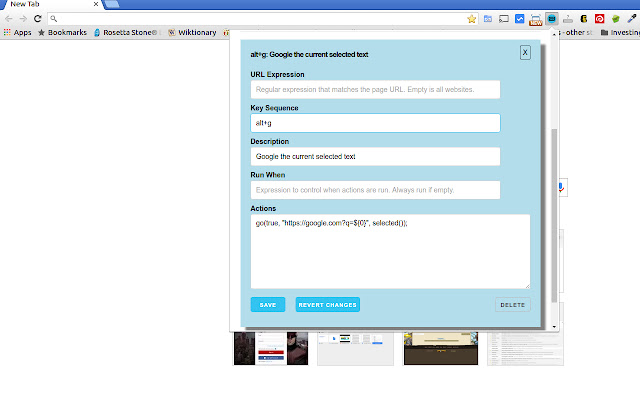
拡張機能のスクリーンショット
KeyboardShortcuts拡張機能のCRXファイルをダウンロード
KeyboardShortcuts拡張子のファイルをcrx形式でダウンロードし、ブラウザにChrome拡張機能を手動でインストールするか、crxファイルを友達と共有して簡単にChrome拡張機能をインストールします。
拡張機能の使用方法
Add custom keyboard shortcuts (hotkeys) to specific web applications using a small flexible language. Currently supports commands including copying content into the clipboard, clicking, touching, opening new pages, focusing on elements, hiding elements on the page and setting content. 拡張機能の基本情報
| 名前 |  KeyboardShortcuts KeyboardShortcuts |
| ID | oiigclempgcopbccpbibeembdmbenpce |
| 公式URL | https://chrome.google.com/webstore/detail/keyboardshortcuts/oiigclempgcopbccpbibeembdmbenpce |
| 説明 | Add Keyboard Shortcuts to Web Applications |
| ファイルサイズ | 498 KB |
| インストール数 | 76 |
| 現在のバージョン | 1.0.0 |
| 最終更新日 | 2016-04-24 |
| 公開日 | 2016-04-24 |
| 評価 | 5.00/5 合計 1 レビュー |
| 開発者 | farleigh |
| 支払い方法 | free |
| 拡張機能のウェブサイト | https://github.com/farleigh/keyboardshortcuts/wiki |
| ヘルプページのURL | https://github.com/farleigh/keyboardshortcuts/wiki |
| 対応言語 | en-US |
| manifest.json | |
{
    "update_url": "https:\/\/clients2.google.com\/service\/update2\/crx",
    "name": "KeyboardShortcuts",
    "version": "1.0.0",
    "description": "Add Keyboard Shortcuts to Web Applications",
    "homepage_url": "https:\/\/github.com\/farleigh\/keyboardshortcuts\/wiki",
    "content_scripts": [
        {
            "matches": [
                "http:\/\/*\/*",
                "https:\/\/*\/*"
            ],
            "js": [
                "js\/3p\/almond-min.js",
                "js\/3p\/jquery.js",
                "js\/3p\/mousetrap.js",
                "js\/keyboard-shortcuts-bundle.js"
            ]
        }
    ],
    "content_security_policy": "script-src 'self'; object-src 'self'",
    "permissions": [
        "tabs",
        "activeTab",
        "storage",
        "clipboardWrite",
        "downloads"
    ],
    "browser_action": {
        "default_icon": "images\/favicon.png",
        "default_popup": "popup.html"
    },
    "icons": {
        "32": "images\/favicon.png",
        "48": "images\/icon48.png",
        "64": "images\/icon64.png",
        "128": "images\/icon128.png"
    },
    "manifest_version": 2
} | |