NinjaLeads.co
NinjaLeads.co extension
NinjaLeads.coとは何ですか?
NinjaLeads.coはNinjaLeadsによって開発されたChromeの拡張機能で、その主な機能は「NinjaLeads.co extension」です。
拡張機能のスクリーンショット
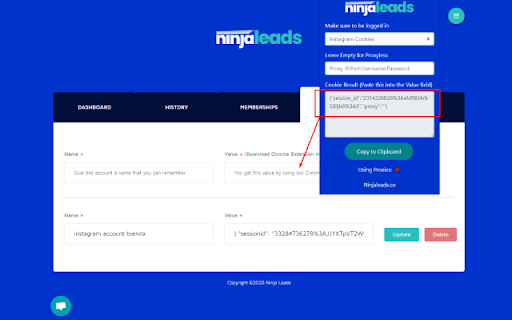
NinjaLeads.co拡張機能のCRXファイルをダウンロード
NinjaLeads.co拡張子のファイルをcrx形式でダウンロードし、ブラウザにChrome拡張機能を手動でインストールするか、crxファイルを友達と共有して簡単にChrome拡張機能をインストールします。
拡張機能の使用方法
                        This Chrome extension makes it easier to work with NinjaLeads by retrieving your cookie data, this way you don't have to do it manually.

Here's how it works:

- Install the extension.
- Make sure to be logged into your Instagram account using the Google Chrome browser.
- Open the extension by clicking on the Ninja icon.
- If you want that NinjaLeads.co uses proxies during the automation progress, make sure to fill out the proxy field in the chrome extension.
- Choose your Ninja (Instagram...).
- Press ""Copy to Clipboard".
- Paste the cookies into the Value field (Accounts tab of NinjaLeads.co)

That's it!

Have questions?
If you have any question about this extension, feel free to send us an email at [email protected] or contact us via our live chat.
拡張機能の基本情報
| 名前 |  NinjaLeads.co NinjaLeads.co |
| ID | ojbmhlplbolcdnnljedpkhbcicijlaik |
| 公式URL | https://chromewebstore.google.com/detail/ninjaleadsco/ojbmhlplbolcdnnljedpkhbcicijlaik |
| 説明 | NinjaLeads.co extension |
| ファイルサイズ | 50.28 KB |
| インストール数 | 26 |
| 現在のバージョン | 0.3 |
| 最終更新日 | 2020-09-23 |
| 公開日 | 2020-07-01 |
| 評価 | 5.00/5 合計 1 レビュー |
| 開発者 | NinjaLeads |
| Eメール | [email protected] |
| 支払い方法 | free |
| 拡張機能のウェブサイト | https://www.ninjaleads.co/ |
| 対応言語 | en-US |
| manifest.json | |
{
    "update_url": "https:\/\/clients2.google.com\/service\/update2\/crx",
    "name": "NinjaLeads.co",
    "description": "NinjaLeads.co extension",
    "version": "0.3",
    "manifest_version": 2,
    "icons": {
        "128": "icon_128.png"
    },
    "permissions": [
        "cookies",
        "*:\/\/*.instagram.com\/*",
        "*:\/\/*.linkedin.com\/*",
        "*:\/\/*.facebook.com\/*",
        "*:\/\/*.youtube.com\/*"
    ],
    "background": {
        "scripts": [
            "background.js"
        ]
    },
    "browser_action": {
        "default_popup": "popup.html"
    }
} | |