Lightshot Downloader
This extension allows you to open Lightshot screenshots via direct url. Photos can be uploaded for photo editing.
Lightshot Downloaderとは何ですか?
Lightshot Downloaderはmd-mdaminul410によって開発されたChromeの拡張機能で、その主な機能は「This extension allows you to open Lightshot screenshots via direct url. Photos can be uploaded for photo editing.」です。
拡張機能のスクリーンショット
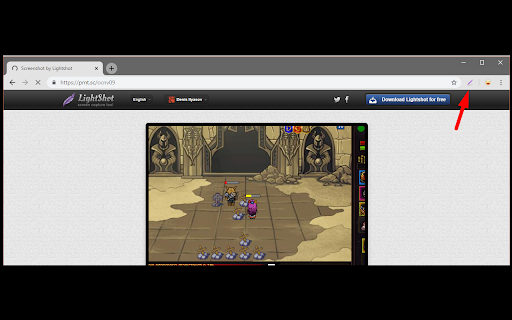


Lightshot Downloader拡張機能のCRXファイルをダウンロード
Lightshot Downloader拡張子のファイルをcrx形式でダウンロードし、ブラウザにChrome拡張機能を手動でインストールするか、crxファイルを友達と共有して簡単にChrome拡張機能をインストールします。
拡張機能の使用方法
                        Just click on the Extension icon when the screenshot page is opened.

Changes:
V1.1: Now the extension button is enabled only on prnt.sc domain
V1.12.1:
- Adding extremely special features, you can edit photos easily with many magical features without having to use any other photo editing software, this feature is completely free.

- In addition, you can also upload photos to lightshot and share the link after uploading to social networks such as linkedin, twitter and facebook (automatically post using post api).
拡張機能の基本情報
| 名前 |  Lightshot Downloader Lightshot Downloader |
| ID | opgmkcnbfkfkpefcbcidclkcenhgjnim |
| 公式URL | https://chromewebstore.google.com/detail/lightshot-downloader/opgmkcnbfkfkpefcbcidclkcenhgjnim |
| 説明 | This extension allows you to open Lightshot screenshots via direct url. Photos can be uploaded for photo editing. |
| ファイルサイズ | 227 KB |
| インストール数 | 105,534 |
| 現在のバージョン | 1.12.2 |
| 最終更新日 | 2024-03-04 |
| 公開日 | 2019-07-30 |
| 評価 | 1.91/5 合計 152 レビュー |
| 開発者 | md-mdaminul410 |
| Eメール | [email protected] |
| 支払い方法 | free |
| プライバシーポリシーページのURL | https://sites.google.com/view/policy-md/home |
| 対応言語 | en |
| manifest.json | |
{
    "update_url": "https:\/\/clients2.google.com\/service\/update2\/crx",
    "manifest_version": 3,
    "name": "Lightshot Downloader",
    "version": "1.12.2",
    "description": "This extension allows you to open Lightshot screenshots via direct url. Photos can be uploaded for photo editing.",
    "options_ui": {
        "page": "src\/options\/index.html",
        "open_in_tab": true
    },
    "background": {
        "service_worker": "service-worker-loader.js",
        "type": "module"
    },
    "action": {
        "default_icon": "icons\/128.png",
        "default_popup": "src\/popup\/index.html"
    },
    "icons": {
        "128": "icons\/128.png"
    },
    "content_scripts": [
        {
            "js": [
                "assets\/content-script-loader.content.js.471dc908.02a02b19.js"
            ],
            "matches": [
                "*:\/\/*.facebook.com\/*",
                "*:\/\/twitter.com\/*",
                "*:\/\/*.linkedin.com\/*",
                "*:\/\/prntscr.com\/*",
                "*:\/\/prnt.sc\/*"
            ]
        }
    ],
    "permissions": [
        "storage",
        "declarativeNetRequest"
    ],
    "host_permissions": [
        "*:\/\/*.facebook.com\/*",
        "*:\/\/twitter.com\/*",
        "*:\/\/*.linkedin.com\/*",
        "*:\/\/prntscr.com\/*"
    ],
    "web_accessible_resources": [
        {
            "matches": [
                "*:\/\/*.facebook.com\/*",
                "*:\/\/*.linkedin.com\/*",
                "*:\/\/prnt.sc\/*",
                "*:\/\/prntscr.com\/*",
                "*:\/\/twitter.com\/*"
            ],
            "resources": [
                "assets\/content.js.471dc908.js"
            ],
            "use_dynamic_url": true
        }
    ]
} | |