Multiple File Download
This extension enables the user to select all the documents present in the web page for download.
Multiple File Downloadとは何ですか?
Multiple File Downloadはprabhushanによって開発されたChromeの拡張機能で、その主な機能は「This extension enables the user to select all the documents present in the web page for download.」です。
拡張機能のスクリーンショット

Multiple File Download拡張機能のCRXファイルをダウンロード
Multiple File Download拡張子のファイルをcrx形式でダウンロードし、ブラウザにChrome拡張機能を手動でインストールするか、crxファイルを友達と共有して簡単にChrome拡張機能をインストールします。
拡張機能の使用方法
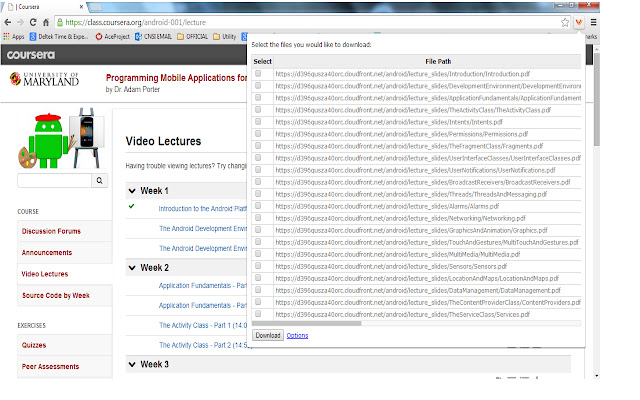
                        Many times we encounter situations where multiple files need to be downloaded from a web page. For example, user can download all the files in Coursera lessons in one shot. This would save lot of time.

Multiple file downloader facilitates the same. It scans through the web page and displays all the files, which user can download. User can select multiple files and click download.
It allows user to customize what file extensions should be downloaded in the web page.The user can also add custom extensions using the options page. User can also decide whether files need to be downloaded to default folder set in Chrome browser or prompt for each file.
BENEFITS FOR END USERS
1) Multi Select files in one go
2) Customise and also add your own extensions to download
KNOWN ISSUE
The extension scans for hyperlink across the web page. As per the design of the page, the hyperlink can be a button or image or both. So there are chances that duplicate links can appear on the extension.
拡張機能の基本情報
| 名前 |  Multiple File Download Multiple File Download |
| ID | opncjdadngnekakilfcgjlgbmekljdbm |
| 公式URL | https://chrome.google.com/webstore/detail/multiple-file-download/opncjdadngnekakilfcgjlgbmekljdbm |
| 説明 | This extension enables the user to select all the documents present in the web page for download. |
| ファイルサイズ | 154 KB |
| インストール数 | 10,000 |
| 現在のバージョン | 1.3 |
| 最終更新日 | 2014-09-09 |
| 公開日 | 2014-09-09 |
| 評価 | 2.56/5 合計 55 レビュー |
| 開発者 | prabhushan |
| 支払い方法 | free |
| 対応言語 | en-US |
| manifest.json | |
{
"update_url": "https:\/\/clients2.google.com\/service\/update2\/crx",
"manifest_version": 2,
"name": "Multiple File Download",
"description": "This extension enables the user to select all the documents present in the web page for download. ",
"short_name": "File download",
"version": "1.3",
"background": {
"page": "popup.html"
},
"icons": {
"16": "sonicdownload.png",
"48": "sonicdownload.png",
"128": "sonicdownload.png"
},
"permissions": [
"tabs",
" | |