GameStop Wallet
GameStop Wallet
GameStop Walletとは何ですか?
GameStop WalletはGameStopによって開発されたChromeの拡張機能で、その主な機能は「GameStop Wallet」です。
拡張機能のスクリーンショット

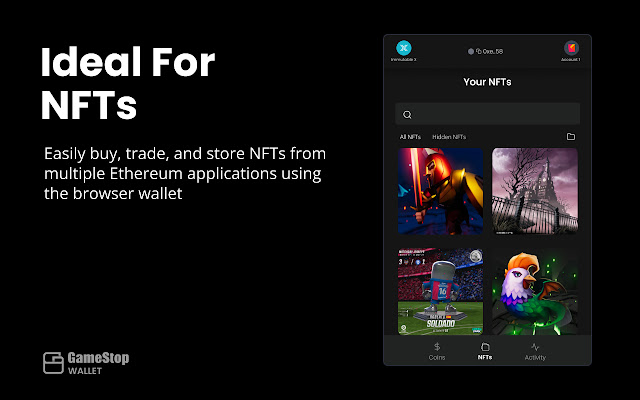

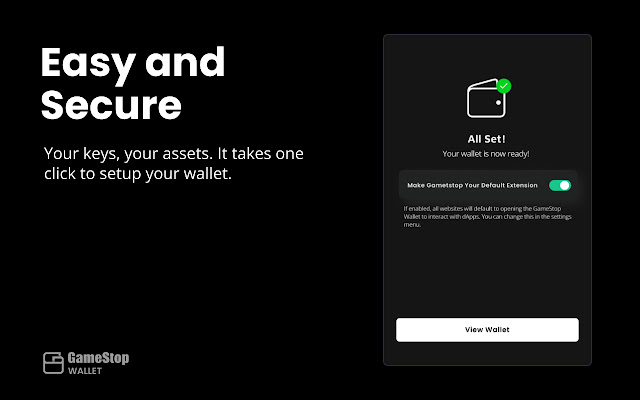
GameStop Wallet拡張機能のCRXファイルをダウンロード
GameStop Wallet拡張子のファイルをcrx形式でダウンロードし、ブラウザにChrome拡張機能を手動でインストールするか、crxファイルを友達と共有して簡単にChrome拡張機能をインストールします。
拡張機能の使用方法
                        GameStop Wallet - Explore Web3
Buy and hold your digital assets.


GameStop Wallet is a simple and secure way to get started with Web3. Use your GameStop Wallet to buy, hold, display, and utilize Ethereum-based assets.

GameStop Wallet is a self-custodial Ethereum wallet, meaning you are always in full control of your wallet and assets. Power to the players!

Harnessing the power of Loopring and Immutable X's zkRollups - Ethereum Layer 2 scaling protocols - GameStop gives you low cost and fast transactions, with Ethereum security, opportunity, and global reach. This allows you to reduce gas fees and network congestion, while always remaining in control of your funds.

Great for n00bs and power-users alike, GameStop Wallet is your homebase and portal into the world of Ethereum. Connect your wallet to the wide ecosystem of Ethereum dApps, including GameStop NFT - a marketplace to buy digital goods!


MAIN FEATURES
• Create a secure, self-custodial Ethereum wallet - where you truly own your assets, and are always in full control.

• Buy ETH with a few taps using Apple Pay, or a credit or debit card via Ramp or Moonpay. Save time and money by purchasing directly to Loopring Layer 2 or Immutable X Layer 2.

• Store all your Ethereum-based assets in one secure place (ETH, ERC-20, ERC-721, ERC-1155).

• Send and receive ETH, ERC-20 tokens, and NFTs - to anyone, anywhere, any time.

• Connect your GameStop Wallet to decentralized apps (dApps) and explore the world of Ethereum - from DeFi to NFT marketplaces.

• Connect your wallet and get started with NFTs on GameStop NFT at https://nft.gamestop.com.

• Learn about Ethereum, Blockchain, GameStop NFT, and best safety practices.
拡張機能の基本情報
| 名前 |  GameStop Wallet GameStop Wallet |
| ID | pkkjjapmlcncipeecdmlhaipahfdphkd |
| 公式URL | https://chrome.google.com/webstore/detail/gamestop-wallet/pkkjjapmlcncipeecdmlhaipahfdphkd |
| 説明 | GameStop Wallet |
| ファイルサイズ | 6.2 MB |
| インストール数 | 70,955 |
| 現在のバージョン | 1.0.11 |
| 最終更新日 | 2023-03-06 |
| 公開日 | 2022-05-22 |
| 評価 | 4.99/5 合計 4343 レビュー |
| 開発者 | GameStop |
| Eメール | [email protected] |
| 拡張機能のウェブサイト | https://wallet.gamestop.com |
| ヘルプページのURL | https://support.blockchain.gamestop.com |
| プライバシーポリシーページのURL | https://wallet.gamestop.com/privacy |
| 対応言語 | en |
| manifest.json | |
{
"update_url": "https:\/\/clients2.google.com\/service\/update2\/crx",
"name": "GameStop Wallet",
"description": "GameStop Wallet",
"version": "1.0.11",
"manifest_version": 3,
"minimum_chrome_version": "92",
"icons": {
"16": "icons\/favicon-16.png",
"32": "icons\/favicon-32.png",
"48": "icons\/favicon-48.png",
"64": "icons\/favicon-64.png",
"128": "icons\/favicon-128.png"
},
"action": {
"default_popup": "index.html",
"default_title": "GameStop Wallet",
"default_icon": {
"16": "icons\/favicon-16.png",
"32": "icons\/favicon-32.png",
"48": "icons\/favicon-48.png",
"64": "icons\/favicon-64.png",
"128": "icons\/favicon-128.png"
}
},
"background": {
"service_worker": "background\/index.js"
},
"content_scripts": [
{
"matches": [
"https:\/\/*\/*",
"http:\/\/*\/*"
],
"js": [
"browser-polyfill.min.js",
"contentscript\/index.js"
],
"run_at": "document_start",
"all_frames": true
}
],
"permissions": [
"storage",
"tabs"
],
"host_permissions": [
" | |