Supreme Autofill
Never miss a drop again, autofill your checkout on the Supreme Store.
Supreme Autofill란 무엇입니까?
Supreme Autofill은(는) https://supremeautofill.co.uk에 의해 개발된 Chrome 확장 프로그램으로, 주요 기능은 "Never miss a drop again, autofill your checkout on the Supreme Store."입니다.
확장 프로그램 스크린샷
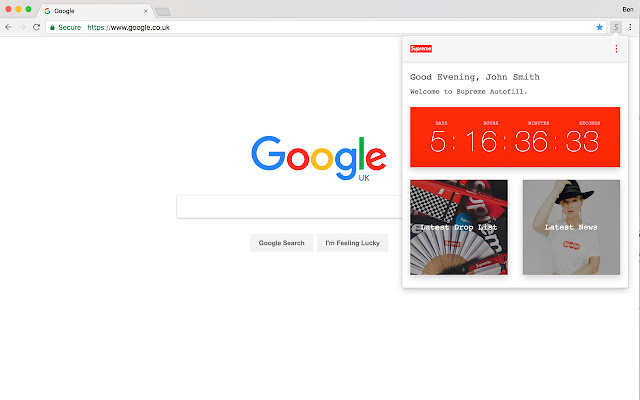


Supreme Autofill 확장 프로그램 CRX 파일 다운로드
크롬 확장 프로그램을 crx 형식으로 다운로드하여 브라우저에 수동으로 설치하거나 crx 파일을 친구들과 공유하여 쉽게 크롬 확장 프로그램을 설치하세요.
확장 프로그램 사용 설명서
                        The best Autofill extension for Supreme on the market, built for SS21. New features added weekly to ensure you can always cop the pieces you want.

Supreme Autofill makes it easy to buy items from the Supreme store. Once an item is in your basket and the checkout button is clicked, Supreme Autofill will enter your details, accept the terms and even finalise the purchase. You’ll never take an L again.

Autofill for Supreme UK, Europe, USA, Canada & Japan.

HOW TO USE
1. Open the extensions options page.
2. Enter your details as they would appear on the Supreme store.
3. Click the save button.
4. If the extension is enabled, when you checkout on the Supreme store your details will be filled out automatically.

ADDITIONAL FEATURES
1. Auto Checkout - If enabled, your details will be filled out automatically and the extension will complete the checkout process
2. Notifications - If enabled, you will receive a push notification every drop day.
3. Supreme Autofill Dashboard - From the popup menu see a countdown timer to the next drop, links to the drop list and Supreme news

DATA STORAGE
Supreme Autofill is secure. Your personal data is stored in Google Chrome, keeping all of your information safe. However if you wish to erase your details you can quickly do so using the delete data button in the options page.

TO DISABLE
1. Open the extensions page in Google Chrome settings.
2. Uncheck Supreme Autofill

LIABILITY
By installing the app, you agree to the following terms and conditions:
The developer is in no way responsible for the security of your data. Your Data is entered so at your own risk.
The developer is not responsible for any accidental purchases incurred by you via the use of this extension.

UPDATES
0.9.1
- State selection & other bug fixes
0.9
- Realtime alerts added
- End of season timer
0.8
- Local Chrome Storage for better security
- Encrypt data for Chrome Storage
0.7
- Added support for all US Cards
- Fixed 7 day countdown timer bug
0.6
- Added support for Japan
0.5
- Added support for the USA & Canada
0.4
- Toggle the extension on & off from the popup menu
- Updated toggle styling
0.3
- Negative countdown bug fixed
0.2
- Checkout script condensed
- Icons updated
- Description updated
확장 프로그램 기본 정보
| 이름 |  Supreme Autofill Supreme Autofill |
| ID | aadmookagofpgbbpbidfmjkipojhinlg |
| 공식 URL | https://chrome.google.com/webstore/detail/supreme-autofill/aadmookagofpgbbpbidfmjkipojhinlg |
| 설명 | Never miss a drop again, autofill your checkout on the Supreme Store. |
| 파일 크기 | 100 KB |
| 설치 횟수 | 1,000 |
| 현재 버전 | 0.9.2 |
| 최근 업데이트 | 2021-03-30 |
| 출시 날짜 | 2020-06-18 |
| 평점 | 3.69/5 총 26 개의 평점 |
| 개발자 | https://supremeautofill.co.uk |
| 이메일 | [email protected] |
| 결제 유형 | free |
| 확장 프로그램 웹 사이트 | https://www.supremeautofill.co.uk/ |
| 도움말 페이지 URL | https://supremeautofill.co.uk/support-and-faq/ |
| 개인정보 보호 정책 페이지 URL | https://supremeautofill.co.uk/privacy |
| 지원되는 언어 | en-GB |
| manifest.json | |
{
    "update_url": "https:\/\/clients2.google.com\/service\/update2\/crx",
    "manifest_version": 2,
    "name": "Supreme Autofill",
    "short_name": "Supreme Autofill",
    "description": "Never miss a drop again, autofill your checkout on the Supreme Store.",
    "version": "0.9.2",
    "content_security_policy": "script-src 'self' https:\/\/www.gstatic.com\/ https:\/\/*.firebaseio.com; object-src 'self'",
    "icons": {
        "128": "app\/icons\/supfill128.png",
        "48": "app\/icons\/supfill48.png",
        "16": "app\/icons\/supfill16.png"
    },
    "browser_action": {
        "default_title": "Supreme Autofill",
        "default_popup": "app\/html\/popup.html"
    },
    "permissions": [
        "storage",
        "notifications",
        "tabs",
        "background",
        "http:\/\/*\/*",
        "https:\/\/*\/*"
    ],
    "options_ui": {
        "page": "app\/html\/options.html",
        "chrome_style": true
    },
    "background": {
        "scripts": [
            "app\/js\/background.js"
        ]
    },
    "content_scripts": [
        {
            "js": [
                "app\/js\/jquery-3.1.1.min.js"
            ],
            "matches": [
                "http:\/\/*\/*",
                "https:\/\/*\/*"
            ]
        },
        {
            "js": [
                "app\/js\/rollups\/aes.js"
            ],
            "matches": [
                "http:\/\/*\/*",
                "https:\/\/*\/*"
            ]
        },
        {
            "js": [
                "app\/js\/fill.js"
            ],
            "matches": [
                "http:\/\/www.supremenewyork.com\/*",
                "https:\/\/www.supremenewyork.com\/*"
            ]
        }
    ]
} | |