Jump to Anywhere - Speed Browsing with 1click
The bookmark which sticks a tag in a Web page, and can jump anywhere. Scrolling is not necessary.
Jump to Anywhere - Speed Browsing with 1click란 무엇입니까?
Jump to Anywhere - Speed Browsing with 1click은(는) pub에 의해 개발된 Chrome 확장 프로그램으로, 주요 기능은 "The bookmark which sticks a tag in a Web page, and can jump anywhere. Scrolling is not necessary."입니다.
확장 프로그램 스크린샷


Jump to Anywhere - Speed Browsing with 1click 확장 프로그램 CRX 파일 다운로드
크롬 확장 프로그램을 crx 형식으로 다운로드하여 브라우저에 수동으로 설치하거나 crx 파일을 친구들과 공유하여 쉽게 크롬 확장 프로그램을 설치하세요.
확장 프로그램 사용 설명서
                        It is not necessary to look for many times in the page that saw once.
You can move to the place to want to see immediately.

[First image]
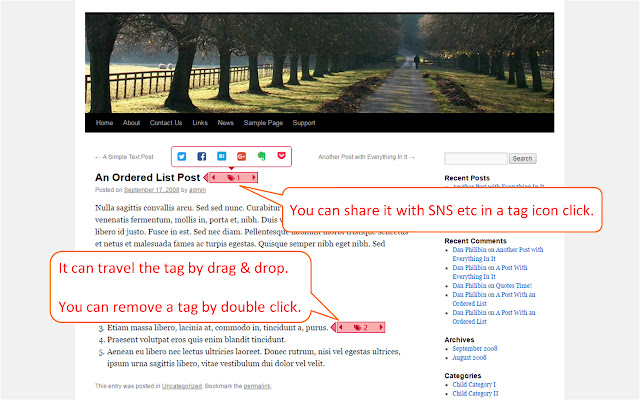
Attach a tag to the favorite place of the Web page and can jump to a tag when I like it.

It is not only the sentence, can register a tag with a sentence, an image, an video or a blank part etc.


Because registration, the summons of the tag only clicks it in a page, I do not disturb reading of the page.

Plural tags can register.

In all Web pages, can move to the top and the end of the page.

[Second image]
The links to service such as SNS etc are displayed when click an icon of the tag center.

[Third image]
In addition, the URL of the page is registered with bookmark of Smark automatically when I register a tag.

I can use the same bookmark and tag from other PCs when I share bookmark.

*The message from Smark is displayed in popup. Please allow popup indication.

*Please reload the open tab after installation or restart Chrome.

*It can not be used in the Chrome Web Store.

■About a trademark
・The logo of "Twitter" and Twitter is the trademark of Twitter, Inc. or the affiliates or a registered trademark.
・The logo of "Facebook" and Facebook is a trademark of Facebook,inc. or a registered trademark.
・"Hatena" is the trademark which is an end Co., Ltd. or a registered trademark.
・The logo of "Google+" and Google+ is a trademark of Google Inc. or a registered trademark.
・The logo of "Evernote" and Evernote is a trademark of American Evernote company or a registered trademark.
・"Pocket" and the Pocket logo are a trademark of Read It Later, Inc or registered trademarks.
확장 프로그램 기본 정보
| 이름 |  Jump to Anywhere - Speed Browsing with 1click Jump to Anywhere - Speed Browsing with 1click |
| ID | aeampjcahpidlojklaijajmkfhdmicdp |
| 공식 URL | https://chrome.google.com/webstore/detail/jump-to-anywhere-speed-br/aeampjcahpidlojklaijajmkfhdmicdp |
| 설명 | The bookmark which sticks a tag in a Web page, and can jump anywhere. Scrolling is not necessary. |
| 파일 크기 | 634 KB |
| 설치 횟수 | 64 |
| 현재 버전 | 0.1.63 |
| 최근 업데이트 | 2017-03-29 |
| 출시 날짜 | 2017-03-29 |
| 평점 | 1.00/5 총 1 개의 평점 |
| 개발자 | pub |
| 이메일 | [email protected] |
| 결제 유형 | free |
| 지원되는 언어 | de,en,fr,es,pt-BR,ru,hi,bn,zh-CN,zh-TW,ja |
| manifest.json | |
{
    "update_url": "https:\/\/clients2.google.com\/service\/update2\/crx",
    "manifest_version": 2,
    "version": "0.1.63",
    "name": "__MSG_extName__",
    "description": "__MSG_extDescription__",
    "default_locale": "en",
    "icons": {
        "16": "img\/icon_tag_16_10_3.png",
        "48": "img\/icon_tag_48_36_6.png",
        "128": "img\/icon_tag_128_96_16.png"
    },
    "content_security_policy": "script-src 'self' https:\/\/ssl.google-analytics.com; object-src 'self'",
    "content_scripts": [
        {
            "matches": [
                "http:\/\/*\/*",
                "https:\/\/*\/*"
            ],
            "exclude_matches": [
                "https:\/\/www.evernote.com\/noteit.*"
            ],
            "css": [
                "lib\/jquery\/toolbar\/jquery.toolbar.css",
                "css\/font-awesome.css",
                "css\/icomoon.css",
                "css\/content.css"
            ],
            "js": [
                "lib\/jquery\/jquery-1.12.4.min.js",
                "lib\/jquery\/toolbar\/jquery.toolbar.min.js",
                "lib\/buy.js",
                "js\/share.js",
                "js\/content.js"
            ],
            "run_at": "document_end"
        }
    ],
    "web_accessible_resources": [
        "fonts\/*"
    ],
    "background": {
        "scripts": [
            "lib\/analytics.js",
            "js\/share.js",
            "js\/background.js"
        ],
        "persistent": false
    },
    "browser_action": {
        "default_title": "Jump to Anywhere",
        "default_popup": "html\/popup.html"
    },
    "permissions": [
        "storage",
        "unlimitedStorage",
        "tabs",
        "bookmarks",
        "identity"
    ]
} | |