Highlight This: finds and marks words
Automatically finds and highlights words and phrases on the web page according to your list
Highlight This: finds and marks words란 무엇입니까?
Highlight This: finds and marks words은(는) https://alaaqweider.online에 의해 개발된 Chrome 확장 프로그램으로, 주요 기능은 "Automatically finds and highlights words and phrases on the web page according to your list"입니다.
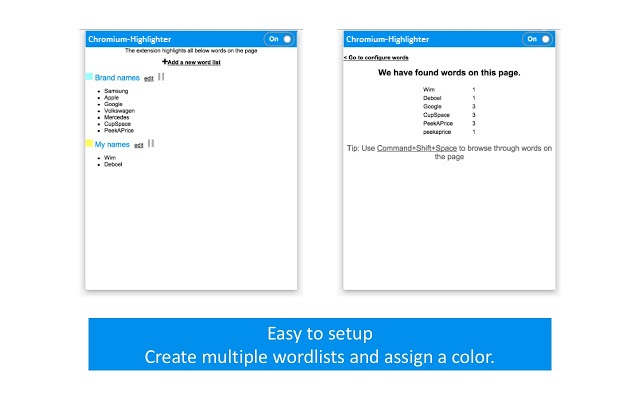
확장 프로그램 스크린샷
Highlight This: finds and marks words 확장 프로그램 CRX 파일 다운로드
크롬 확장 프로그램을 crx 형식으로 다운로드하여 브라우저에 수동으로 설치하거나 crx 파일을 친구들과 공유하여 쉽게 크롬 확장 프로그램을 설치하세요.
확장 프로그램 사용 설명서
                        Automatically finds and highlights words and phrases on the web page according to your list
- No registration required
- Organize your search words in groups and lists
- All data stored locally
- Auto-refreshes highlights on page reload and content changes
- Unlimited words and lists
- Free

Easy to use Chrome Extension that automatically searches for defined words in the current browser tab

and marks them in a text. Many more advanced features available through settings:
- Create color-coded keyword lists
- Disable highlighting on certain sites
- Export or import your settings and keyword lists
- Use lists from Pastebin

Changelog
1.1
*updated latest jquery 3.4.1
1.0
*Intial Release
확장 프로그램 기본 정보
| 이름 |  Highlight This: finds and marks words Highlight This: finds and marks words |
| ID | aflnhjcbpnknodmnmjjlphgcichcfbak |
| 공식 URL | https://chrome.google.com/webstore/detail/highlight-this-finds-and/aflnhjcbpnknodmnmjjlphgcichcfbak |
| 설명 | Automatically finds and highlights words and phrases on the web page according to your list |
| 파일 크기 | 1.01 MB |
| 설치 횟수 | 4,000 |
| 현재 버전 | 1.1 |
| 최근 업데이트 | 2019-07-09 |
| 출시 날짜 | 2019-07-04 |
| 평점 | 3.00/5 총 1 개의 평점 |
| 개발자 | https://alaaqweider.online |
| 이메일 | [email protected] |
| 결제 유형 | free |
| 지원되는 언어 | en,fr,nl,ru |
| manifest.json | |
{
    "update_url": "https:\/\/clients2.google.com\/service\/update2\/crx",
    "manifest_version": 2,
    "name": "__MSG_application_title__",
    "short_name": "Chromium-Highlighter",
    "description": "__MSG_application_description__",
    "default_locale": "en",
    "permissions": [
        "tabs",
        "contextMenus",
        "notifications",
        "activeTab",
        "alarms",
        "downloads",
        "storage"
    ],
    "icons": {
        "16": "Plugin16.png",
        "96": "Plugin96.png"
    },
    "background": {
        "scripts": [
            "libs\/sanitize-html\/sanitize-html.js",
            "extWordHighlighter.js"
        ]
    },
    "commands": {
        "ScrollHighlight": {
            "suggested_key": {
                "default": "Ctrl+Shift+Space",
                "mac": "Command+Shift+Space"
            },
            "description": "ScrollHighlight"
        }
    },
    "version": "1.1",
    "content_scripts": [
        {
            "matches": [
                "http:\/\/*\/*",
                "https:\/\/*\/*"
            ],
            "js": [
                "libs\/jquery\/jquery-3.4.1.js",
                "hilitor.js",
                "tabWordHighlighter.js"
            ],
            "css": [
                "highlightThis.css"
            ],
            "all_frames": true,
            "run_at": "document_start",
            "match_about_blank": true
        }
    ],
    "browser_action": {
        "default_icon": "Plugin16.png",
        "default_popup": "popup.html"
    }
} | |