ScreenplaySubs - Netflix with Screenplays
Watch Netflix movies with its screenplays side-by-side
ScreenplaySubs - Netflix with Screenplays란 무엇입니까?
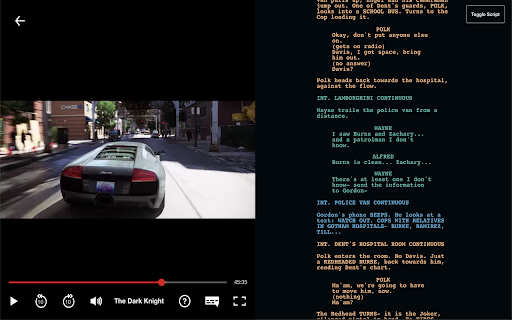
ScreenplaySubs - Netflix with Screenplays은(는) justEgan에 의해 개발된 Chrome 확장 프로그램으로, 주요 기능은 "Watch Netflix movies with its screenplays side-by-side"입니다.
확장 프로그램 스크린샷




ScreenplaySubs - Netflix with Screenplays 확장 프로그램 CRX 파일 다운로드
크롬 확장 프로그램을 crx 형식으로 다운로드하여 브라우저에 수동으로 설치하거나 crx 파일을 친구들과 공유하여 쉽게 크롬 확장 프로그램을 설치하세요.
확장 프로그램 사용 설명서
                        >What's this?
ScreenplaySubs displays a screenplay of the movie you're watching on Netflix, and automatically adjusts the position of the screenplay based on the timestamp of the movie. It essentially provides a subtitle-like experience for reading screenplays. Since not all movies in Netflix are supported, we show a constantly updated list of movies supported in our website here https://screenplaysubs.com/movies

>Who is this for?
ScreenplaySubs delivers plenty of rewatch value to the movie you're watching. You'll get insights to different scenes you may have not yet realized, including:
- When a dialogue is improvised/reworded.
- When a scene is omitted or included in production/post.
- What an action is trying to emphasize on.
- When the order between two scenes are switched.
- In general how an action, dialogue, or scene heading is translated to screen.

>I'm interested! How do I set this up?
- Awesome! Install the browser extension.
- Check out the movie catalogue for movies to watch, and press "Watch".
- That's about it! You'll be redirected to Netflix and can start watching the movie.

Movie, Film, Netflix, Education, Screenplays, Film Student, Filmmaker
확장 프로그램 기본 정보
| 이름 |  ScreenplaySubs - Netflix with Screenplays ScreenplaySubs - Netflix with Screenplays |
| ID | cacofhihgjfapcpaocgkaadkpmgfieki |
| 공식 URL | https://chromewebstore.google.com/detail/screenplaysubs-netflix-wi/cacofhihgjfapcpaocgkaadkpmgfieki |
| 설명 | Watch Netflix movies with its screenplays side-by-side |
| 파일 크기 | 182 KB |
| 설치 횟수 | 4,108 |
| 현재 버전 | 1.2 |
| 최근 업데이트 | 2020-08-31 |
| 출시 날짜 | 2020-08-04 |
| 평점 | 3.00/5 총 8 개의 평점 |
| 개발자 | justEgan |
| 이메일 | [email protected] |
| 결제 유형 | free |
| 확장 프로그램 웹 사이트 | https://screenplaysubs.com/ |
| 도움말 페이지 URL | https://screenplaysubs.com/ |
| 지원되는 언어 | en,ru |
| manifest.json | |
{
    "update_url": "https:\/\/clients2.google.com\/service\/update2\/crx",
    "manifest_version": 2,
    "version": "1.2",
    "name": "ScreenplaySubs - Netflix with Screenplays",
    "short_name": "ScreenplaySubs",
    "description": "__MSG_appDesc__",
    "default_locale": "en",
    "background": {
        "scripts": [
            "background.js"
        ]
    },
    "browser_action": {
        "default_popup": "popup.html"
    },
    "content_scripts": [
        {
            "all_frames": false,
            "matches": [
                "*:\/\/netflix.com\/*",
                "*:\/\/www.netflix.com\/*"
            ],
            "js": [
                "content.js"
            ]
        }
    ],
    "icons": {
        "16": "assets\/img\/icon-16x16.png",
        "48": "assets\/img\/icon-48x48.png",
        "128": "assets\/img\/icon-128x128.png"
    },
    "permissions": [
        "tabs"
    ],
    "content_security_policy": "script-src 'self'; object-src 'self' https:\/\/ac68l4zjmb.execute-api.us-west-2.amazonaws.com\/dev\/fetchSupportedMovies https:\/\/8fnqprtjzi.execute-api.us-west-2.amazonaws.com\/dev\/getScriptDev; connect-src 'self' https:\/\/ac68l4zjmb.execute-api.us-west-2.amazonaws.com\/dev\/fetchSupportedMovies https:\/\/8fnqprtjzi.execute-api.us-west-2.amazonaws.com\/dev\/getScriptDev ws:\/\/localhost:9090\/",
    "web_accessible_resources": [
        "assets\/img\/*"
    ]
} | |