Netsso LoginPilot
Extension for Netsso AutoLogin, Simple Links, Notes. LoginPilot is also avalaible for Internet Explorer, FireFox, Edge, Opera.
Netsso LoginPilot란 무엇입니까?
Netsso LoginPilot은(는) https://www.netsso.com에 의해 개발된 Chrome 확장 프로그램으로, 주요 기능은 "Extension for Netsso AutoLogin, Simple Links, Notes. LoginPilot is also avalaible for Internet Explorer, FireFox, Edge, Opera."입니다.
확장 프로그램 스크린샷

Netsso LoginPilot 확장 프로그램 CRX 파일 다운로드
크롬 확장 프로그램을 crx 형식으로 다운로드하여 브라우저에 수동으로 설치하거나 crx 파일을 친구들과 공유하여 쉽게 크롬 확장 프로그램을 설치하세요.
확장 프로그램 사용 설명서
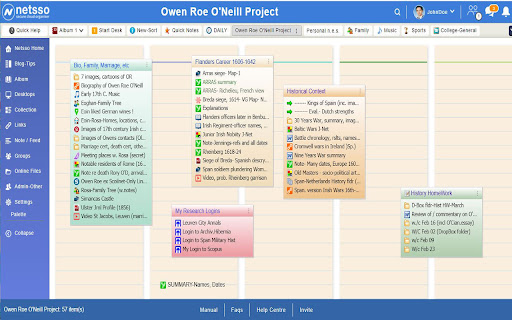
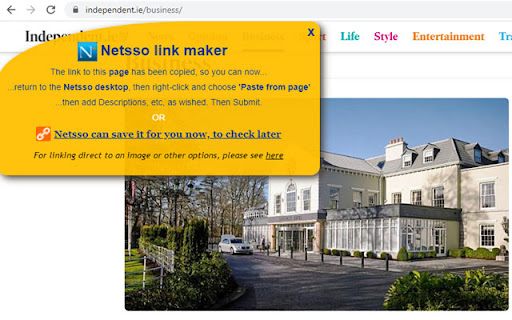
                        The LoginPilot is a free password manager to utilise Netsso's "AutoLogin Link" feature. Some web  sites require you to log in your Username and Password and the LoginPilot collects these from you, one time, and later guides Netsso in entering these for you when you visit those places afterwards. It also enables you to record any web object for Netsso with a simple right-click

Please Register on https://www.netsso.com to use the LoginPilot

Netsso is Your private, Single Sign On Portal to your personal internet world. After logging in to Netsso, on any computer and some tablets, you can double-click to any of your recorded web pages, web images, links, documents online, web mail, etc without having to remember and type their exact addresses, or your usernames and passwords. In a new service you can auto-encrypt any documents on your DropBox,  OneDrive or Google Drive by loading them through your Netsso. When you download them thru Netsso onto any computer, they will automatically decrypt. Netsso remembers each document's exclusive password. And you can share these encrypted documents with other Netsso members.
확장 프로그램 기본 정보
| 이름 |  Netsso LoginPilot Netsso LoginPilot |
| ID | cihmbankckionldkkcnehkgmopjeojof |
| 공식 URL | https://chromewebstore.google.com/detail/netsso-loginpilot/cihmbankckionldkkcnehkgmopjeojof |
| 설명 | Extension for Netsso AutoLogin, Simple Links, Notes. LoginPilot is also avalaible for Internet Explorer, FireFox, Edge, Opera. |
| 파일 크기 | 69.42 KB |
| 설치 횟수 | 12 |
| 현재 버전 | 3.4 |
| 최근 업데이트 | 2020-10-27 |
| 출시 날짜 | 2019-03-25 |
| 평점 | 4.80/5 총 5 개의 평점 |
| 개발자 | https://www.netsso.com |
| 이메일 | [email protected] |
| 결제 유형 | free |
| 확장 프로그램 웹 사이트 | https://www.netsso.com |
| 도움말 페이지 URL | https://www.netsso.com/manual |
| 개인정보 보호 정책 페이지 URL | https://www.netsso.com/privacy-statement |
| 지원되는 언어 | en |
| manifest.json | |
{
    "update_url": "https:\/\/clients2.google.com\/service\/update2\/crx",
    "manifest_version": 2,
    "name": "Netsso LoginPilot",
    "version": "3.4",
    "minimum_chrome_version": "15.0",
    "description": "Extension for Netsso AutoLogin, Simple Links, Notes. LoginPilot is also avalaible for Internet Explorer, FireFox, Edge, Opera.",
    "homepage_url": "http:\/\/www.netsso.com",
    "background": {
        "scripts": [
            "lpc.js",
            "lpb.js"
        ]
    },
    "content_scripts": [
        {
            "matches": [
                "http:\/\/*\/*",
                "https:\/\/*\/*"
            ],
            "js": [
                "lpi.js"
            ],
            "run_at": "document_start",
            "all_frames": true
        },
        {
            "matches": [
                "http:\/\/*\/*",
                "https:\/\/*\/*"
            ],
            "js": [
                "lpc.js",
                "lpd.js"
            ],
            "run_at": "document_idle",
            "all_frames": true
        }
    ],
    "content_security_policy": "script-src 'self' 'unsafe-eval'; object-src 'self';",
    "permissions": [
        "tabs",
        "contextMenus",
        "http:\/\/*\/*",
        "https:\/\/*\/*"
    ],
    "icons": {
        "16": "images\/icon16.png",
        "32": "images\/icon32.png",
        "48": "images\/icon48.png"
    },
    "browser_action": {
        "default_icon": "images\/icon16.png",
        "default_title": "Copy link for Netsso"
    },
    "web_accessible_resources": [
        "images\/icon16.png",
        "images\/x3.gif"
    ]
} | |