NoteTab - Notepad in the Homepage
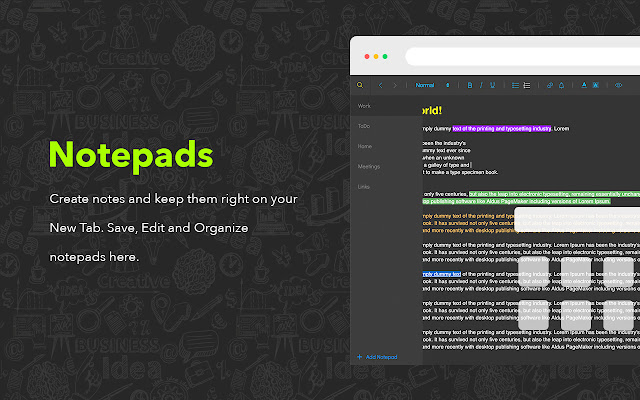
Entire New Tab is a notepad for your remarks. Make different notes right in the New Tab
NoteTab - Notepad in the Homepage란 무엇입니까?
NoteTab - Notepad in the Homepage은(는) http://notetab.li에 의해 개발된 Chrome 확장 프로그램으로, 주요 기능은 "Entire New Tab is a notepad for your remarks. Make different notes right in the New Tab"입니다.
확장 프로그램 스크린샷



NoteTab - Notepad in the Homepage 확장 프로그램 CRX 파일 다운로드
크롬 확장 프로그램을 crx 형식으로 다운로드하여 브라우저에 수동으로 설치하거나 crx 파일을 친구들과 공유하여 쉽게 크롬 확장 프로그램을 설치하세요.
확장 프로그램 사용 설명서
                        Do you always need to make various notes? It's an option exactly for you. The New Tab is a Notepad! Open the homepage to make remarks or find already saved notes. Use the whole New Tab as a blank page to tape the thoughts or plans. Use editing to create a structure or section. Add links to your text or set a schedule. All these are called NoteTab - your amazing homepage with a notepad.

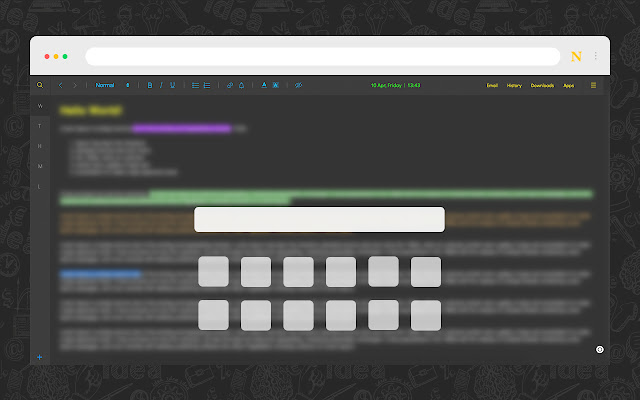
The New Tab as a notepad to write comments quickly with extended opportunities. This incredible Start Page has quick access to email, history, downloads and other apps. Here are gathered most using points and put in one place to make browsing more convenient and productive. Keep bookmarks in a simple touch and use search for quick navigation across saved links.

Some useful features:

1. Edit, save and organize notes directly in the Start page. Rename saved tabs, change fonts, colors, etc.
2. Easy access to bookmarks on the homepage is also available. Bookmarks with a search bar allows you to find items quickly from the list of various websites.
3. ToDo list helps you to manage important events and deals. Add title, time, date and be always updated with upcoming items.
4. Searching from the search bar gets results from the Bing search engine through redirection of the “https://notetab.li/search?q="".

NoteTab is a customized new tab for Chrome browser that will make the browsing experience better and efficient. Open a New Tab and use it as you use notepad, only better.
확장 프로그램 기본 정보
| 이름 |  NoteTab - Notepad in the Homepage NoteTab - Notepad in the Homepage |
| ID | cjnhekhopohdcoojldnnpfmogbljienl |
| 공식 URL | https://chrome.google.com/webstore/detail/cjnhekhopohdcoojldnnpfmogbljienl |
| 설명 | Entire New Tab is a notepad for your remarks. Make different notes right in the New Tab |
| 파일 크기 | 503 KB |
| 설치 횟수 | 8,211 |
| 현재 버전 | 1.1 |
| 최근 업데이트 | 2023-06-13 |
| 출시 날짜 | 2020-05-11 |
| 평점 | 4.58/5 총 547 개의 평점 |
| 개발자 | http://notetab.li |
| 이메일 | [email protected] |
| 결제 유형 | free |
| 확장 프로그램 웹 사이트 | https://notetab.li/ |
| 개인정보 보호 정책 페이지 URL | https://notetab.li/privacy.html |
| 지원되는 언어 | de,en,nl,no,vi,da,es,it,pl,ro,hi,ta,th,zh-CN,ko |
| manifest.json | |
{
    "update_url": "https:\/\/clients2.google.com\/service\/update2\/crx",
    "name": "__MSG_name__",
    "description": "__MSG_desc__",
    "version": "1.1",
    "default_locale": "en",
    "manifest_version": 2,
    "icons": {
        "32": "assets\/static\/32.png",
        "64": "assets\/static\/64.png",
        "128": "assets\/static\/128.png"
    },
    "permissions": [
        "bookmarks",
        "storage",
        "unlimitedStorage",
        "tabs",
        "notifications",
        "alarms",
        "https:\/\/sshot.org\/*",
        "chrome:\/\/favicon\/*"
    ],
    "browser_action": {
        "default_title": "__MSG_title__"
    },
    "background": {
        "scripts": [
            ".\/js\/background.js"
        ]
    },
    "chrome_url_overrides": {
        "newtab": "newtab.html"
    },
    "chrome_settings_overrides": {
        "search_provider": {
            "encoding": "UTF-8",
            "favicon_url": "https:\/\/notetab.li\/assets\/img\/128.png",
            "is_default": true,
            "keyword": "NoteTab",
            "name": "NoteTab",
            "search_url": "https:\/\/notetab.li\/search?q={searchTerms}"
        }
    },
    "content_security_policy": "script-src 'self' 'unsafe-eval'; object-src 'self'",
    "web_accessible_resources": [
        "static\/*",
        "assets\/*.svg",
        "assets\/*.png",
        "assets\/*.css",
        "assets\/*.otf"
    ]
} | |