ZipApply
Find decision makers and Hiring managers fast!
ZipApply란 무엇입니까?
ZipApply은(는) http://zipapply.com에 의해 개발된 Chrome 확장 프로그램으로, 주요 기능은 "Find decision makers and Hiring managers fast!"입니다.
확장 프로그램 스크린샷
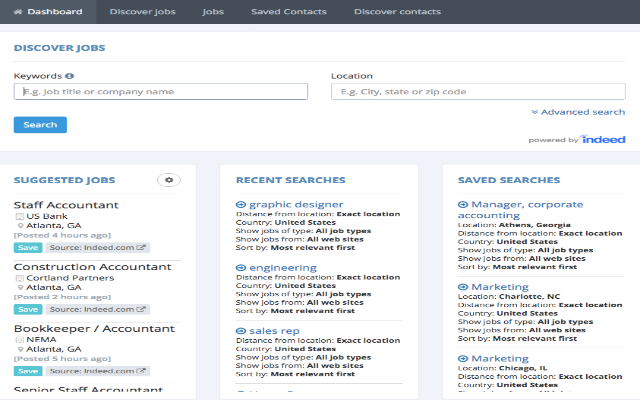
ZipApply 확장 프로그램 CRX 파일 다운로드
크롬 확장 프로그램을 crx 형식으로 다운로드하여 브라우저에 수동으로 설치하거나 crx 파일을 친구들과 공유하여 쉽게 크롬 확장 프로그램을 설치하세요.
확장 프로그램 사용 설명서
ZipApply helps you find and save people online. ZipApply is a productivity tool for job seekers. Save Jobs and Contacts while searching the web. ZipApply enables job seekers to find hiring companies in by city or zipcode radius. You can then find Hiring Managers or Decision Makers at the desired companies. The software will then identify the corporate email address of the hiring manager and validate. Once validated it will look for all the social profiles associated with the email address and link them inside zipapply in the contacts record. You can verify and apply the social updates. ZipApply allows you to add notes to contacts and essentially manage your job search in one place. Download our free chrome extension and try it today! 확장 프로그램 기본 정보
| 이름 |  ZipApply ZipApply |
| ID | ckkcmppakkinjdpifkdlgnggjjhlkocp |
| 공식 URL | https://chrome.google.com/webstore/detail/ckkcmppakkinjdpifkdlgnggjjhlkocp |
| 설명 | Find decision makers and Hiring managers fast! |
| 파일 크기 | 1.16 MB |
| 설치 횟수 | 126 |
| 현재 버전 | 0.5.5 |
| 최근 업데이트 | 2018-02-23 |
| 출시 날짜 | 2018-02-23 |
| 평점 | 4.50/5 총 2 개의 평점 |
| 개발자 | http://zipapply.com |
| 이메일 | [email protected] |
| 결제 유형 | free |
| 지원되는 언어 | en |
| manifest.json | |
{
    "update_url": "https:\/\/clients2.google.com\/service\/update2\/crx",
    "name": "ZipApply",
    "short_name": "Profile grabber",
    "version": "0.5.5",
    "description": "Find decision makers and Hiring managers fast!",
    "permissions": [
        "notifications",
        "activeTab",
        "tabs",
        "webRequest",
        "webRequestBlocking",
        "*:\/\/*\/*",
        "https:\/\/*\/*"
    ],
    "content_security_policy": "script-src 'self' 'unsafe-eval' https:\/\/www.google.com https:\/\/cse.google.com https:\/\/www.googleapis.com; object-src 'self'",
    "browser_action": {
        "default_icon": "icons\/icon-19g.png",
        "default_popup": "components\/browseraction\/search.html",
        "default_title": "zipapply Title"
    },
    "icons": {
        "128": "icons\/icon-128.png",
        "48": "icons\/icon-48.png",
        "38": "icons\/icon-38.png",
        "24": "icons\/icon-19.png",
        "16": "icons\/icon-16.png"
    },
    "background": {
        "scripts": [
            "libs\/jquery.js",
            "background.js"
        ]
    },
    "content_scripts": [
        {
            "matches": [
                "http:\/\/*\/*",
                "https:\/\/*\/*",
                "*:\/\/*\/*"
            ],
            "include_globs": [
                "*:\/\/www.linkedin.com\/*",
                "*:\/\/*.indeed.*\/viewjob*",
                "*:\/\/*.indeed.*\/cmp\/*"
            ],
            "css": [
                "css\/button.css"
            ],
            "js": [
                "libs\/jquery.js",
                "contentscripts\/button.js",
                "contentscripts\/linkedin_parser.js",
                "contentscripts\/linkedin_urlaction.js",
                "contentscripts\/emailaddress.js",
                "libs\/jquery-ui.js"
            ],
            "run_at": "document_idle",
            "all_frames": false
        },
        {
            "matches": [
                "https:\/\/www.zipapply.com\/*"
            ],
            "js": [
                "contentscripts\/ping_web.js"
            ],
            "run_at": "document_end",
            "all_frames": false
        }
    ],
    "manifest_version": 2,
    "web_accessible_resources": [
        "contentscripts\/get_discover_email_data.js",
        "contentscripts\/getdata.js",
        "libs\/*",
        "img\/*",
        "css\/*",
        "html\/*"
    ]
} | |