Salesforce OmniLogin
Free and Open Source extension for store and manage Salesforce logins using OAuth2.
Salesforce OmniLogin란 무엇입니까?
Salesforce OmniLogin은(는) Javier Martínez de Pissón Caruncho에 의해 개발된 Chrome 확장 프로그램으로, 주요 기능은 "Free and Open Source extension for store and manage Salesforce logins using OAuth2."입니다.
확장 프로그램 스크린샷
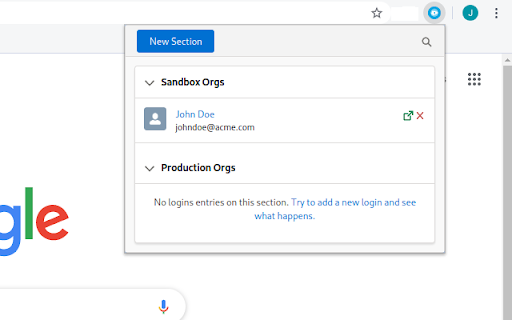
Salesforce OmniLogin 확장 프로그램 CRX 파일 다운로드
크롬 확장 프로그램을 crx 형식으로 다운로드하여 브라우저에 수동으로 설치하거나 crx 파일을 친구들과 공유하여 쉽게 크롬 확장 프로그램을 설치하세요.
확장 프로그램 사용 설명서
                        Salesforce OmniLogin provides Salesforce admins and developers a tool to manage accesses to their orgs using standard OAuth2, avoiding the use of passwords to login in Salesforce - you only have to enter its username/password once!

All your usernames are foldered in sections, keeping your orgs always organized and filterable; by using the Salesforce OAuth2 flow, you or your admin can revoke the access from the extension at any time, securing all your accesses.

Salesforce OmniLogin is written using Open Source Lightning Web Components, as a proof of concept to test LWC Framework outside Salesforce Platform or the more frequent "Web app" context - as this was the original idea, the extension is Free and Open Source. You can browse the code in GitHub.

Keep in mind that the extension is still experimental - don't use it in production environments!
확장 프로그램 기본 정보
| 이름 |  Salesforce OmniLogin Salesforce OmniLogin |
| ID | daknjjebdbcihmlfifnaflconldlhhpl |
| 공식 URL | https://chromewebstore.google.com/detail/salesforce-omnilogin/daknjjebdbcihmlfifnaflconldlhhpl |
| 설명 | Free and Open Source extension for store and manage Salesforce logins using OAuth2. |
| 파일 크기 | 291 KB |
| 설치 횟수 | 95 |
| 현재 버전 | 0.7.4 |
| 최근 업데이트 | 2020-06-20 |
| 출시 날짜 | 2020-06-19 |
| 평점 | 5.00/5 총 1 개의 평점 |
| 개발자 | Javier Martínez de Pissón Caruncho |
| 이메일 | [email protected] |
| 결제 유형 | free |
| 지원되는 언어 | en |
| manifest.json | |
{
    "update_url": "https:\/\/clients2.google.com\/service\/update2\/crx",
    "name": "Salesforce OmniLogin",
    "version": "0.7.4",
    "description": "Free and Open Source extension for store and manage Salesforce logins using OAuth2.",
    "permissions": [
        "storage",
        "identity",
        "https:\/\/login.salesforce.com\/services\/oauth2\/*",
        "https:\/\/test.salesforce.com\/services\/oauth2\/*",
        "https:\/\/*.my.salesforce.com\/services\/oauth2\/*",
        "https:\/\/*.force.com\/*\/services\/oauth2\/*",
        "https:\/\/*.salesforce.com\/services\/oauth2\/*"
    ],
    "icons": {
        "32": "icons\/32.png",
        "128": "icons\/128.png"
    },
    "background": {
        "scripts": [
            "background.js"
        ],
        "persistent": false
    },
    "browser_action": {
        "default_title": "Salesforce OmniLogin",
        "default_popup": "index.html"
    },
    "manifest_version": 2
} | |