YouTube Comment Filter
Allows you to filter out Youtube spam.
YouTube Comment Filter란 무엇입니까?
YouTube Comment Filter은(는) averyboyd2에 의해 개발된 Chrome 확장 프로그램으로, 주요 기능은 "Allows you to filter out Youtube spam."입니다.
확장 프로그램 스크린샷
YouTube Comment Filter 확장 프로그램 CRX 파일 다운로드
크롬 확장 프로그램을 crx 형식으로 다운로드하여 브라우저에 수동으로 설치하거나 crx 파일을 친구들과 공유하여 쉽게 크롬 확장 프로그램을 설치하세요.
확장 프로그램 사용 설명서
                        YouTube comments can be very annoying and these comments can overrun a discussion thread.
But YouTube's comment reporting is too dependent on the community's idea of what spam is. What users consider to be spam is different from person to person, so there should be a way to filter out what you think is spam for yourself.

This extension is a spam filter for YouTube comments just like any e-mail service would have. It will learn what you consider to be spam and hide any spam it finds from you.

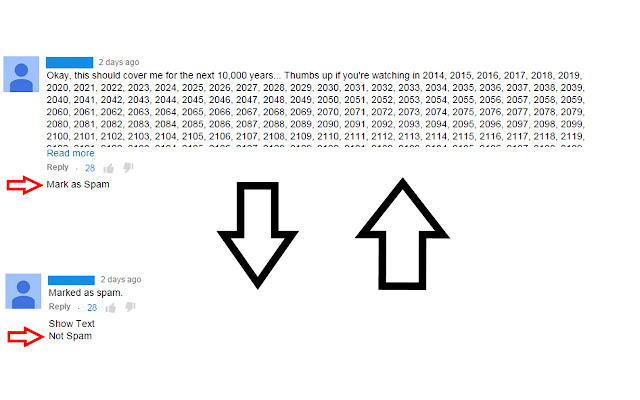
Mark comments as spam as you see fit and unmark any comments you feel were undeservingly marked as spam by clicking on the text as shown.
확장 프로그램 기본 정보
| 이름 |  YouTube Comment Filter YouTube Comment Filter |
| ID | dhanbbkjemobhmgfldpcaegfhcibknbd |
| 공식 URL | https://chrome.google.com/webstore/detail/youtube-comment-filter/dhanbbkjemobhmgfldpcaegfhcibknbd |
| 설명 | Allows you to filter out Youtube spam. |
| 파일 크기 | 131 KB |
| 설치 횟수 | 72 |
| 현재 버전 | 1.1.3 |
| 최근 업데이트 | 2015-03-28 |
| 출시 날짜 | 2015-03-28 |
| 평점 | 2.00/5 총 4 개의 평점 |
| 개발자 | averyboyd2 |
| 결제 유형 | free |
| 지원되는 언어 | en |
| manifest.json | |
{
    "update_url": "https:\/\/clients2.google.com\/service\/update2\/crx",
    "manifest_version": 2,
    "name": "YouTube Comment Filter",
    "description": "Allows you to filter out Youtube spam.",
    "version": "1.1.3",
    "icons": {
        "128": "FilTube128.png",
        "48": "FilTube48.png"
    },
    "options_page": "options.html",
    "background": {
        "scripts": [
            "background.js"
        ]
    },
    "content_scripts": [
        {
            "matches": [
                "https:\/\/apis.google.com\/*",
                "https:\/\/www.youtube.com\/*"
            ],
            "js": [
                "jquery.min.js",
                "editor.js"
            ],
            "run_at": "document_end",
            "all_frames": true
        }
    ]
} | |