Tiny Break
Created to take care of you while you work on the computer. It reminds you to take care of your mind, body and spirit.
Tiny Break란 무엇입니까?
Tiny Break은(는) snarklin에 의해 개발된 Chrome 확장 프로그램으로, 주요 기능은 "Created to take care of you while you work on the computer. It reminds you to take care of your mind, body and spirit."입니다.
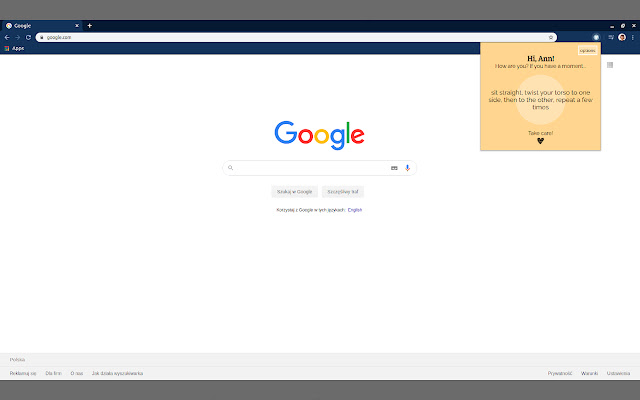
확장 프로그램 스크린샷

Tiny Break 확장 프로그램 CRX 파일 다운로드
크롬 확장 프로그램을 crx 형식으로 다운로드하여 브라우저에 수동으로 설치하거나 crx 파일을 친구들과 공유하여 쉽게 크롬 확장 프로그램을 설치하세요.
확장 프로그램 사용 설명서
                        Tiny Break is a Google Chrome extension created to take care of you while you work on the computer.
We often get so absorbed in work or even in browsing the internet that we forget about the little things like breathing deeply, stretching the body or drinking water to start with.
Tiny Break uses those short moments when you open a new tab in the browser to remind you to take care of your mind, body and spirit. It remembers all those small activities which are good for you and it tells you nice things :) It's quiet, non-invasive and always polite, a good work buddy.
확장 프로그램 기본 정보
| 이름 |  Tiny Break Tiny Break |
| ID | dkbcdbbjnacachlkaknpceopcohglcda |
| 공식 URL | https://chrome.google.com/webstore/detail/tiny-break/dkbcdbbjnacachlkaknpceopcohglcda |
| 설명 | Created to take care of you while you work on the computer. It reminds you to take care of your mind, body and spirit. |
| 파일 크기 | 48.42 KB |
| 설치 횟수 | 78 |
| 현재 버전 | 1.1 |
| 최근 업데이트 | 2020-03-26 |
| 출시 날짜 | 2020-03-26 |
| 평점 | 5.00/5 총 2 개의 평점 |
| 개발자 | snarklin |
| 결제 유형 | free |
| 지원되는 언어 | en |
| manifest.json | |
{
    "update_url": "https:\/\/clients2.google.com\/service\/update2\/crx",
    "manifest_version": 2,
    "name": "Tiny Break",
    "description": "Created to take care of you while you work on the computer. It reminds you to take care of your mind, body and spirit.",
    "version": "1.1",
    "author": "Julia Lojek",
    "icons": {
        "16": "images\/logo-16.png",
        "32": "images\/logo-32.png",
        "48": "images\/logo-48.png",
        "128": "images\/logo-128.png"
    },
    "browser_action": {
        "deafult_title": "Tiny Break",
        "default_popup": "popup.html",
        "default_icon": {
            "16": "images\/logo-16.png",
            "32": "images\/logo-32.png",
            "48": "images\/logo-48.png",
            "128": "images\/logo-128.png"
        }
    },
    "permissions": [
        "storage",
        "activeTab"
    ],
    "chrome_url_overrides": {
        "newtab": "newtab.html"
    },
    "options_ui": {
        "chrome_style": true,
        "page": "options.html",
        "open_in_tab": false
    }
} | |