HKU Moodle Helper
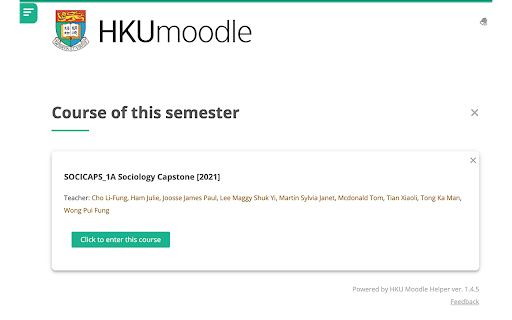
This extension allows HKU students to show your current courses (in a semester) in a separate entry in HKU Moodle. By: Andrew Z
HKU Moodle Helper란 무엇입니까?
HKU Moodle Helper은(는) andrewzhku에 의해 개발된 Chrome 확장 프로그램으로, 주요 기능은 "This extension allows HKU students to show your current courses (in a semester) in a separate entry in HKU Moodle. By: Andrew Z"입니다.
확장 프로그램 스크린샷
HKU Moodle Helper 확장 프로그램 CRX 파일 다운로드
크롬 확장 프로그램을 crx 형식으로 다운로드하여 브라우저에 수동으로 설치하거나 crx 파일을 친구들과 공유하여 쉽게 크롬 확장 프로그램을 설치하세요.
확장 프로그램 사용 설명서
                        1⃣️Click "Add to this semester" on a course
2⃣️Voilà! You'll see the course on the top of the page. Under "Course of this semester".

🎉Your semester list is synced across devices (any chrome browser that is logged into the same Google account)
🎉After a semester ends, you can empty your selection on one click.
🎉You can choose to "Remove from this semester" anytime!
🎉 UI improvements from the vanilla Moodle!

❓Suggestions? Or feedbacks? Please do not hesitate to contact me at [email protected], or WeChat me @andrew7746!!!

This project is open-sourced on GitHub.
확장 프로그램 기본 정보
| 이름 |  HKU Moodle Helper HKU Moodle Helper |
| ID | einenigpmpgopefpkfbmnlcjmoamijap |
| 공식 URL | https://chromewebstore.google.com/detail/hku-moodle-helper/einenigpmpgopefpkfbmnlcjmoamijap |
| 설명 | This extension allows HKU students to show your current courses (in a semester) in a separate entry in HKU Moodle. By: Andrew Z |
| 파일 크기 | 28.2 KB |
| 설치 횟수 | 1,140 |
| 현재 버전 | 1.4.6 |
| 최근 업데이트 | 2022-02-13 |
| 출시 날짜 | 2019-11-06 |
| 평점 | 5.00/5 총 4 개의 평점 |
| 개발자 | andrewzhku |
| 결제 유형 | free |
| 지원되는 언어 | en |
| manifest.json | |
{
    "update_url": "https:\/\/clients2.google.com\/service\/update2\/crx",
    "name": "HKU Moodle Helper",
    "version": "1.4.6",
    "description": "This extension allows HKU students to show your current courses (in a semester) in a separate entry in HKU Moodle. By: Andrew Z",
    "permissions": [
        "storage"
    ],
    "content_scripts": [
        {
            "matches": [
                "http:\/\/moodle.hku.hk\/*",
                "https:\/\/moodle.hku.hk\/*",
                "http:\/\/121.37.222.164:8091\/*",
                "https:\/\/121.37.222.164:8091\/*"
            ],
            "css": [
                "myStyle.css"
            ],
            "js": [
                "browser-polyfill.js",
                "feedback.js",
                "messageBox.js",
                "contentScript.js"
            ],
            "run_at": "document_end"
        }
    ],
    "icons": {
        "16": "images\/16.png",
        "32": "images\/32.png",
        "48": "images\/48.png",
        "128": "images\/128.png"
    },
    "manifest_version": 2
} | |