Keyword Volume Extractor
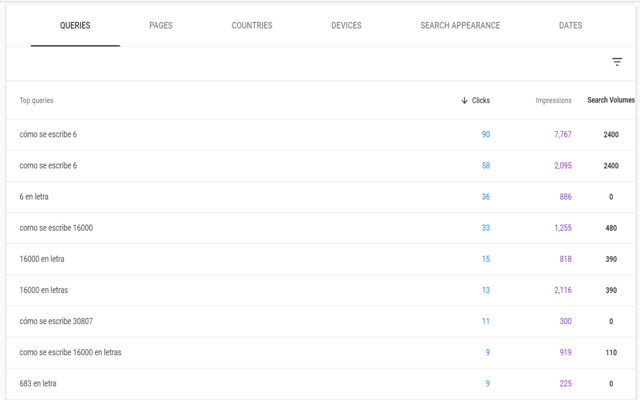
Retrieve & download keyword volume directly inside Google Search Console UI.
Keyword Volume Extractor란 무엇입니까?
Keyword Volume Extractor은(는) antoine.eripret.dev에 의해 개발된 Chrome 확장 프로그램으로, 주요 기능은 "Retrieve & download keyword volume directly inside Google Search Console UI."입니다.
확장 프로그램 스크린샷
Keyword Volume Extractor 확장 프로그램 CRX 파일 다운로드
크롬 확장 프로그램을 crx 형식으로 다운로드하여 브라우저에 수동으로 설치하거나 crx 파일을 친구들과 공유하여 쉽게 크롬 확장 프로그램을 설치하세요.
확장 프로그램 사용 설명서
                        Extract & download your search volumes for more than 35 countries directly in Google Search Console with this free extension for Google Chrome.

Google Search Console is a widely used tool by the Search Engine Optimization (SEO) community, as it allows us to assess how well our websites are performing, with metrics such as clicks & impressions. Search volume is an important missing metrics of the tool and they can't be added easily within the UI.

Exporting our keyword data and merging them with other data providers is often a waste of time. This extension aims to reduce that friction. With this FREE extension, you will be able to use Google Search Console and preview & download the search volumes at the same time.

How to configure the extension?
After installing the application, you must configure your country in the "Options" screen, and that's it!

How does it work?
When you browse Google Search Console, the extension download search volumes (from a free API) associated to your queries and display them.

- You need to change your options and refresh the page if you want to retrieve data for more than one country
- If you have more than one property, you need to also refresh the page when you browse them. Indeed, Google Search Console is actually a web application loading on a single page, and the extension is only triggered when the page is loaded.

Is there any known limitations?
1. If a keyword is not included in the free API we use, the search volume returned will be 0.
2. Some keywords (like "animal" and "animals") are grouped in the free API the extensions uses. Therefore, "animal" is likely to return something, but "animals" will return 0. Same comment for misspellings for instance.
3. The UI displays at most 1000 keywords, therefore the extension will be able to retrieve and download data for up to 1000 keywords as well.

How can I contact you if I have an issue?
The full code is available on GitHub (https://github.com/antoineeripret/google_search_console_search_volume) and you can create an issue there (https://github.com/antoineeripret/google_search_console_search_volume/issues).

If you wish to extend the extension's functionalities, you are more than welcome to submit a pull request using the same links as well.

Who created the extension?
The extension has been created by Antoine Eripret (https://twitter.com/antoineripret) in collaboration with Jose Luis Hernando (https://twitter.com/jlhernando) and help from Fede Gómez (https://twitter.com/_fede_gomez_).

Icon credits: Flaticon (https://www.flaticon.es/autores/monkik)
확장 프로그램 기본 정보
| 이름 |  Keyword Volume Extractor Keyword Volume Extractor |
| ID | fhabpopknhenifjggdimpmelijmgohig |
| 공식 URL | https://chrome.google.com/webstore/detail/fhabpopknhenifjggdimpmelijmgohig |
| 설명 | Retrieve & download keyword volume directly inside Google Search Console UI. |
| 파일 크기 | 14.01 KB |
| 설치 횟수 | 1,638 |
| 현재 버전 | 0.3.2 |
| 최근 업데이트 | 2021-08-20 |
| 출시 날짜 | 2021-06-11 |
| 평점 | 4.29/5 총 7 개의 평점 |
| 개발자 | antoine.eripret.dev |
| 이메일 | [email protected] |
| 결제 유형 | free |
| 도움말 페이지 URL | https://github.com/antoineeripret/google_search_console_search_volume |
| 지원되는 언어 | en |
| manifest.json | |
{
    "update_url": "https:\/\/clients2.google.com\/service\/update2\/crx",
    "manifest_version": 2,
    "name": "Keyword Volume Extractor",
    "description": "Retrieve & download keyword volume directly inside Google Search Console UI.",
    "version": "0.3.2",
    "content_scripts": [
        {
            "js": [
                "code.js"
            ],
            "matches": [
                "https:\/\/search.google.com\/*"
            ],
            "run_at": "document_end"
        }
    ],
    "icons": {
        "128": "icon.png"
    },
    "permissions": [
        "storage"
    ],
    "options_ui": {
        "page": "options.html",
        "open_in_tab": false
    }
} | |