Basecamp Notifier
Display Basecamp activity with desktop notifications.
Basecamp Notifier란 무엇입니까?
Basecamp Notifier은(는) Samuel Simões에 의해 개발된 Chrome 확장 프로그램으로, 주요 기능은 "Display Basecamp activity with desktop notifications."입니다.
확장 프로그램 스크린샷
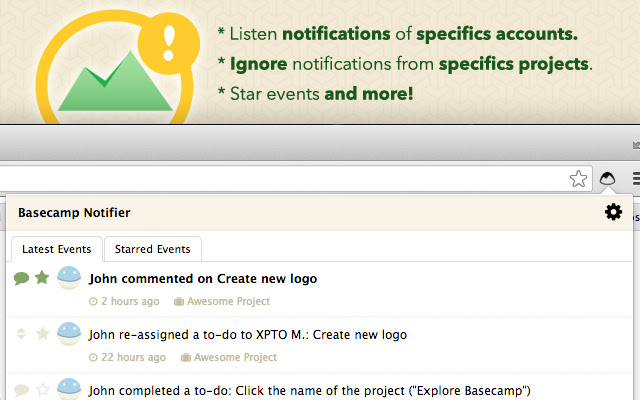


Basecamp Notifier 확장 프로그램 CRX 파일 다운로드
크롬 확장 프로그램을 crx 형식으로 다운로드하여 브라우저에 수동으로 설치하거나 crx 파일을 친구들과 공유하여 쉽게 크롬 확장 프로그램을 설치하세요.
확장 프로그램 사용 설명서
                        ********************************
**** ONLY FOR BASECAMP v2 ****
********************************

The best free and multiplataform extension which notifies the activity of your Basecamp Accounts with desktop notifications with unique features!

* Possibility to listen notifications of specifics accounts.

* Possibility to ignore notifications from specifics projects in your listened accounts.

* Possibility to ignore events according to their type.

* Comments preview in events list

* Possibility to star events to read later.

* Oauth2 support, no login or password are asked.

Changelogs: https://github.com/samuelsimoes/Chrome-Basecamp-Notifier/releases

-> Basecamp Chrome Notifier is an open-source project, feel free to help us improve the extension in GitHub coding or report bugs.

https://github.com/samuelsimoes/Chrome-Basecamp-Notifier
확장 프로그램 기본 정보
| 이름 |  Basecamp Notifier Basecamp Notifier |
| ID | fihjmkangcncdhnbnenfipalmcegljii |
| 공식 URL | https://chrome.google.com/webstore/detail/basecamp-notifier/fihjmkangcncdhnbnenfipalmcegljii |
| 설명 | Display Basecamp activity with desktop notifications. |
| 파일 크기 | 368 KB |
| 설치 횟수 | 455 |
| 현재 버전 | 2.0.4 |
| 최근 업데이트 | 2016-09-17 |
| 출시 날짜 | 2016-09-17 |
| 평점 | 2.96/5 총 23 개의 평점 |
| 개발자 | Samuel Simões |
| 결제 유형 | free |
| 지원되는 언어 | en-US |
| manifest.json | |
{
    "update_url": "https:\/\/clients2.google.com\/service\/update2\/crx",
    "name": "Basecamp Notifier",
    "version": "2.0.4",
    "description": "Display Basecamp activity with desktop notifications.",
    "icons": {
        "16": "img\/icons\/16.png",
        "48": "img\/icons\/48.png",
        "128": "img\/icons\/128.png"
    },
    "permissions": [
        "tabs",
        "storage",
        "notifications",
        "http:\/\/*\/*",
        "https:\/\/*\/*",
        "background"
    ],
    "web_accessible_resources": [
        "options.html"
    ],
    "options_page": "options.html",
    "background": {
        "page": "background.html"
    },
    "browser_action": {
        "default_icon": "img\/icons\/popup-icon.png",
        "default_popup": "popup.html"
    },
    "manifest_version": 2,
    "content_security_policy": "script-src 'self' 'unsafe-eval'; object-src 'self'"
} | |