CrossFire Plus
Navigate using only the keyboard. Adapted from mallowlabs' CrossFire for Chrome, with several extra features
CrossFire Plus란 무엇입니까?
CrossFire Plus은(는) oowildcat에 의해 개발된 Chrome 확장 프로그램으로, 주요 기능은 "Navigate using only the keyboard. Adapted from mallowlabs' CrossFire for Chrome, with several extra features"입니다.
확장 프로그램 스크린샷

CrossFire Plus 확장 프로그램 CRX 파일 다운로드
크롬 확장 프로그램을 crx 형식으로 다운로드하여 브라우저에 수동으로 설치하거나 crx 파일을 친구들과 공유하여 쉽게 크롬 확장 프로그램을 설치하세요.
확장 프로그램 사용 설명서
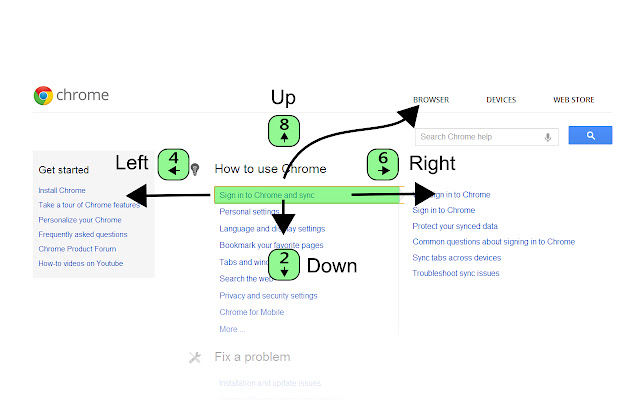
                        CrossFire Plus allows navigating using the keyboard, to move through links to the left, right, up or down.

Quick start (with the default settings after installation. Remember that extensions don't work on special pages or the web store):

Press the numpad arrows to navigate: 4 for left, 6 for right, 8 for up, 2 for down.
Press 5 to open a link in a new tab, or Enter to open it in this one.
Press 0 to go back.
Press . (del) to close the tab.
Press - (minus) to open a new tab (or + for an alternate homepage, which you specify in the options).
Press 7 and 9 to move left and right through the tabs.

When a form field is selected, these are disabled to allow you to enter data. Normally, navigating will miss out form fields. You can however use numpad "/" to enter or leave them - press this (the highlight will turn red) and then a navigation key.

Check the options page for alternative key bindings that you can use, as well as information on other keys.

--

This extension is adapted from CrossFire for Chrome, by mallowlabs. I changed this extension over time for my personal use, adding a few new features. Since it turned out well, I got in touch with them, wondering if they might want to incorporate the changes into the original. They suggested uploading it myself instead, as a lot of the code has been modified and they wouldn't be able to support the changes themselves. So here it is!

-- Important Note: If you have been using the original, then be sure to disable it before trying this. If you do not, then the results will be unexpected! --

Features that differ from the original:

* By default, you use the numpad keys to navigate. You can change this to other layouts in the options - using the arrow keys with or without shift being pressed, Vi-keys, or a new dynamic system that uses all of the main area of the keyboard (useful for small laptops).

* When navigating, a more visible rectangle is used to highlight the links. This works well both for links and images, making it clear which item is selected. You can also change the color if you like, in the options.

* If the page doesn't have any links when scrolled down to a point (e.g. a blog, half way through), then pressing to navigate down to the next link won't skip right to it but instead more slowly scroll down the page. This allows reading the page as you go. You can also scroll the page quickly by holding a navigation key down.

* You can press a key to allow entering form fields. This allows the next press to enter an input or other control - you can see that this is active by the highlight rectangle changing to red. You can also make this the default behavior in the options. Note that this won't allow navigating into or out of plugins (such as Adobe Flash) - you will need to click to do that.

* Other keys are available for performing such functions as opening a new tab, moving between tabs, closing them etc. If you are using the numpad layout, you can control most browser features just using this area of the keyboard, so it is very efficient.

--

Many thanks to mallowlabs for creating the original. Hopefully this modified version will prove useful too.

Also, check out my own extensions - search the web store for both tabtiles and Last Tab Back.
확장 프로그램 기본 정보
| 이름 |  CrossFire Plus CrossFire Plus |
| ID | gdgjkoipaaipbipkfddlgocgpfffnnhd |
| 공식 URL | https://chrome.google.com/webstore/detail/crossfire-plus/gdgjkoipaaipbipkfddlgocgpfffnnhd |
| 설명 | Navigate using only the keyboard. Adapted from mallowlabs' CrossFire for Chrome, with several extra features |
| 파일 크기 | 33.91 KB |
| 설치 횟수 | 118 |
| 현재 버전 | 0.3.1.1 |
| 최근 업데이트 | 2016-04-10 |
| 출시 날짜 | 2016-04-10 |
| 평점 | 4.30/5 총 10 개의 평점 |
| 개발자 | oowildcat |
| 결제 유형 | free |
| 지원되는 언어 | en |
| manifest.json | |
{
    "update_url": "https:\/\/clients2.google.com\/service\/update2\/crx",
    "manifest_version": 2,
    "content_scripts": [
        {
            "js": [
                "utils.js",
                "options-default.js",
                "crossfire-chrome.js"
            ],
            "run_at": "document_end",
            "matches": [
                "http:\/\/*\/*",
                "https:\/\/*\/*"
            ]
        }
    ],
    "version": "0.3.1.1",
    "name": "CrossFire Plus",
    "description": "Navigate using only the keyboard. Adapted from mallowlabs' CrossFire for Chrome, with several extra features",
    "options_page": "options.html",
    "background": {
        "scripts": [
            "utils.js",
            "options-default.js",
            "background.js"
        ]
    },
    "icons": {
        "16": "16x16.png",
        "32": "32x32.png",
        "48": "48x48.png",
        "128": "128x128.png"
    },
    "permissions": [
        "tabs"
    ]
} | |