Kindle Smart Reader
Kindle Smart Reader.
Kindle Smart Reader란 무엇입니까?
Kindle Smart Reader은(는) Mystic Voltage에 의해 개발된 Chrome 확장 프로그램으로, 주요 기능은 "Kindle Smart Reader."입니다.
확장 프로그램 스크린샷


Kindle Smart Reader 확장 프로그램 CRX 파일 다운로드
크롬 확장 프로그램을 crx 형식으로 다운로드하여 브라우저에 수동으로 설치하거나 crx 파일을 친구들과 공유하여 쉽게 크롬 확장 프로그램을 설치하세요.
확장 프로그램 사용 설명서
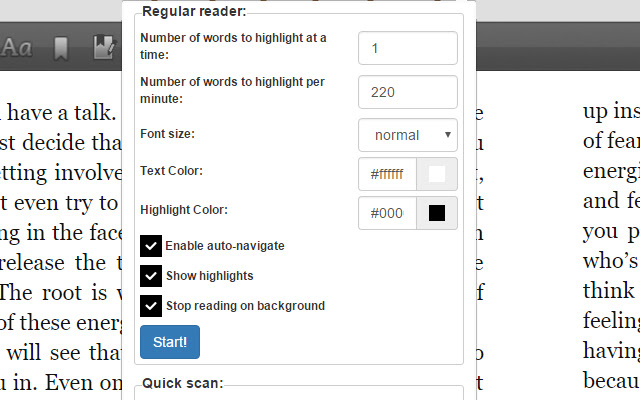
                        The Kindle Smart Reader allows you to read Amazon Kindle books and ebooks much easier by guiding your eye at the desired speed you want while turning the pages for you. It's a much faster way to read Kindle ebooks and helps keep your mind concentrated and focused.

It's also great for speed readers as you can set your reading speed to any desired reading speed. It is customizable in that you can change the text color, text size, and highlighting color. You can also select how many keywords to highlight at a time.

Another feature is the ability to scan through the entire book at your desired speed. This will help you get an overall idea of the book within minutes. It's called our Quick Scan feature and allows you to page through your books like you would a physical book.
확장 프로그램 기본 정보
| 이름 |  Kindle Smart Reader Kindle Smart Reader |
| ID | glocjilifmhjgdlligfiomacjikhhehj |
| 공식 URL | https://chrome.google.com/webstore/detail/kindle-smart-reader/glocjilifmhjgdlligfiomacjikhhehj |
| 설명 | Kindle Smart Reader. |
| 파일 크기 | 585 KB |
| 설치 횟수 | 1,000 |
| 현재 버전 | 0.0.2 |
| 최근 업데이트 | 2017-02-07 |
| 출시 날짜 | 2017-02-07 |
| 평점 | 3.00/5 총 6 개의 평점 |
| 개발자 | Mystic Voltage |
| 결제 유형 | free |
| 지원되는 언어 | en-US |
| manifest.json | |
{
"update_url": "https:\/\/clients2.google.com\/service\/update2\/crx",
"background": {
"scripts": [
"jquery.min.js",
"background.js"
]
},
"browser_action": {
"default_popup": "popup.html",
"default_title": "Kindle Smart Reader Settings"
},
"content_scripts": [
{
"all_frames": true,
"css": [
"style.css"
],
"js": [
"jquery.min.js",
"contentscript.js"
],
"matches": [
"https:\/\/read.amazon.com\/*",
"https:\/\/ws-na.amazon-adsystem.com\/*"
],
"run_at": "document_end"
}
],
"description": "Kindle Smart Reader.",
"manifest_version": 2,
"name": "Kindle Smart Reader",
"permissions": [
"tabs",
" | |