David Beckham New Tab
David Beckham Fan? Start each day with the David Beckham's most gorgeous pictures!
David Beckham New Tab란 무엇입니까?
David Beckham New Tab은(는) John Cuzak에 의해 개발된 Chrome 확장 프로그램으로, 주요 기능은 "David Beckham Fan? Start each day with the David Beckham's most gorgeous pictures!"입니다.
확장 프로그램 스크린샷
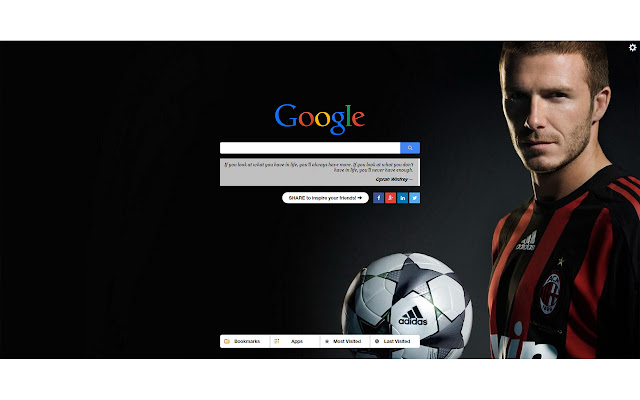


David Beckham New Tab 확장 프로그램 CRX 파일 다운로드
크롬 확장 프로그램을 crx 형식으로 다운로드하여 브라우저에 수동으로 설치하거나 crx 파일을 친구들과 공유하여 쉽게 크롬 확장 프로그램을 설치하세요.
확장 프로그램 사용 설명서
                        David Beckham is, by far, the most stylish football player in the world!

For fans, like me, I created this great Chrome extension: David Beckham New Tab.

Features:
- each tab a new David Beckham image. Awesome daily variation :)
- Google search for easy navigation
- Super easy mouse-over navigation over Bookmarks, Apps, Most Visited and Last Visited sites
- Speed Dial
- Some cool quotes, to feel inspired every single day!
- a link to a mega deal website

Now, if you have any comments, suggestion, complain, please drop me a line and I'll do it. Hope you'll like it :)

Go Beckham!!!

(If you like it, please give it a 5*! Thanks)

Disclosure: some of the links from this extension have an affiliate code attached, so I can get some change if you buy from them.  This will allow us to further improve this extension in the future. Thank you.
확장 프로그램 기본 정보
| 이름 |  David Beckham New Tab David Beckham New Tab |
| ID | hfmekleihfibfedddkgjhiilggbpplgn |
| 공식 URL | https://chrome.google.com/webstore/detail/david-beckham-new-tab/hfmekleihfibfedddkgjhiilggbpplgn |
| 설명 | David Beckham Fan? Start each day with the David Beckham's most gorgeous pictures! |
| 파일 크기 | 1.01 MB |
| 설치 횟수 | 113 |
| 현재 버전 | 2.5.0.1 |
| 최근 업데이트 | 2022-03-02 |
| 출시 날짜 | 2015-07-21 |
| 평점 | 4.06/5 총 18 개의 평점 |
| 개발자 | John Cuzak |
| 이메일 | [email protected] |
| 결제 유형 | free |
| 개인정보 보호 정책 페이지 URL | http://startjoe.com/terms-and-privacy.html |
| 지원되는 언어 | id,ms,de,en,fil,fr,nl,no,vi,tr,ca,da,et,es,es-419,hr,it,lv,lt,hu,pl,pt-BR,pt-PT,ro,sk,sl,fi,sv,el,sr,bg,ru,uk,mr,hi,bn,gu,ta,te,ml,th,zh-CN,zh-TW,ja |
| manifest.json | |
{
"update_url": "https:\/\/clients2.google.com\/service\/update2\/crx",
"manifest_version": 2,
"name": "__MSG_appName__",
"description": "__MSG_appDesc__",
"version": "2.5.0.1",
"default_locale": "en",
"icons": {
"128": "icons\/icon128.png",
"48": "icons\/icon48.png",
"16": "icons\/icon16.png"
},
"background": {
"page": "src\/background.html",
"persistent": true
},
"options_page": "src\/options.html",
"chrome_url_overrides": {
"newtab": "src\/override.html"
},
"permissions": [
" | |