osmo.mobi - panTo control
Add a button to osmo.mobi to enable/disable auto map recenter
osmo.mobi - panTo control란 무엇입니까?
osmo.mobi - panTo control은(는) Bruno Duyé에 의해 개발된 Chrome 확장 프로그램으로, 주요 기능은 "Add a button to osmo.mobi to enable/disable auto map recenter"입니다.
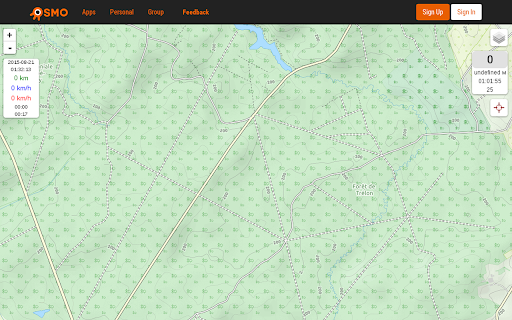
확장 프로그램 스크린샷
osmo.mobi - panTo control 확장 프로그램 CRX 파일 다운로드
크롬 확장 프로그램을 crx 형식으로 다운로드하여 브라우저에 수동으로 설치하거나 crx 파일을 친구들과 공유하여 쉽게 크롬 확장 프로그램을 설치하세요.
확장 프로그램 사용 설명서
                        Add a button to osmo.mobi to enable/disable auto map recenter.

When plugin activated, you should see a new button appear in the right top of the screen. Just click on it to toggle auto map recenter.
확장 프로그램 기본 정보
| 이름 |  osmo.mobi - panTo control osmo.mobi - panTo control |
| ID | hndjlfnbhcmmdjhpblfgkdfpcgdjooni |
| 공식 URL | https://chromewebstore.google.com/detail/osmomobi-panto-control/hndjlfnbhcmmdjhpblfgkdfpcgdjooni |
| 설명 | Add a button to osmo.mobi to enable/disable auto map recenter |
| 파일 크기 | 83.82 KB |
| 설치 횟수 | 20 |
| 현재 버전 | 0.1 |
| 최근 업데이트 | 2015-08-20 |
| 출시 날짜 | 2015-08-20 |
| 평점 | 3.00/5 총 1 개의 평점 |
| 개발자 | Bruno Duyé |
| 결제 유형 | free |
| 확장 프로그램 웹 사이트 | https://github.com/brunetton/osmo-panTo_control-chrome_extension |
| 지원되는 언어 | en |
| manifest.json | |
{
    "update_url": "https:\/\/clients2.google.com\/service\/update2\/crx",
    "manifest_version": 2,
    "name": "osmo.mobi - panTo control",
    "author": "Bruno Duy\u00e9",
    "description": "Add a button to osmo.mobi to enable\/disable auto map recenter",
    "version": "0.1",
    "icons": {
        "64": "icon.png"
    },
    "content_scripts": [
        {
            "matches": [
                "http:\/\/osmo.mobi\/s\/*",
                "https:\/\/osmo.mobi\/s\/*"
            ],
            "js": [
                "add_button.js"
            ]
        }
    ],
    "web_accessible_resources": [
        "target-green.png",
        "target-red.png"
    ]
} | |