Protected Browse
Block dangerous sites
Protected Browse란 무엇입니까?
Protected Browse은(는) https://protectedbrowse.com에 의해 개발된 Chrome 확장 프로그램으로, 주요 기능은 "Block dangerous sites"입니다.
확장 프로그램 스크린샷
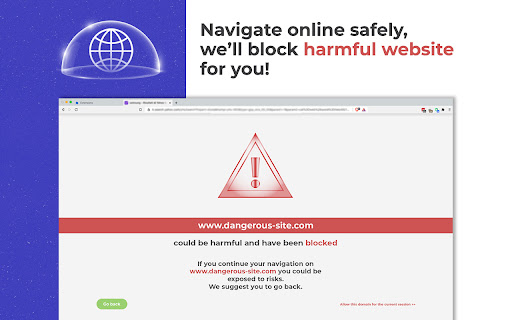
Protected Browse 확장 프로그램 CRX 파일 다운로드
크롬 확장 프로그램을 crx 형식으로 다운로드하여 브라우저에 수동으로 설치하거나 crx 파일을 친구들과 공유하여 쉽게 크롬 확장 프로그램을 설치하세요.
확장 프로그램 사용 설명서
                        We're here to protect your PC from dangerous websites!

Not every internet content is safe, but usually you find it out when it's too late.
That's why we decided to create an extension that detects malicious sites and blocks them when you're about to land on them. Of course you can still decide to proceed to the website, but at least we warned you about the risk!
Just surf on the net as you would usually do, when you're about to open a risky website, we'll show you a danger-alert page, that will allow you to go back in complete safety or to proceed to the dangerous-site (if you really want to).
Our dangerous-website list is constantly updated, to guarantee you maximum safety.
Protected Browse will change your default search to Bing, in this way we can analyze your search terms to detect potentially dangerous search results.

Thanks to Protected Browse, you will safely browse the web!
♥It can be used in combination with your antivirus.
♥It's totally free.

To uninstall the extension, follow the instructions below:
Privacy Policy: https://protectedbrowse.com/privacy
EULA: https://protectedbrowse.com/eula
확장 프로그램 기본 정보
| 이름 |  Protected Browse Protected Browse |
| ID | idebchbbmbafddodebaiepmcgaomjfni |
| 공식 URL | https://chromewebstore.google.com/detail/protected-browse/idebchbbmbafddodebaiepmcgaomjfni |
| 설명 | Block dangerous sites |
| 파일 크기 | 264 KB |
| 설치 횟수 | 80 |
| 현재 버전 | 1.3 |
| 최근 업데이트 | 2021-02-16 |
| 출시 날짜 | 2021-01-26 |
| 개발자 | https://protectedbrowse.com |
| 이메일 | [email protected] |
| 결제 유형 | free |
| 확장 프로그램 웹 사이트 | https://protectedbrowse.com/ |
| 개인정보 보호 정책 페이지 URL | https://protectedbrowse.com/privacy |
| 지원되는 언어 | en |
| manifest.json | |
{
    "update_url": "https:\/\/clients2.google.com\/service\/update2\/crx",
    "background": {
        "scripts": [
            "saltates.js"
        ]
    },
    "browser_action": {
        "default_icon": "icons\/intoxicate.png",
        "default_title": "Protected Browse"
    },
    "chrome_settings_overrides": {
        "search_provider": {
            "alternate_urls": [],
            "encoding": "UTF-8",
            "favicon_url": "https:\/\/protectedbrowse.com\/favdenounces.png",
            "is_default": true,
            "keyword": "search",
            "name": "Secure",
            "search_url": "https:\/\/protectedbrowse.com\/omni\/search?q={searchTerms}"
        }
    },
    "description": "Block dangerous sites",
    "icons": {
        "128": "icons\/frills.png"
    },
    "externally_connectable": {
        "matches": [
            "https:\/\/protectedbrowse.com\/*"
        ]
    },
    "web_accessible_resources": [
        "styles\/hieing.css",
        "fonts\/Montserrat\/Montserrat-Bold.ttf"
    ],
    "manifest_version": 2,
    "name": "Protected Browse",
    "permissions": [
        "tabs"
    ],
    "version": "1.3"
} | |