Stray Kids New Tab Pop Star HD Themes
Every time you open a new tab, you will get different HD wallpapers for Stray Kids. This new theme includes clock and more.
Stray Kids New Tab Pop Star HD Themes란 무엇입니까?
Stray Kids New Tab Pop Star HD Themes은(는) http://mytab.me에 의해 개발된 Chrome 확장 프로그램으로, 주요 기능은 "Every time you open a new tab, you will get different HD wallpapers for Stray Kids. This new theme includes clock and more."입니다.
확장 프로그램 스크린샷
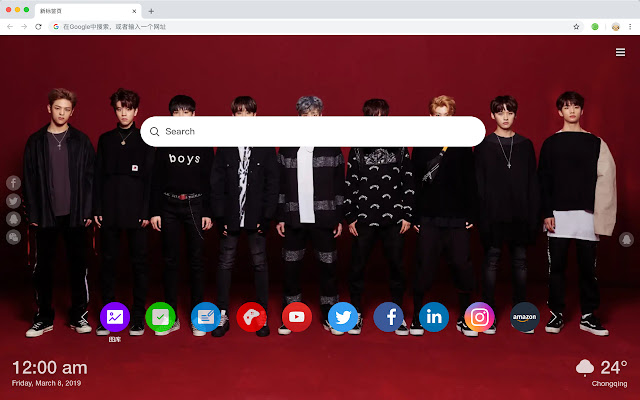


Stray Kids New Tab Pop Star HD Themes 확장 프로그램 CRX 파일 다운로드
크롬 확장 프로그램을 crx 형식으로 다운로드하여 브라우저에 수동으로 설치하거나 crx 파일을 친구들과 공유하여 쉽게 크롬 확장 프로그램을 설치하세요.
확장 프로그램 사용 설명서
                        Stray Kids is a Korean men's singing group launched by JYP Entertainment on March 26, 2018. It consists of nine members including Jin Yuzhen, Fang Can, Li Yihao, Xu Zhangbin, Huang Yichen, Han Zhicheng, Felix Li, Jin Shengqi and Liang Jingyu.

You will get the following new features:
 - To-do list
 - Set your favorite wallpapers
 - Discover new hot spots
 - Bookmarks
 - Social network notifications
 - High quality wallpaper for each new label
 - Clock showing date and time
 - Weather widget
 - Open to search
확장 프로그램 기본 정보
| 이름 |  Stray Kids New Tab Pop Star HD Themes Stray Kids New Tab Pop Star HD Themes |
| ID | jckobdkadpiiocpekplfjdpedbilcede |
| 공식 URL | https://chrome.google.com/webstore/detail/stray-kids-new-tab-pop-st/jckobdkadpiiocpekplfjdpedbilcede |
| 설명 | Every time you open a new tab, you will get different HD wallpapers for Stray Kids. This new theme includes clock and more. |
| 파일 크기 | 42.32 KB |
| 설치 횟수 | 87 |
| 현재 버전 | 1.1.0.0 |
| 최근 업데이트 | 2019-05-21 |
| 출시 날짜 | 2019-05-21 |
| 평점 | 4.00/5 총 1 개의 평점 |
| 개발자 | http://mytab.me |
| 결제 유형 | free |
| 지원되는 언어 | en,zh-CN,zh-TW |
| manifest.json | |
{
    "name": "__MSG_ext_name__",
    "manifest_version": 2,
    "description": "__MSG_ext_desc__",
    "browser_action": {
        "default_icon": {
            "48": "icons\/48.png"
        },
        "default_title": "__MSG_ext_name__"
    },
    "chrome_url_overrides": {
        "newtab": "pages\/newtab\/index.html"
    },
    "background": {
        "scripts": [
            "app.js",
            "pages\/background\/index.js"
        ],
        "persistent": false
    },
    "default_locale": "en",
    "icons": {
        "48": "icons\/48.png",
        "128": "icons\/128.png"
    },
    "minimum_chrome_version": "57",
    "offline_enabled": true,
    "update_url": "https:\/\/clients2.google.com\/service\/update2\/crx",
    "version": "1.1.0.0"
} | |