Scroll Marker
Visual aid for scrolling web pages.
Scroll Marker란 무엇입니까?
Scroll Marker은(는) arkham.development에 의해 개발된 Chrome 확장 프로그램으로, 주요 기능은 "Visual aid for scrolling web pages."입니다.
확장 프로그램 스크린샷
Scroll Marker 확장 프로그램 CRX 파일 다운로드
크롬 확장 프로그램을 crx 형식으로 다운로드하여 브라우저에 수동으로 설치하거나 crx 파일을 친구들과 공유하여 쉽게 크롬 확장 프로그램을 설치하세요.
확장 프로그램 사용 설명서
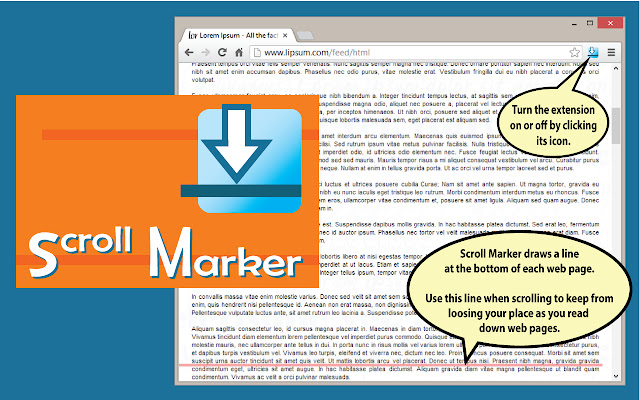
                        Adds a customizable line ("Marker") to the bottom of web pages which helps users visually keep their place when the page is scrolled.

After the page scrolls, the Marker will move up with the page, and remain in place for a moment to help the user keep track of where they left off.  After a set period of time, the Marker will redraw again near the bottom of the freshly scrolled web page, awaiting the next scroll.

The Marker color, opacity, width and distance from the bottom of the web page can be changed by the user.  Also, the delay after scrolling before the Marker redraws itself is also configurable.

Scroll Marker does not set cookies, track users or webpages, and does not communicate or exchange data with anyone.  It simply uses basic JavaScript to temporarily insert and manipulate its "marker" object in web pages after they load.  The only information it reads are the size and scrolling dimensions of Chrome's browser windows.
확장 프로그램 기본 정보
| 이름 |  Scroll Marker Scroll Marker |
| ID | jdoinodpdahlmpgmpmhonheidpjhhnid |
| 공식 URL | https://chrome.google.com/webstore/detail/scroll-marker/jdoinodpdahlmpgmpmhonheidpjhhnid |
| 설명 | Visual aid for scrolling web pages. |
| 파일 크기 | 308 KB |
| 설치 횟수 | 3,406 |
| 현재 버전 | 0.97 |
| 최근 업데이트 | 2013-01-07 |
| 출시 날짜 | 2013-01-07 |
| 평점 | 3.48/5 총 31 개의 평점 |
| 개발자 | arkham.development |
| 결제 유형 | free |
| 지원되는 언어 | en-US |
| manifest.json | |
{
    "update_url": "http:\/\/clients2.google.com\/service\/update2\/crx",
    "name": "Scroll Marker",
    "version": "0.97",
    "manifest_version": 2,
    "description": "Visual aid for scrolling web pages.",
    "content_scripts": [
        {
            "matches": [
                "http:\/\/*\/*",
                "https:\/\/*\/*"
            ],
            "js": [
                "js\/jquery-1.8.1.js",
                "js\/marker.js",
                "js\/jquery.ba-dotimeout.js"
            ],
            "run_at": "document_idle"
        }
    ],
    "permissions": [
        "tabs",
        "http:\/\/*\/*",
        "https:\/\/*\/*"
    ],
    "background": {
        "scripts": [
            "js\/background.js"
        ]
    },
    "options_page": "options.html",
    "browser_action": {
        "default_icon": "images\/icon_128.png"
    },
    "icons": {
        "16": "images\/icon_16.png",
        "48": "images\/icon_48.png",
        "128": "images\/icon_128.png"
    }
} | |