Password Confidential
A secure and easy solution for managing all of your passwords.
Password Confidential란 무엇입니까?
Password Confidential은(는) http://passwordconfidential.com에 의해 개발된 Chrome 확장 프로그램으로, 주요 기능은 "A secure and easy solution for managing all of your passwords."입니다.
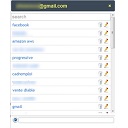
확장 프로그램 스크린샷


Password Confidential 확장 프로그램 CRX 파일 다운로드
크롬 확장 프로그램을 crx 형식으로 다운로드하여 브라우저에 수동으로 설치하거나 crx 파일을 친구들과 공유하여 쉽게 크롬 확장 프로그램을 설치하세요.
확장 프로그램 사용 설명서
                        Password Confidential is a free password manager that enables you to easily capture, store and safely manage your passwords.

As you surf the web Password Confidential automatically captures and encrypts the login and password information for all your sites. The next time you visit a site you will be automatically logged in or you can even launch sites directly from within Password Confidential.

Your passwords and IDs are stored in a secure encrypted file protected from hackers and ID thieves.   Your master password is the unique key for unlocking the encrypted file and the master password is known solely to you.


Benefits:
 - Saves you from having to remember all your different passwords
 - Automatically captures passwords and logins as you surf the web
 - Keeps your passwords safe by storing them in a secure encrypted file
 - Includes a password generator for creating strong secure passwords
 - Imports passwords from other password managers, from Excel or from CSV files
 - Exports passwords to a CSV file if you want to import them into another program.

Security:
 - Passwords are encrypted on your device before being sent to a secure server for storage.
 - No unencrypted data is ever sent over the network.
 - Password Confidential uses the strongest available encryption, AES-256 with the master password secured with PBKDF2.
 - You master password is the key that decrypts your passwords.  The master password is known solely to you and is never stored by Password Confidential
확장 프로그램 기본 정보
| 이름 |  Password Confidential Password Confidential |
| ID | jilfkcpkaebpoffjifmchdcpekglnjkl |
| 공식 URL | https://chrome.google.com/webstore/detail/password-confidential/jilfkcpkaebpoffjifmchdcpekglnjkl |
| 설명 | A secure and easy solution for managing all of your passwords. |
| 파일 크기 | 2.53 MB |
| 설치 횟수 | 468 |
| 현재 버전 | 1.3.32 |
| 최근 업데이트 | 2022-05-20 |
| 출시 날짜 | 2020-07-02 |
| 평점 | 4.20/5 총 5 개의 평점 |
| 개발자 | http://passwordconfidential.com |
| 이메일 | [email protected] |
| 결제 유형 | free |
| 확장 프로그램 웹 사이트 | https://passwordconfidential.com |
| 도움말 페이지 URL | https://passwordconfidential.com/support.html |
| 개인정보 보호 정책 페이지 URL | http://passwordconfidential.com/privacy.html |
| 지원되는 언어 | de,en,fr,es,it |
| manifest.json | |
{
    "update_url": "https:\/\/clients2.google.com\/service\/update2\/crx",
    "author": "Smart PC Solutions",
    "name": "Password Confidential",
    "description": "__MSG_appDesc__",
    "default_locale": "en",
    "version": "1.3.32",
    "minimum_chrome_version": "26.0",
    "manifest_version": 2,
    "background": {
        "page": "background.html",
        "persistent": true
    },
    "content_scripts": [
        {
            "all_frames": true,
            "js": [
                "config.js",
                "constants.js",
                "framework.js",
                "content.js",
                "js\/mustache.js"
            ],
            "css": [
                "customization\/styles\/content.css"
            ],
            "matches": [
                "http:\/\/*\/*",
                "https:\/\/*\/*",
                "file:\/\/\/*"
            ],
            "run_at": "document_start"
        }
    ],
    "browser_action": {
        "default_popup": "popup.html"
    },
    "icons": {
        "16": "customization\/images\/logoblue_16x16.png",
        "19": "customization\/images\/logoblue_19x19.png",
        "24": "customization\/images\/logoblue_24x24.png",
        "32": "customization\/images\/logoblue_32x32.png",
        "38": "customization\/images\/logoblue_38x38.png",
        "48": "customization\/images\/logoblue_48x48.png",
        "128": "customization\/images\/logored_128x128.png"
    },
    "web_accessible_resources": [
        "customization\/fonts\/*.woff2",
        "customization\/images\/*.png",
        "customization\/styles\/*.css",
        "config.js",
        "framework.js",
        "frame.js"
    ],
    "optional_permissions": [],
    "permissions": [
        "activeTab",
        "storage",
        "https:\/\/api.passwordconfidential.com\/*"
    ]
} | |