VIPKid+
One-click scheduling
VIPKid+란 무엇입니까?
VIPKid+은(는) David Beroff에 의해 개발된 Chrome 확장 프로그램으로, 주요 기능은 "One-click scheduling"입니다.
확장 프로그램 스크린샷

VIPKid+ 확장 프로그램 CRX 파일 다운로드
크롬 확장 프로그램을 crx 형식으로 다운로드하여 브라우저에 수동으로 설치하거나 crx 파일을 친구들과 공유하여 쉽게 크롬 확장 프로그램을 설치하세요.
확장 프로그램 사용 설명서
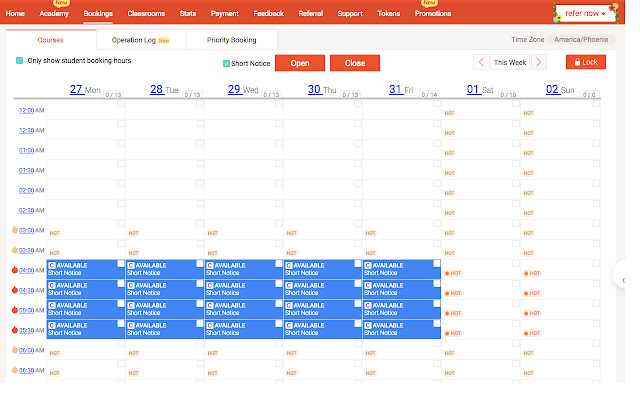
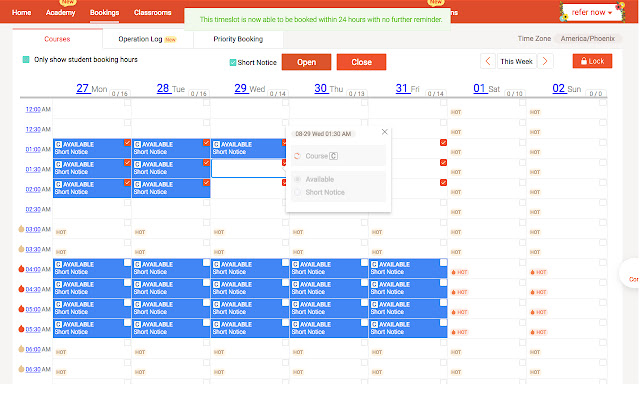
                        This extension improves upon the scheduling tool on the VIPKid teacher portal. Instead of repeatedly opening the same slots every week and switching them to short notice (if that's your thing), you can just select the checkboxes for the slots you want. The checkboxes will remain checked week to week, or if you refresh the page, which means opening new slots is as simple as clicking the 'open' button. If you want to close them back up, just click the 'close' button. You can also select an entire day, or an entire row of slots by clicking on the day or time numbers.


1.)  Install the VIPKID+ extension into your web browser.

2.)  Log in to the VIPKID teacher portal.

3.) Open your bookings tab and unlock your schedule in the top right hand corner.

4.) Select the time slots you would like to open by marking each slot with a check box. Alternatively, you can select an entire day by clicking on the day, or select an entire row by clicking the indicated time in that row.

5.)  If you would like to mark each of your classes as “short notice” check the “short notice” check box at the top of the schedule. Skip this step if you do not want to book short notice classes.

6.)  Click the orange “open” button at the top of the schedule.

7.) DONE! Your schedule should be changed and slots open, ready to be booked!

8.) Week to week, your original selected check boxes will stay checked (even if you refresh the page), so all you have to do is click “open” on the following weeks to open those slots. You can select the “close” button at the top of the schedule at any time to close all of your checked slots. You can also uncheck any boxes you wish and rearrange your schedule at any time.
확장 프로그램 기본 정보
| 이름 |  VIPKid+ VIPKid+ |
| ID | jkegafcmfkiomkbkakkiepdbcmjjdpmi |
| 공식 URL | https://chrome.google.com/webstore/detail/vipkid+/jkegafcmfkiomkbkakkiepdbcmjjdpmi |
| 설명 | One-click scheduling |
| 파일 크기 | 12.53 KB |
| 설치 횟수 | 536 |
| 현재 버전 | 1.12 |
| 최근 업데이트 | 2020-04-26 |
| 출시 날짜 | 2020-04-26 |
| 평점 | 4.88/5 총 8 개의 평점 |
| 개발자 | David Beroff |
| 이메일 | [email protected] |
| 결제 유형 | free |
| 개인정보 보호 정책 페이지 URL | https://awesomeamericanaudio.com/legal/privacy.php |
| 지원되는 언어 | en-US |
| manifest.json | |
{
    "update_url": "https:\/\/clients2.google.com\/service\/update2\/crx",
    "manifest_version": 2,
    "name": "VIPKid+",
    "short_name": "VIPKid+",
    "version": "1.12",
    "description": "One-click scheduling",
    "icons": {
        "16": "16.png",
        "48": "48.png",
        "128": "128.png"
    },
    "content_scripts": [
        {
            "matches": [
                "https:\/\/t.vipkid.com.cn\/tp\/booking\/course",
                "https:\/\/www.vipkidteachers.com\/tp\/booking\/course",
                "https:\/\/www.vipkid.com\/tp\/booking\/course"
            ],
            "css": [
                "vkp-override.css"
            ],
            "js": [
                "VIPKid+.js"
            ],
            "run_at": "document_end"
        }
    ],
    "browser_action": {
        "default_icon": "16.png",
        "default_popup": "popup.html"
    },
    "permissions": [
        "storage"
    ]
} | |