Bootswatch Previewer
Preview any Bootswatch theme on your Bootstrap website right from the browser!
Bootswatch Previewer란 무엇입니까?
Bootswatch Previewer은(는) Kobi Tate에 의해 개발된 Chrome 확장 프로그램으로, 주요 기능은 "Preview any Bootswatch theme on your Bootstrap website right from the browser!"입니다.
확장 프로그램 스크린샷
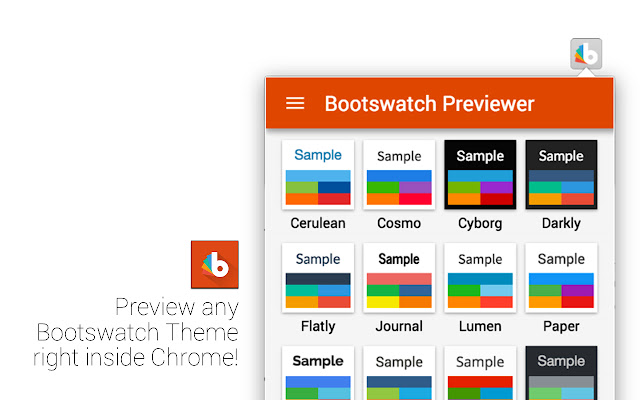
Bootswatch Previewer 확장 프로그램 CRX 파일 다운로드
크롬 확장 프로그램을 crx 형식으로 다운로드하여 브라우저에 수동으로 설치하거나 crx 파일을 친구들과 공유하여 쉽게 크롬 확장 프로그램을 설치하세요.
확장 프로그램 사용 설명서
                        Preview any Bootswatch theme on your Bootstrap website right from the browser!
Works with pages built on Bootstrap 4. Download the legacy version below for Bootstrap v3 support.

Created by Kobi Tate
http://kobitate.com

Contribute on GitHub
http://github.com/therealgitcub/bootswatch-previewer

Legacy version for Bootstrap v3:
https://chrome.google.com/webstore/detail/bootswatch-previewer-lega/ajgcecinmfljdnijggkfmonkgepeidpg

I am not affiliated or associated with Bootswatch. This is an unofficial product created by me.
확장 프로그램 기본 정보
| 이름 |  Bootswatch Previewer Bootswatch Previewer |
| ID | jlmhopkiicfdiaghialcjleommnolkpl |
| 공식 URL | https://chrome.google.com/webstore/detail/bootswatch-previewer/jlmhopkiicfdiaghialcjleommnolkpl |
| 설명 | Preview any Bootswatch theme on your Bootstrap website right from the browser! |
| 파일 크기 | 1.03 MB |
| 설치 횟수 | 79 |
| 현재 버전 | 2.0 |
| 최근 업데이트 | 2017-12-12 |
| 출시 날짜 | 2017-12-12 |
| 평점 | 5.00/5 총 1 개의 평점 |
| 개발자 | Kobi Tate |
| 이메일 | [email protected] |
| 결제 유형 | free |
| 지원되는 언어 | en |
| manifest.json | |
{
    "update_url": "https:\/\/clients2.google.com\/service\/update2\/crx",
    "manifest_version": 2,
    "name": "Bootswatch Previewer",
    "description": "Preview any Bootswatch theme on your Bootstrap website right from the browser!",
    "version": "2.0",
    "browser_action": {
        "default_popup": "popup\/popup.html",
        "default_icon": "icons\/icon48.png",
        "default_title": "Bootswatch Previewer"
    },
    "background": {
        "scripts": [
            "js\/init.min.js"
        ],
        "persistent": false
    },
    "permissions": [
        "activeTab",
        "storage"
    ],
    "web_accessible_resources": [
        "themes\/*",
        "lib\/fonts\/*"
    ],
    "icons": {
        "128": "icons\/icon.png",
        "48": "icons\/icon48.png"
    },
    "content_security_policy": "script-src 'self' https:\/\/www.google-analytics.com; object-src 'self'"
} | |